

What if the biggest cloud risk isn’t a single failure, but gaps between teams, vendors, and responsibilities? As cloud environments grow, security settings, user access, backups, and routine administration can become harder to oversee consistently. Cloud management services for enterprises bring these responsibilities into a coordinated operating model, with clearer ownership and stronger visibility.
Cloud complexity is also a leadership issue, not just a technical one. NIST’s Cybersecurity Framework 2.0, released in February 2024, added a Govern function that places cybersecurity within broader organizational risk management. That shift reinforces the need for leaders to understand cloud responsibilities, risks, and priorities.
This article explains what managed cloud services cover and how governance, security, monitoring, and recovery planning work together. You’ll learn what to prioritize, from access controls and Microsoft 365 administration to backup verification and restore testing. You’ll also see how a managed partner can complement internal IT, clarify accountability, and align cloud operations with business goals.
Key Takeaways
- Cloud management goes beyond hosting or migration. It provides ongoing oversight of cloud administration, security, and continuity.
- Use a repeatable operating cycle to discover cloud assets, set a security baseline, monitor activity, make improvements, and review results.
- Cloud management services for enterprises can clarify ownership of applications, accounts, and data while making operational gaps easier to see.
- Apply Zero Trust by verifying access and limiting permissions, then connect security controls with backup verification and recovery planning.
- Managed cloud operations, including Microsoft 365 administration and monitoring, can complement internal IT and support business continuity.
What Cloud Management Services for Enterprises Cover, and Why They Matter
Cloud management services for enterprises provide ongoing oversight of cloud environments, including administration, security, monitoring, and continuity planning. The goal isn’t simply to keep applications running. It’s to make responsibilities visible, configurations consistent, and operational decisions easier as the business changes.
Cloud management is broader than hosting, migration, or buying a cloud application. It includes the ongoing work of managing the services and settings a business depends on. A foundational overview of cloud management can help clarify the discipline. A practical operating approach turns that concept into clear ownership and repeatable controls.
For a concise introduction to cloud environments, watch this overview:
Using a cloud provider doesn’t transfer every responsibility to that provider. The provider generally manages the underlying infrastructure it operates, while the organization remains responsible for decisions such as who gets access, how services are configured, and how business data is handled. The division varies by service, so document which responsibilities belong to your organization and which belong to the provider.
What does a managed cloud service typically oversee?
Scope can include configuration, identity and access, monitoring, routine maintenance, and coordination when an issue affects cloud services. Infrastructure management focuses on the resources that run workloads. SaaS administration focuses on the applications employees use. For example, Microsoft 365 oversight can include user and license administration, security configuration, and day-to-day support. Define the scope around your workloads, risk priorities, and internal capacity. For each service, identify who administers it, who approves changes, and who receives incident escalations.
Gradius IT Solutions provides cloud and Microsoft 365 management as part of its managed IT and security services. This connects administration with security oversight and continuity planning, rather than leaving each task with a different owner.
Which organizations benefit from managed cloud operations?
Growing organizations can benefit when cloud responsibilities are spread across employees, vendors, and internal IT, making routine oversight difficult to sustain. This is especially relevant for firms handling sensitive client, patient, or financial information, where access and data-management decisions need clear ownership. A managed partner can coordinate defined tasks with an internal IT team, adding capacity or expertise while the business retains control of its systems and priorities.
The practical payoff is fewer operational blind spots. Teams can see who owns key settings, where administration sits, and how cloud work supports business needs. That clarity makes it easier to set priorities and address gaps before they disrupt daily operations.
How Enterprise Cloud Management Works Day to Day
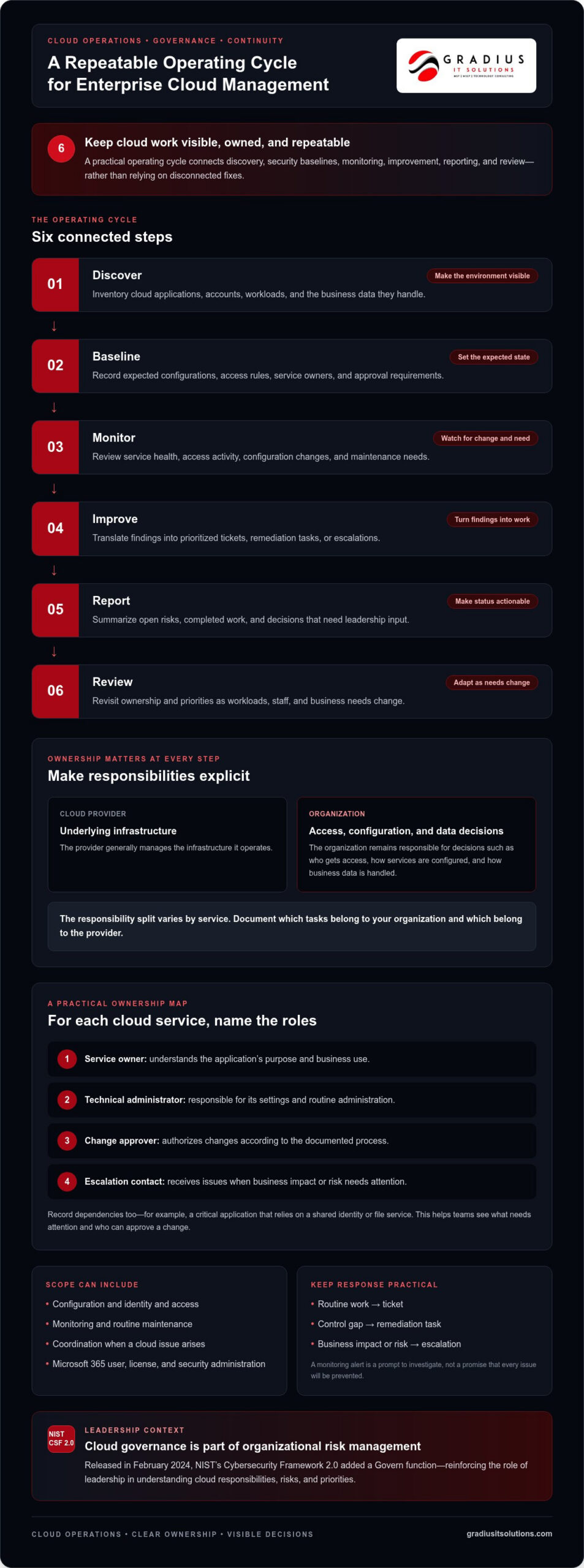
Effective cloud operations follow a repeatable cycle, not a series of disconnected fixes. Cloud management services for enterprises use this cycle to keep systems visible, responsibilities clear, and decisions documented. The U.S. Army’s Enterprise Cloud Management Activity (ECMA) offers a public example of cloud management organized around governance, security, and operations at scale.
- Discover: Inventory cloud applications, accounts, workloads, and the business data they handle.
- Baseline: Record expected configurations, access rules, owners, and approval requirements.
- Monitor: Review service health, access activity, configuration changes, and maintenance needs.
- Improve: Turn findings into prioritized tickets, remediation tasks, or escalations.
- Report: Summarize open risks, completed work, and decisions that need leadership input.
- Review: Revisit ownership and priorities as workloads, staff, and business needs change.
An inventory is useful only when each service has a responsible owner. For example, a business application should have an internal contact who understands its purpose, an administrator responsible for its technical settings, and a clear route for raising issues. Record dependencies too, such as a critical application relying on a shared identity or file service. This map helps teams identify what needs attention and who can approve a change.
How are cloud environments monitored and maintained?
Routine oversight includes checking service health, reviewing access and configuration changes, and identifying maintenance needs. A monitoring alert is a prompt to investigate, not a promise that every issue will be prevented. Each finding should have a next step: a ticket for routine work, a remediation task for a control gap, or an escalation when business impact or risk requires a decision.
Useful reports make those actions visible. They show which issues remain open, who owns them, what has changed, and where a decision is needed. Keep the operating record practical: document the system owner, technical contact, escalation path, change approver, and process for recording completed work. Clear records reduce ambiguity during routine administration and incident response.
How does managed cloud support work with internal IT?
Shared support works best when roles are agreed in advance. Internal IT brings business context and retains decision authority. A managed team can support routine administration, provide specialist expertise, and coordinate escalations. For instance, the managed team might investigate a configuration alert, while internal IT or a business owner approves a change that affects a critical workflow.
Define who handles each task, who approves higher-impact changes, and how updates are shared. This co-managed model adds capacity without removing internal control. If your team is considering shared IT responsibilities, explore co-managed IT support to see how responsibilities can be coordinated with Gradius IT Solutions.
How Cloud Security, Compliance, and Recovery Fit Together
Cloud adoption doesn’t transfer responsibility for identities, data, or configuration to the provider. Your organization still needs to decide who can access each service, how sensitive information is handled, and how settings are maintained. Cloud management services for enterprises bring these decisions into one operating approach, connecting preventative security controls with recovery plans and clear accountability.
A useful foundation is Zero Trust: verify access rather than assuming a user or device should be trusted, and give each account only the permissions it needs. This principle informs practical choices, from requiring additional verification at sign-in to reviewing whether former employees or people in changing roles still have appropriate access.
Security and continuity depend on layers that support one another. MFA can make stolen passwords harder to use. Endpoint protection helps secure devices, while endpoint detection and response tools can help identify and investigate suspicious device activity. Email security, patch management, and access reviews address different risks. Backups provide a recovery option if data is lost or disrupted. No single control replaces the others.
Which security controls deserve ongoing attention?
Make these controls part of routine cloud administration, not one-time setup tasks:
- MFA: Require an additional verification step for email and remote access.
- Endpoint protection: Monitor devices and investigate unusual activity through appropriate security tools.
- Email security: Review protections against suspicious messages and links, and reinforce safe handling habits with employees.
- Patch management: Track updates for operating systems and applications, and address gaps through a defined process.
- Access reviews: Confirm that permissions remain appropriate as roles and responsibilities change.
These practices can support compliance efforts by making controls and responsibilities more consistent. They don’t automatically establish compliance. Applicable requirements depend on the organization and the information it handles, so leaders should connect technical measures to their actual obligations and retain evidence of relevant processes.
How do backups and recovery planning support continuity?
A backup is only useful if the organization can restore the data it needs. Gradius IT Solutions supports recovery planning with automatic daily backups, an off-site or immutable copy, and scheduled restore tests with documented results. Testing helps verify that recovery steps work and gives the team a clearer basis for responding to disruption.
Define which data and services matter most, who coordinates recovery, and how the team will confirm restored systems are usable. Pairing this planning with identity, device, email, and configuration controls creates a stronger operating picture. For deeper guidance on layered protection, explore managed cybersecurity services.
How to Assess Cloud Management Needs Before Choosing an Operating Model
Choose an operating model based on the work your cloud environment needs, not on a generic checklist. A focused assessment can reveal who owns each service, where access or configuration is inconsistent, and whether teams know how to respond when an issue affects business operations. Prioritize by business criticality and data sensitivity: a system supporting essential work or holding sensitive information may need closer oversight than a low-impact tool.
Use this sequence to build a practical view of your needs:
- Inventory workloads: List cloud platforms, applications, accounts, and the data they support. Note dependencies, such as systems that rely on a shared identity or file service.
- Assign owners: Record a business owner for each service and identify who administers it. Unassigned applications and unclear vendor handoffs signal fragmented responsibility.
- Review access and controls: Check administrator access, MFA, endpoint protection, email security, and patching. Look for settings that differ across similar accounts or services.
- Check recovery readiness: Confirm that backup verification and restore testing are documented, and identify who coordinates recovery decisions.
- Set priorities and measures: Track visibility into services, documented ownership, open control gaps, and completed recovery tests. Assign an owner and next action to each gap.
This process should also expose operational friction. For example, if staff don’t know whether internal IT or a vendor approves a configuration change, the issue is more than missing documentation: the decision path is unclear. Define who can approve routine changes, who handles higher-impact decisions, and how urgent issues are escalated. Keep the record accessible and update it when systems or responsibilities change.
What should a cloud management assessment examine?
Look beyond a list of applications. Map each service to its business purpose, owner, administrator access, and dependencies. Then compare actual practices with the security and recovery processes the organization intends to follow. Missing access reviews, inconsistent MFA, unclear incident coordination, or undocumented restore results point to specific work that can be prioritized and assigned.
When should a business use managed or co-managed cloud support?
Managed support can fit when internal capacity can’t sustain agreed administration and monitoring. Co-managed support can fit when internal IT retains ownership and business context but needs additional operational coverage or specialist expertise. The model should make decision rights explicit, not create another unclear handoff. Gradius IT Solutions provides cloud and Microsoft 365 administration, including licensing, security configuration, and day-to-day management.
A Managed Cloud Approach That Connects Operations, Security, and Business Continuity
Cloud administration, cybersecurity, user support, and recovery planning work best when responsibilities connect. A managed IT relationship can coordinate these functions so an access change, security alert, or backup concern has a clear owner and escalation path. That doesn’t mean every issue can be prevented. It means teams have a consistent way to identify, investigate, document, and address operational needs.
Gradius IT Solutions supports cloud operations through Microsoft 365 licensing and day-to-day administration, security configuration, monitoring, cybersecurity, and backup verification. For example, an employee role change can prompt an access review, while routine monitoring helps surface changes or service concerns for investigation. Documented backup verification and scheduled restore tests provide decision-makers with evidence of recovery readiness, not just an assumption that data can be restored.
What does integrated cloud management look like in practice?
Microsoft 365 administration can be coordinated with security settings and access oversight, including MFA enforcement, data loss prevention policies, and email archiving. Monitoring findings can move into support tickets, security investigations, or an escalation for internal approval. This creates a connected operational workflow while leaving business decisions with the organization. Learn how this broader operating model fits within managed IT services.
Reporting makes the work visible. Leaders can review open issues, assigned owners, security and configuration work, and documented restore-test results. That information supports practical decisions about priorities and follow-up. It also helps internal IT retain business context while a managed team coordinates defined operational tasks.
How can leaders take the next step?
Bring a working picture of your cloud environment to the discussion. Useful inputs include workload owners, current access and security controls, backup and recovery plans, and the business priorities that matter most. You don’t need perfect documentation to start. Gaps in ownership or evidence can help identify where to focus.
Gradius IT Solutions offers a free 30-minute assessment that includes a compliance gap analysis and cyber-insurance readiness review. You’ll receive a written report within a week, outlining findings to help guide practical next steps for cloud management, security, and continuity.
Schedule your free IT assessment with Gradius IT Solutions to clarify cloud responsibilities and identify the next steps for your business.
Make Cloud Operations More Visible and Resilient
Strong cloud management depends on clear ownership, consistent administration, and practical plans for security and recovery. The right operating model helps leaders see who manages key services, how access and configuration are overseen, and whether restore procedures have been tested. Cloud management services for enterprises can coordinate these responsibilities while complementing internal IT and keeping business priorities in view.
Gradius IT Solutions offers a free 30-minute IT and cybersecurity assessment that includes a compliance gap analysis and cyber-insurance readiness review. You’ll receive a written report within a week, giving your team a starting point for prioritizing improvements.
With clear next steps, your organization can strengthen cloud oversight at a pace that fits its needs and build greater confidence in day-to-day operations and continuity.
Frequently Asked Questions
What do cloud management services for enterprises include?
Cloud management services for enterprises typically include ongoing administration, security configuration, monitoring, maintenance, and recovery planning for cloud systems. The scope may cover cloud infrastructure as well as business applications such as Microsoft 365. Common tasks include managing accounts and permissions, reviewing configurations, tracking service issues, and verifying backups. Match the responsibilities to your organization’s workloads, risk priorities, and internal IT capabilities.
How do managed cloud services differ from cloud hosting?
Cloud hosting provides access to computing resources or hosted applications, while managed cloud services add ongoing operational oversight. A managed team may help administer user accounts, review security settings, monitor services, coordinate maintenance, and support recovery planning. Hosting alone doesn’t necessarily include that broader coordination. Clarify which tasks belong to your organization, cloud provider, and managed partner so important responsibilities don’t fall between teams.
Are cloud management services secure?
Cloud management services can help strengthen security through consistent administration and layered controls, but no service can guarantee that every threat or incident will be prevented. Ask how access is managed, whether MFA is used, how devices and email are protected, and how security findings are investigated and escalated. Regular access reviews, patch management, employee awareness, and tested recovery procedures all contribute to a more accountable security approach.
Can a managed cloud provider work with an internal IT team?
Yes. A managed cloud partner can work alongside internal IT through a co-managed model. Internal staff retain business context and decision authority, while responsibilities such as routine administration, monitoring, or specialist security work can be shared by agreement. Document task ownership, change approvals, escalation paths, and reporting expectations. This structure can add operational capacity without requiring the organization to hand over control of its cloud environment.
How do cloud management services support business continuity?
They support continuity by connecting daily cloud administration with backup oversight, recovery planning, and restore testing. Gradius IT Solutions uses automatic daily backups, an off-site or immutable copy, and scheduled restore tests with documented results. Those tests help determine whether data can be recovered and give teams evidence to guide next steps. Clear recovery roles and escalation processes also help staff coordinate if a service is disrupted.
Does cloud management automatically make a business compliant?
No. Cloud management can support compliance efforts by helping maintain security settings, access records, backup evidence, and documented processes, but it doesn’t automatically make a business compliant. Requirements depend on the organization, its industry, and the information it handles. Leaders should identify the standards or obligations that apply, then map relevant controls and evidence to them. A compliance review can help surface gaps, but accountability remains with the organization.
When should a business consider managed cloud services?
Consider managed cloud services when responsibilities are split across teams or vendors, routine administration is inconsistent, or internal IT lacks capacity for agreed monitoring and security work. They can also help when access ownership, escalation routes, or recovery readiness are unclear. Gradius IT Solutions offers a free 30-minute assessment that includes a compliance gap analysis and cyber-insurance readiness review, followed by a written report within a week. Schedule an assessment to identify practical next steps.

Article by
Robert Joyce
**Robert Joyce** is the Founder, CEO, and Chief Technology Officer of Gradius IT Solutions, a security first provider of Managed IT Services, Cybersecurity, Cloud, Compliance, and Secure AI solutions serving businesses throughout New Jersey, New York, Connecticut, and across the United States.
With more than 28 years of IT experience, including 23 years supporting hedge funds, global banks, and wealth management firms, Robert has built a career designing and managing secure, resilient, and highly available technology environments where uptime, cybersecurity, and business continuity are essential.
His expertise includes Microsoft 365, cloud computing, cybersecurity, networking, infrastructure, disaster recovery, compliance, virtualization, and strategic IT leadership. Following the events of September 11, Robert helped rebuild critical technology infrastructure for Merrill Lynch, an experience that reinforced the importance of resilience, planning, and operational excellence.
Robert founded Gradius IT Solutions to bring enterprise level technology and security services to small and midsized businesses at a predictable monthly cost. Today, the company delivers fully managed and co managed IT services, cybersecurity, Microsoft 365, cloud solutions, compliance consulting, Secure AI consulting, technology projects, and vCIO services. Through a U.S. based 24/7 Help Desk and a nationwide network of trusted technology partners, Gradius supports organizations across the country with responsive, security focused technology solutions.
Robert partners with business owners and executive leaders to align technology with business goals, reduce risk, strengthen cybersecurity, improve productivity, and create long term IT strategies that support growth. His mission is simple: provide every client with enterprise class technology, exceptional service, and a trusted advisor they can rely on as their business evolves.
Disclaimer
## Disclaimer
The information provided in this article is for general informational and educational purposes only and should not be considered professional IT, cybersecurity, legal, regulatory, or compliance advice. While Gradius IT Solutions strives to provide accurate and up to date information, technology, security threats, and regulatory requirements change frequently, and we cannot guarantee that all information will remain current or applicable to your specific situation.
Every organization has unique technology, security, compliance, and business requirements. Before implementing any recommendations discussed in this article, you should evaluate their suitability for your environment or consult with a qualified technology professional.
Gradius IT Solutions makes no warranties, express or implied, regarding the completeness, accuracy, reliability, or results obtained from the use of this information. Any actions you take based on this content are at your own risk. Gradius IT Solutions shall not be liable for any direct, indirect, incidental, or consequential damages arising from the use of, or reliance upon, the information contained in this article.
References to third party products, services, or vendors are provided for informational purposes only and do not constitute an endorsement unless explicitly stated.
If you would like guidance tailored to your organization, contact Gradius IT Solutions to schedule a consultation with one of our technology experts.