
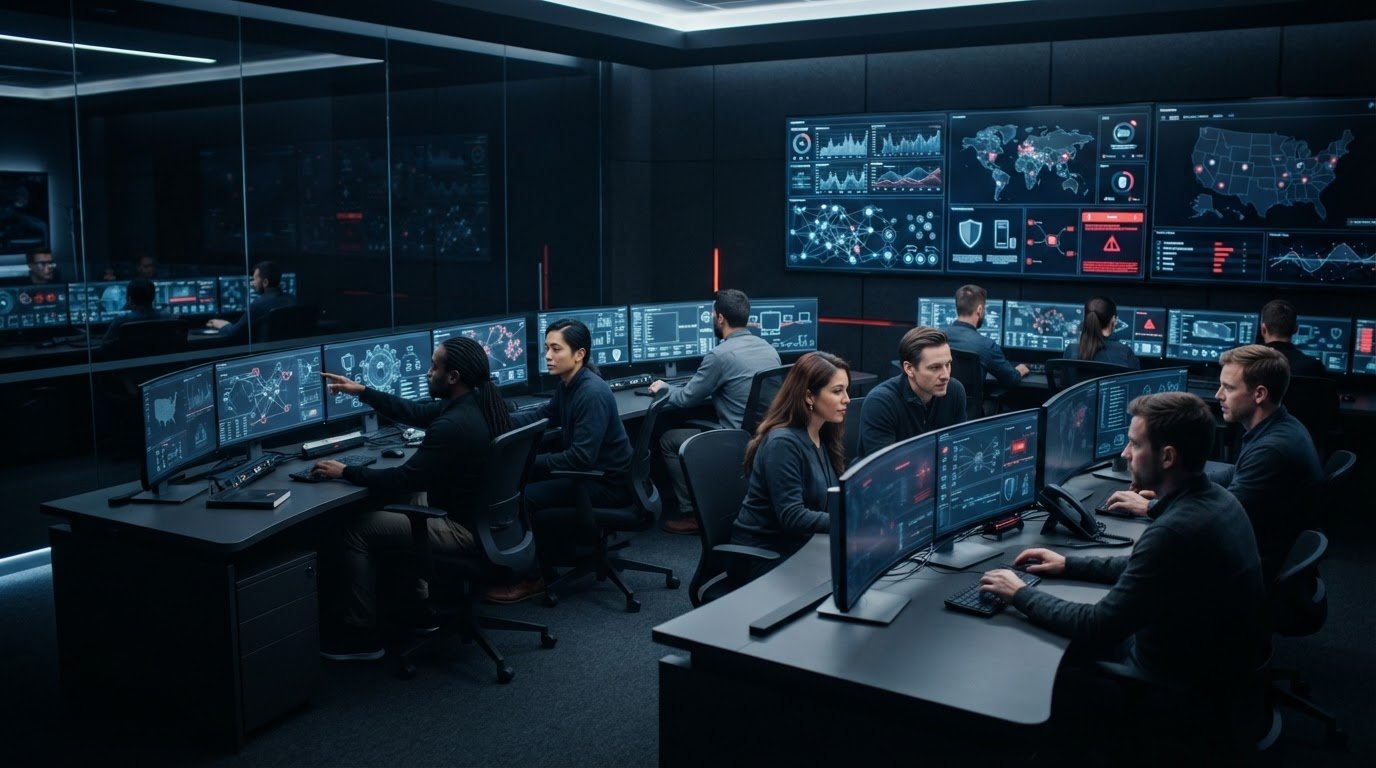
Security monitoring only creates value when someone can turn an alert into a decision and a response. That’s a real challenge for small and midsize businesses: internal teams are stretched, alerts can arrive at any hour, and a dashboard alone doesn’t show whether a threat is being investigated or contained. This guide explains what to expect from a managed security operations center SMB service, from continuous monitoring to incident response.
A SOC should do more than forward alerts. Gradius provides 24/7 U.S.-based SOC coverage, using security tools and threat intelligence to help detect, investigate, and respond to potential incidents. Effective operations also depend on everyday security foundations, including clear policies, managed devices, and an agreed process for escalating issues.
You’ll learn how monitoring connects to response, how to assess whether a managed SOC fits your business, and which responsibilities remain with your team. We’ll also cover practical steps that make the service more effective, so you can weigh its value without adding complexity for complexity’s sake.
Key Takeaways
- Understand how a managed SOC moves from collecting security signals to investigating and coordinating a response.
- Before onboarding a managed security operations center SMB service, document critical systems, key processes, and the people responsible for decisions.
- Compare basic alert monitoring, internal security operations, and managed SOC support to identify the coverage your business needs.
- Set clear escalation paths and communication preferences so your team knows who receives alerts and who approves business decisions.
- See how SIEM, EDR/XDR, threat intelligence, and compliance-aware IT support can work together to strengthen security operations.
What a Managed Security Operations Center Means for an SMB
A managed security operations center is more than a collection of security tools. It’s a team following an operating process to review security signals, investigate suspicious activity, assess potential impact, and coordinate next steps. For SMBs, a managed security operations center can provide ongoing security operations without requiring the business to build and staff a full internal SOC.
A Security Operations Center (SOC) combines people, processes, and technology. A managed SOC delivers those operational capabilities as a service. That’s different from buying software and expecting a small IT team to interpret every alert, and different from an occasional security review that provides a point-in-time view rather than monitoring activity as it happens.
Continuous monitoring helps a business notice and investigate signals that might otherwise go unseen between routine IT tasks. It supports risk management, but it can’t guarantee that every attack will be prevented or detected. The practical goal is better visibility and a defined path for handling suspicious activity.
What does a SOC monitor and why does it matter?
A SOC may review activity from employee computers and servers, email systems, network devices, and security platforms. A single event can be harmless, while related events may deserve closer attention. For example, an unusual sign-in followed by unexpected activity on a computer could warrant investigation. Context helps analysts distinguish routine behavior from a pattern that may indicate risk.
SIEM, or security information and event management, collects and correlates security events from connected systems. It helps analysts examine related signals together instead of treating each alert in isolation. EDR and XDR tools help identify and investigate suspicious activity on endpoints, such as workstations and servers. EDR focuses on endpoint activity; XDR can bring together signals across multiple security layers. These tools surface evidence. Analysts interpret it and determine what needs attention.
How is a managed SOC different from basic monitoring?
Basic monitoring may collect alerts or notify someone that a threshold was crossed. A managed SOC adds investigation and prioritization, then escalates significant findings through an agreed process. That distinction matters: a long list of alerts doesn’t tell a business whether an issue was assessed, who owns the next step, or whether a decision is needed.
Before service begins, clarify who reviews alerts, who contacts your business, and who can authorize actions that affect users or systems. The SOC can investigate and communicate findings, while business leaders provide context and make decisions that require organizational authority. Gradius combines SOC coverage with security tools and threat intelligence. Coordinating these capabilities with managed IT and compliance-aware support connects monitoring to broader business resilience. Learn more about cybersecurity services for business resilience.
How a Managed SOC Moves from Detection to Incident Response
Detection is the start of the work, not the finish. A useful managed security operations center SMB service connects an alert to investigation, a clear assessment, and a coordinated response. Document the process before an incident, when people can agree on who needs to know and who has authority to make business decisions.
What happens after a security alert is detected?
An alert is a signal to examine, not proof of a confirmed incident. Analysts review its source, related activity, and available security data before deciding what it may mean. A failed sign-in alone may be routine; repeated unusual sign-ins combined with unexpected device activity could call for escalation. Context helps direct attention to events that may affect the business.
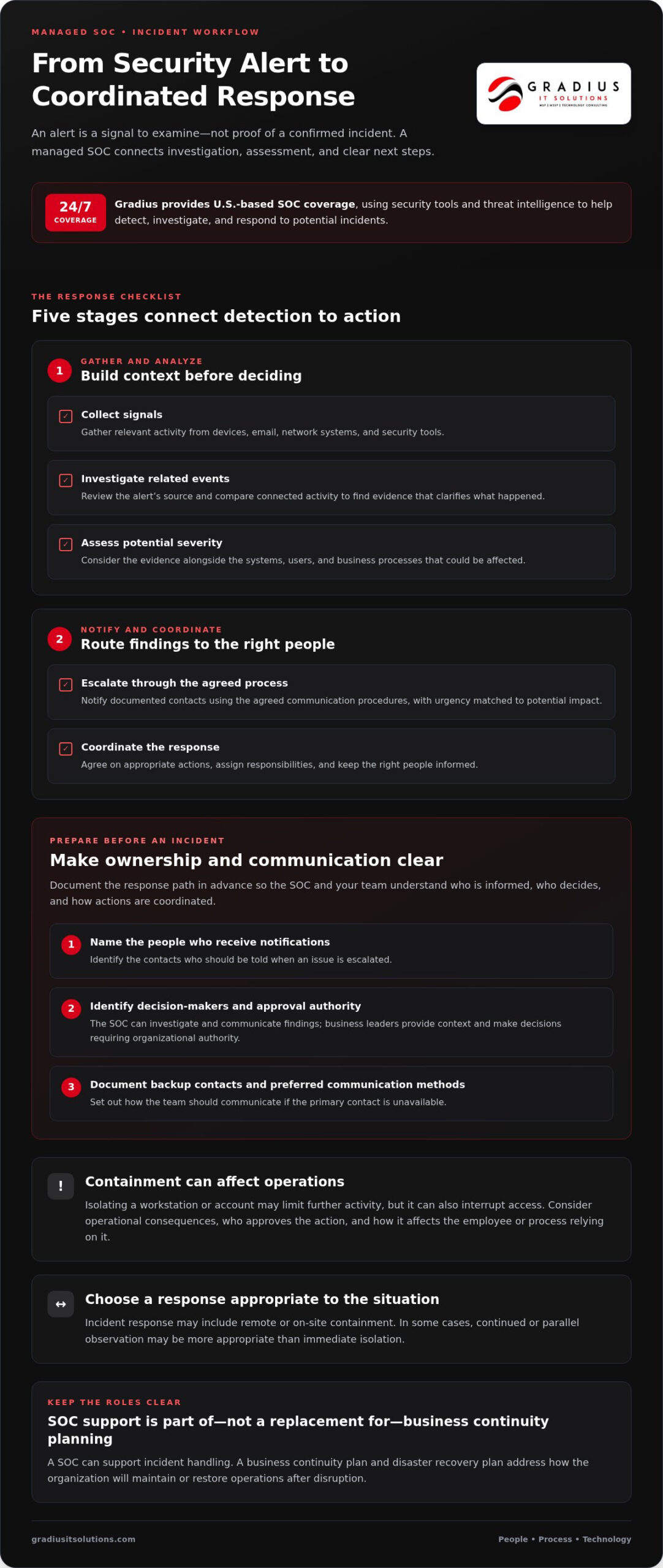
A practical response sequence looks like this:
- Collect signals: Gather relevant activity from devices, email, network systems, and security tools.
- Investigate: Compare related events and look for evidence that clarifies what happened.
- Assess severity: Consider the evidence alongside the systems, users, and business processes potentially affected.
- Escalate: Notify the agreed contacts using documented communication procedures, with urgency matched to the potential impact.
- Coordinate response: Agree on appropriate actions, assign responsibilities, and keep the right people informed.
Containment can limit further activity, but it may also interrupt access to a device or account. Coordinate the action with operational consequences in mind. For example, isolating a workstation may be appropriate, but the business should know who approves the step and how it affects the employee or process relying on it. Incident response can include remote or on-site containment, or parallel observation when continued monitoring is more appropriate than immediate isolation.
Set the response path in advance: name the people who receive notifications, identify decision-makers, and document backup contacts and preferred communication methods. The NIST Cybersecurity Framework offers guidance for organizing cybersecurity risk management, including preparation and response. A SOC can support incident handling, but it doesn’t replace a business continuity plan or disaster recovery plan. Those plans address how the organization will maintain or restore operations after disruption.
Which security controls make SOC monitoring more effective?
Monitoring works best when security controls provide useful signals and reduce preventable exposure. MFA makes stolen passwords harder to use on their own. Endpoint protection, including EDR/XDR, can provide details about suspicious activity on devices, while email security can surface potentially harmful messages. Patch management helps address known software weaknesses by applying and managing updates.
These controls work as layers, not substitutes for investigation. Documenting who manages them and how alerts connect to the response process gives analysts clearer context. Coordinated help desk and SOC support can connect security findings with day-to-day IT operations. For guidance on escalation paths and security priorities, review Gradius IT Solutions’ cybersecurity assessment.
Managed SOC vs. Internal Security and Basic Monitoring
There isn’t one right operating model for every small business. The choice depends on your internal expertise, the coverage you need, the sensitivity of the information you handle, and how clearly security responsibilities are assigned. A managed security operations center SMB solution can extend an existing IT team or provide specialist operational capacity where dedicated security staff aren’t practical. Compare what each model actually does, not just the tools it uses.
| Area | Internal security operations | Basic alert monitoring | Managed SOC support |
|---|---|---|---|
| Monitoring coverage | Set by internal staffing and schedules. | Collects or forwards alerts, often with limited follow-up. | Provides ongoing monitoring according to the service arrangement. |
| Investigation | Internal staff examine alerts and supporting context. | May flag activity without determining its significance. | Analysts investigate and prioritize notable findings. |
| Escalation | Handled through internal procedures. | May notify a contact, with next steps left to the business. | Uses agreed contacts and escalation procedures. |
| Response coordination | Internal staff coordinate actions and business communication. | Often limited to alerts or notifications. | Coordinates investigation and response with designated business contacts. |
| Internal responsibilities | Staff own monitoring, response, and decisions. | Staff must interpret alerts and decide what happens next. | Business leaders still provide context and authorize decisions that affect operations. |
This is a practical comparison, not a guarantee of what every service includes. Responsibilities and coverage vary by operating model, so map them to your needs. A business with an established IT team may prefer a co-managed approach: internal staff retain business context and day-to-day technology ownership, while a SOC adds specialist monitoring and investigation. Gradius coordinates SOC services with managed IT support, including co-managed IT designed to work alongside an internal team.
When might an SMB benefit from managed SOC coverage?
Consider external SOC support if security monitoring competes with routine IT work, alerts wait for someone to review them, or ownership is unclear. The case may be stronger when your business handles sensitive client, patient, or financial information, or needs better documentation for security processes. These are reasons to assess operational needs, not proof that one model fits every organization.
What should a practical SOC comparison measure?
Compare how findings are investigated, how escalation works, and how response actions are coordinated with your IT team and business decision-makers. Review the clarity of reporting and whether documentation supports relevant compliance responsibilities and cyber-insurance readiness. A useful comparison makes ownership visible: what the SOC handles, what your team decides, and how the two stay aligned as systems and business needs change.
Prepare Your Business for Managed SOC Operations
A managed security operations center SMB service can make informed decisions only when it understands the environment it’s monitoring. Preparation doesn’t require perfect documentation. It does require a reliable starting point: which systems matter most, how work depends on them, and who can provide context or approve action during a security event.
What information should an SMB organize first?
Start with a practical inventory. Capture essential devices, users, cloud services, and business workflows, then note which systems support critical work. For example, identify the applications employees need to serve customers, process records, or communicate. This context helps security analysts distinguish a technical issue from a disruption that could affect operations.
- Systems and services: List important computers, servers, network resources, email, and cloud platforms.
- People and roles: Name the IT contacts, business decision-makers, and backup contacts for security events.
- Policies and procedures: Gather existing security policies, incident response procedures, and business continuity or recovery plans.
- Dependencies: Note key workflows and the technology or teams they rely on.
Keep the information current. Assign an owner to update it when staff, applications, or processes change. A concise, maintained record is more useful during an incident than a detailed document no one trusts or can locate.
Use onboarding to review foundational protections. Confirm MFA is applied to important accounts, endpoint protection is deployed on business devices, email security is in place, and patch management has a clear owner. Apply Zero Trust principles by giving users access only to the systems and information they need for their roles. These layers help reduce exposure and give monitoring teams useful context. Record gaps and assign an owner to address each one, rather than treating SOC onboarding as a substitute for everyday security maintenance.
How should a business connect SOC work to compliance?
Begin by identifying the obligations that apply to your organization, industry, and data. Don’t assume a rule affecting one type of business automatically applies to yours. Then map relevant security activities to existing written policies, incident procedures, and continuity documentation. This makes it easier to see whether responsibilities are assigned and records are available when needed.
Clear documentation also helps connect operational security with audit preparation. Compliance as a Service can complement SOC operations by supporting documentation and compliance needs. Keep the process practical: identify the policy, the responsible owner, the evidence retained, and how often the record should be reviewed.
Measure whether the operating process is improving, not just how many alerts it generates. Useful measures include whether escalations reached the intended contacts, whether follow-up actions were documented, and whether recurring issues were assigned for resolution. Review these with IT and business leaders so monitoring findings lead to clear ownership and sustained improvements.
How Gradius Delivers Managed SOC Support for SMBs
Effective security operations connect monitoring with clear ownership, incident response, and the wider IT environment. Gradius provides SOC services supported by SIEM, EDR/XDR, threat intelligence, and incident response. These capabilities are most useful when they fit the organization’s systems and response procedures, not when they operate as a disconnected layer.
SIEM helps bring security events together for investigation. EDR/XDR tools contribute information about suspicious activity on devices and across security layers, while threat intelligence provides additional context for assessing potential threats. Analysts use these signals to investigate activity and coordinate response with the business. Monitoring can support earlier, more informed decisions, but it doesn’t eliminate risk or replace the organization’s responsibility to make business decisions.
How a coordinated security partner supports SMB operations
Security findings often touch more than one area of IT. A suspicious account, for instance, may require coordination between security responders and the people responsible for user access, business applications, or communications. Aligning SOC and IT operations can reduce handoff confusion and help the right people understand what needs attention.
Gradius coordinates cybersecurity with compliance-aware managed IT support. Documented policies and incident response planning give teams a shared reference for escalation, decision-making, and follow-up. Broader managed IT services can connect security operations with routine technology management, so security work reflects how the business actually operates.
During response, containment may be performed remotely or on-site, depending on the situation. Parallel observation mode can also support monitoring activity while the team gathers more context. These are response approaches, not promises of a particular outcome. The goal is to coordinate actions thoughtfully, taking potential business impact into account.
What to expect from a first cybersecurity assessment
A practical starting point is a free, no-obligation 30-minute conversation about your current security environment and priorities. The assessment includes a compliance gap analysis and a cyber-insurance readiness review. It can help surface areas to address, clarify how your existing controls support security operations, and give decision-makers a more organized view of next steps.
After the conversation, Gradius provides a written assessment report within a week. Use it to prioritize improvements, assign owners, and identify where SOC support could complement your internal IT capabilities. The assessment is a focused way to understand current gaps and plan security operations around business needs, without treating technology as an end in itself.
Details about the free cybersecurity assessment with Gradius IT Solutions are available online.
Build a Security Plan That Can Grow with Your Business
Security operations should evolve alongside your business. As systems, staff, and workflows change, revisit who owns key decisions, which operations need the most protection, and how security work fits into day-to-day IT. A managed security operations center SMB plan is most useful when it reflects business priorities, rather than adding tools without clear ownership or purpose.
Use your next planning conversation to identify the decisions that still feel uncertain. Where does your team need more visibility? Which process needs clearer ownership? What would help leadership respond confidently to a security finding? Specific answers make it easier to set priorities and build a practical path forward.
Gradius can help assess your current environment and identify steps that align security operations with your business needs.
With clear priorities and the right support, your team can strengthen security while staying focused on running the business.
Frequently Asked Questions
What is the difference between a SOC and an MSSP?
A SOC is the people, processes, and technology used to monitor and respond to security activity. An MSSP is a provider that delivers managed security services, which may include SOC operations and other security support. In practice, an MSSP may run a SOC or coordinate several security functions. Focus on what work is performed and how it fits your business, rather than relying on the label alone.
Can a managed SOC work with a small business that already has an IT provider?
Yes. A managed SOC can complement an existing IT provider when responsibilities and handoffs are clearly agreed. For example, the SOC might investigate a suspicious sign-in and notify the IT team to help verify the affected account or device. The teams should establish how they share relevant findings, who owns follow-up actions, and who communicates with business leaders. This lets security expertise supplement existing IT knowledge instead of creating parallel, disconnected processes.
Does SOC monitoring replace employee cybersecurity training?
No. Monitoring and employee awareness address different parts of security. A SOC can help investigate suspicious activity, while trained employees can recognize unusual requests and report them promptly. For example, staff should know how to flag an unexpected request to change payment details, even if it appears to come from a familiar contact. Regular, practical guidance helps employees understand how to raise concerns without trying to investigate an incident themselves.
What information should a business share during a security incident?
Share what was observed, when it began, which users or systems may be involved, and what actions have already been taken. Include relevant business context, such as whether an affected account supports an important workflow. Preserve suspicious messages or screenshots if your response procedure allows, and avoid deleting files or making uncoordinated changes. Accurate early details help responders investigate efficiently and reduce confusion about what happened.
How does a SOC support cyber-insurance readiness?
A SOC can support readiness by helping the business understand how monitoring and response processes relate to the controls and records an insurer may ask about. Keep current evidence, such as security policies, incident procedures, and records showing how key protections are managed. Use an insurer’s questionnaire to identify documentation gaps and assign owners to address them. SOC involvement can inform preparation, but it doesn’t guarantee coverage, renewal, or specific policy terms.
Can a managed SOC guarantee that a business will not suffer a breach?
No. No monitoring service can guarantee that a breach will never occur. A managed SOC can help improve visibility, investigate suspicious activity, and support a coordinated response, but outcomes also depend on the business’s systems, controls, decisions, and changing threats. Treat SOC coverage as one part of a layered security program. Maintain preventive safeguards, clear procedures, and employee awareness, and review them as your organization changes.

Article by
Robert Joyce
**Robert Joyce** is the Founder, CEO, and Chief Technology Officer of Gradius IT Solutions, a security first provider of Managed IT Services, Cybersecurity, Cloud, Compliance, and Secure AI solutions serving businesses throughout New Jersey, New York, Connecticut, and across the United States.
With more than 28 years of IT experience, including 23 years supporting hedge funds, global banks, and wealth management firms, Robert has built a career designing and managing secure, resilient, and highly available technology environments where uptime, cybersecurity, and business continuity are essential.
His expertise includes Microsoft 365, cloud computing, cybersecurity, networking, infrastructure, disaster recovery, compliance, virtualization, and strategic IT leadership. Following the events of September 11, Robert helped rebuild critical technology infrastructure for Merrill Lynch, an experience that reinforced the importance of resilience, planning, and operational excellence.
Robert founded Gradius IT Solutions to bring enterprise level technology and security services to small and midsized businesses at a predictable monthly cost. Today, the company delivers fully managed and co managed IT services, cybersecurity, Microsoft 365, cloud solutions, compliance consulting, Secure AI consulting, technology projects, and vCIO services. Through a U.S. based 24/7 Help Desk and a nationwide network of trusted technology partners, Gradius supports organizations across the country with responsive, security focused technology solutions.
Robert partners with business owners and executive leaders to align technology with business goals, reduce risk, strengthen cybersecurity, improve productivity, and create long term IT strategies that support growth. His mission is simple: provide every client with enterprise class technology, exceptional service, and a trusted advisor they can rely on as their business evolves.
Disclaimer
## Disclaimer
The information provided in this article is for general informational and educational purposes only and should not be considered professional IT, cybersecurity, legal, regulatory, or compliance advice. While Gradius IT Solutions strives to provide accurate and up to date information, technology, security threats, and regulatory requirements change frequently, and we cannot guarantee that all information will remain current or applicable to your specific situation.
Every organization has unique technology, security, compliance, and business requirements. Before implementing any recommendations discussed in this article, you should evaluate their suitability for your environment or consult with a qualified technology professional.
Gradius IT Solutions makes no warranties, express or implied, regarding the completeness, accuracy, reliability, or results obtained from the use of this information. Any actions you take based on this content are at your own risk. Gradius IT Solutions shall not be liable for any direct, indirect, incidental, or consequential damages arising from the use of, or reliance upon, the information contained in this article.
References to third party products, services, or vendors are provided for informational purposes only and do not constitute an endorsement unless explicitly stated.
If you would like guidance tailored to your organization, contact Gradius IT Solutions to schedule a consultation with one of our technology experts.