

What if your business already has security tools, but no one can confirm they’re configured correctly, monitored, or ready to support recovery? That uncertainty often drives searches for reliable small business protection. A list of products alone won’t answer the important question: are the right protections working together, with clear ownership when something goes wrong?
It’s reasonable to want straightforward answers, especially when an insurance or compliance review could expose gaps. Strong cybersecurity doesn’t require a maze of tools. It requires practical, layered safeguards, consistent oversight, and a response plan people understand.
This guide explains how to assess your needs and prioritize protections such as multi-factor authentication, endpoint security, email defenses, backups, and employee awareness. You’ll also learn what evidence to request from a provider, including monitoring responsibilities, documented recovery tests, and incident response roles. The goal is a manageable first step toward better security readiness, with less uncertainty about who is protecting your systems and how.
Key Takeaways
- Map the systems and information your business relies on before deciding which protections need attention first.
- Use layered safeguards, including account protection, endpoint security, email defenses, backups, and employee awareness, rather than relying on one tool.
- When comparing providers, ask who monitors alerts, escalates issues, supports incident response, and documents actions.
- Turn security gaps into a manageable plan: assign owners, prioritize improvements, and review progress regularly.
- Gradius IT Solutions’ free assessment includes a compliance gap analysis and cyber-insurance readiness review, with a written report delivered within a week.
What cybersecurity means for a small business, and what it must protect
Business cybersecurity is the combination of policies, technologies, and response practices a company uses to protect its systems, information, and ability to operate. It covers more than blocking unwanted access. A useful security program helps prevent common problems, detect suspicious activity, respond with clear steps, and recover systems and data when something goes wrong.
Small organizations need this discipline even without an in-house security team. Staff still use accounts, email, laptops, networks, cloud applications, and sensitive business records. A search for cybersecurity services may start with a particular tool or provider, but the first practical step is understanding what the business needs to protect and who is responsible for it.
Watch this overview for practical ideas on preventing cyberattacks and building a security strategy:
Which business assets should a cybersecurity review cover?
Start with an inventory of user accounts, laptops, servers, email, cloud applications, network equipment, and sensitive records. For each item, identify who can access it and whether that access is still needed. This can uncover former employee accounts, unnecessary permissions, or important systems that have no clear owner.
Then connect each asset to daily work. If email is unavailable, can staff serve customers? If a shared file is lost, can invoices or project records be restored? Thinking through these dependencies helps prioritize safeguards according to operational impact, not just technical complexity.
Why is cybersecurity more than buying security software?
Security tools need secure configuration, updates, monitoring, and a named owner. A tool that generates alerts without anyone reviewing or escalating them may not help the business respond in time. Employee habits and documented procedures matter too: staff need a clear way to report suspicious messages, while leaders need to know who coordinates response decisions.
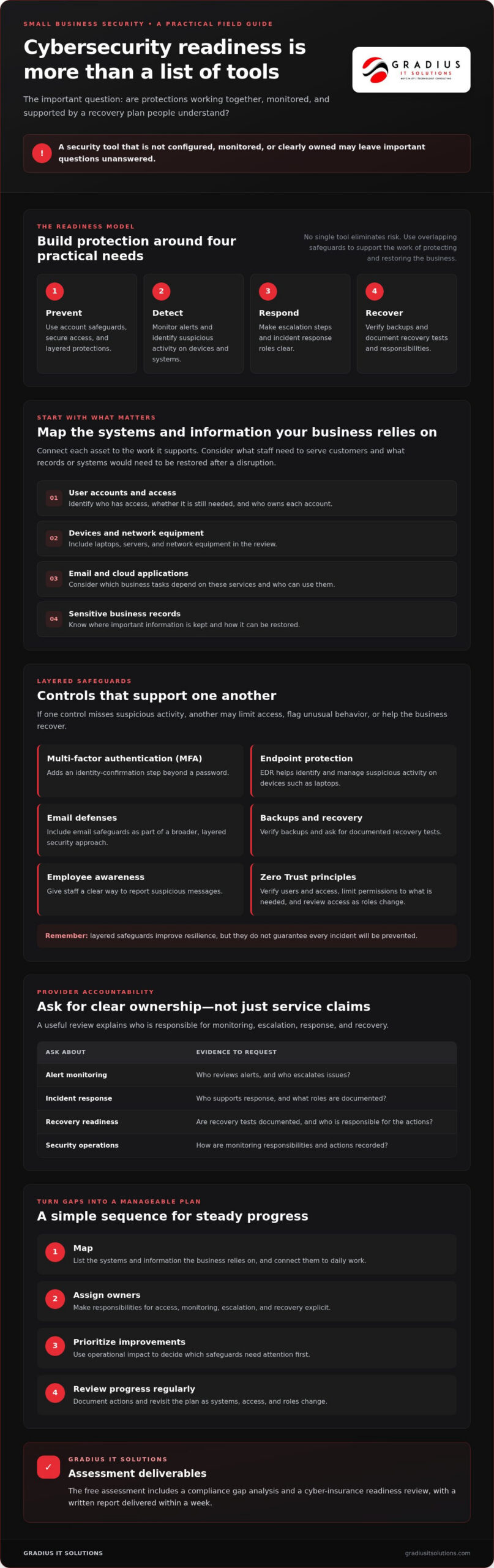
These safeguards work best as layered cybersecurity controls, with separate protections supporting one another. For example, account safeguards can limit unauthorized access, endpoint protection can help identify suspicious activity on devices, and verified backups can support recovery. No single tool eliminates risk. Cybersecurity improves resilience by preparing the business to prevent, detect, respond, and recover, while recognizing that no plan can prevent every incident.
How layered cybersecurity controls reduce everyday business risk
Layered security means using distinct safeguards that support one another instead of relying on a single tool or policy. If one control misses suspicious activity, another may limit access, flag unusual behavior, or help the business recover. That overlap makes security more resilient, but it doesn’t guarantee that every incident will be prevented.
Overlapping safeguards improve resilience by giving a business more than one opportunity to prevent, detect, and contain a threat, without promising that every attack will be stopped. The practical goal is to reduce the chance that one missed update, stolen password, or mistaken click becomes a wider business disruption.
Zero Trust is an approach that verifies users and their access rather than automatically trusting a person or device because it’s already connected. In practice, that means checking identity, limiting access to what someone needs, and reviewing permissions as roles change. When evaluating cybersecurity services, ask how these principles apply across everyday accounts, devices, and business applications.
How do MFA and endpoint protection work together?
Multi-factor authentication (MFA) asks users to confirm their identity with an additional step beyond a password. Endpoint detection and response (EDR) helps identify and manage suspicious activity on devices such as laptops. Extended detection and response (XDR) can bring related security signals from multiple sources together. Ask a provider which accounts and devices are covered, who reviews alerts, and what happens when a threat is identified.
A security information and event management system (SIEM) gathers and analyzes activity records from different systems to help surface patterns that may need investigation. These tools have different roles: MFA strengthens sign-in, EDR/XDR monitors activity, and SIEM helps connect signals. The tool name matters less than coverage, configuration, alert ownership, and a documented response process.
How do email security, patching, and backups support resilience?
Email filtering can help identify or block suspicious messages, while employee awareness helps staff recognize and report unexpected requests. Patch management means applying software updates that address known weaknesses. Together, these measures can reduce exposure, but they work best when someone confirms updates are applied and reports are acted on. The Federal Trade Commission offers practical guidance to help small businesses prioritize cybersecurity improvements.
Backups support recovery after data loss or disruption, but a backup is useful only if the business can restore what it needs. Confirm what is backed up, who checks it, and whether restore tests are documented. To see how these controls can fit into a coordinated approach, review managed cybersecurity services and consider which safeguards need clearer ownership in your organization.
How to evaluate a cybersecurity provider beyond its service claims
Strong provider claims are easy to make. Clear responsibilities and records are easier to verify. Ask providers who watches for threats, who decides what happens next, and how the work is documented. Review the service agreement, too. Commitments for critical issue escalation and response should be clear in writing, not left as assumptions.
| Area | Questions to ask | Evidence to request |
|---|---|---|
| Monitoring hours | When are security alerts monitored, and by whom? | Written coverage details and alert-handling process |
| Alert escalation | Who is contacted, how, and under what conditions? | Escalation steps and named responsibility roles |
| Incident response | Who coordinates investigation and response decisions? | Plain-language workflow and documented responsibilities |
| Backups | How is backup success checked, and are restores tested? | Verification records and restore-test results |
| Documentation | What security activity and follow-up are recorded? | Sample reports, policies, or issue records with sensitive details removed |
What evidence should a cybersecurity provider be able to explain?
Ask for a walkthrough of how an alert moves from detection to investigation, escalation, and resolution. Clarify who monitors alerts, who can approve disruptive actions, and how the provider records decisions and follow-up. Request examples of backup verification, restore-test documentation, and routine security reporting. The goal isn’t to collect technical dashboards; it’s to understand what happened, what was done, and what remains open.
Responsibilities should be divided plainly. The provider may monitor and investigate, while business leaders make decisions about operational impact and employees follow reporting procedures. For example, agree on who can authorize disconnecting a device if it may be compromised. Ask providers to explain 24/7 monitoring and support in terms of coverage, escalation, and response ownership, not just availability.
How can a business assess compliance and insurance readiness?
Requirements vary by industry and business circumstances. Identify which obligations apply to your organization and confirm them with qualified advisers. Then ask how policies, incident response plans, and audit evidence are maintained, reviewed, and updated. Compliance documents can support readiness, but they don’t prove that every security risk is addressed.
Look for verifiable operating details rather than phrases such as “comprehensive” or “enterprise-grade.” The Cybersecurity and Infrastructure Security Agency offers practical guidance to help organizations prioritize cybersecurity improvements. If documentation or control ownership is unclear, schedule a cybersecurity assessment with Gradius IT Solutions to identify gaps and define practical next steps.
How to prioritize cybersecurity improvements and document progress
A useful security plan turns a broad list of concerns into assigned, trackable work. Start with the systems that matter most to daily operations, then document what needs to improve and who will move it forward. Priorities should reflect business impact, data sensitivity, and obligations relevant to the organization, not a generic checklist alone.
Use this sequence to build a practical improvement plan:
- Inventory systems. List critical accounts, devices, email, applications, networks, and data. Note which business functions depend on each one.
- Assess existing controls. Check whether account protection, endpoint coverage, email security, software patching, and backups are in place and working as intended.
- Rank the gaps. Consider the sensitivity of affected information, the operational impact of an outage, and whether an applicable obligation or insurance requirement is involved.
- Assign owners. For each gap, record a responsible person, the next action, a target date, and the evidence that will show the action is complete.
- Review progress. Revisit open items with leadership, confirm completed work, and adjust priorities as business needs change.
What should a practical cybersecurity improvement plan include?
Keep the record simple enough to maintain. For each critical system, document its business owner, existing safeguards, unresolved risks, and next step. A gap might be that a departing employee’s access hasn’t been reviewed, or that backup records don’t show whether a restore was tested. Set achievable milestones and make trade-offs visible to leadership, especially when a change could affect access or daily workflows.
Refresh the plan when the organization adopts new technology, changes how it operates, or faces a material change in its risk environment. A plan that isn’t reviewed can quickly stop reflecting the business it’s meant to protect.
How should a business prepare for an incident or recovery?
Write down who coordinates decisions, who contacts the provider, and how staff and customers will receive appropriate updates. Document escalation paths before an incident, so people aren’t left guessing about authority or next steps. Connect this response plan to business continuity documentation, which identifies how essential work can continue during disruption.
For critical backups, schedule restore tests and retain the results. The records should show what was tested, whether recovery worked, and what follow-up is required. That evidence helps leaders see whether recovery plans are usable, not just written.
How Gradius connects managed cybersecurity, monitoring, and accountability
Security work can become fragmented when one team manages IT, another reviews alerts, and business leaders are left to coordinate compliance records and incident decisions. Gradius IT Solutions brings managed IT, cybersecurity, Security Operations Center (SOC) monitoring, incident response, and compliance support together. When comparing providers in Garfield NJ, the key question is whether responsibilities, evidence, and next steps are clear, not whether a provider promises perfect protection.
What can a cybersecurity assessment help a business understand?
Gradius IT Solutions’ free assessment includes a compliance gap analysis and a cyber-insurance readiness review. It can help decision-makers identify areas that may need attention and organize practical next steps. The assessment includes a written report delivered within a week, and Gradius IT Solutions states that assessment requests receive a response within one business day. Findings can inform planning, but the review doesn’t replace legal advice or confirm that an organization meets every regulatory requirement.
Use the report to clarify ownership: which gaps should be addressed first, who will coordinate the work, and what evidence will demonstrate progress. That gives leaders a basis for follow-up instead of leaving findings as a list of technical concerns.
When does managed cybersecurity support make sense?
Additional support may be useful when an internal team needs help coordinating security monitoring, incident response, or documentation alongside daily IT responsibilities. Gradius IT Solutions provides 24/7 U.S.-based SOC coverage and incident response. Its cybersecurity capabilities include monitoring tools and protections such as MFA, endpoint protection, email security, patch management, and backup verification. Ask how coverage and escalation responsibilities fit your needs, and confirm commitments in the service agreement.
One accountable partner can help connect routine IT management with security operations and compliance support. That coordination can make it easier to understand who owns an alert, what action was taken, and where documentation is kept. It doesn’t guarantee that incidents or compliance gaps will never occur. Review the scope, reporting, and decision-making process before choosing a provider. For additional context on Gradius IT Solutions’ cybersecurity approach, see its managed cybersecurity services.
Make your next security improvement a practical one
Small-business cybersecurity works best as an ongoing, accountable process. Inventory the systems and information your business depends on, prioritize layered safeguards, and document who owns each action. When evaluating a provider, look beyond tool names. Confirm who monitors alerts, how incidents are escalated, and whether recovery steps are tested and recorded.
If you searched for “cybersecurity garfield nj,” use the same practical questions to assess any provider: What will be reviewed, what evidence will you receive, and what happens next? A clear assessment can help turn uncertainty about security gaps, insurance readiness, and compliance documentation into a manageable plan.
Gradius IT Solutions’ free assessment includes a compliance gap analysis and cyber-insurance readiness review. You’ll receive a written report within a week, and Gradius states that assessment requests receive a response within one business day. The assessment can inform next steps, but it doesn’t replace legal or regulatory advice or guarantee security or compliance.
Start with a clearer view of your current safeguards, then build readiness one well-owned improvement at a time.
Frequently Asked Questions
What cybersecurity does a small business need?
A small business needs safeguards for its accounts, devices, email, networks, business data, and ability to operate. Start by reviewing multi-factor authentication, endpoint protection, email security, software updates, backups, and employee reporting procedures. The right combination depends on the systems and information the business uses. Use these areas as a starting checklist, then identify what’s covered and who is responsible for maintaining each safeguard.
Is managed cybersecurity worth it for a small business?
Managed cybersecurity may be useful when an internal team needs additional monitoring, incident response, or help maintaining security documentation. A provider can take on agreed operational responsibilities while business leaders remain involved in decisions that affect employees and daily work. Before selecting a service, compare its coverage, alert escalation, reporting, and response commitments with your team’s capacity and the systems your business depends on.
How does multi-factor authentication help protect a business?
Multi-factor authentication (MFA) requires an additional identity check beyond a password, such as an approval prompt or code. If a password is exposed, that second step can make it harder for another person to access the account. Apply MFA to important accounts, including email and remote access, and review who has access regularly. MFA strengthens sign-in security, but it should complement other safeguards rather than replace them.
What should a business ask a cybersecurity provider?
Ask who monitors alerts, what monitoring hours are covered, and how critical issues are escalated. Clarify who investigates an incident, who makes decisions that could interrupt business operations, and how actions are recorded. Request examples of security reports, backup verification, and restore-test documentation. Review the service agreement to ensure scope and response commitments are clear in writing. A provider should be able to explain its processes in plain language.
How often should a business test its backups?
Choose a testing schedule based on how quickly essential work must resume, which data matters most, and how often systems change. Test restores for critical systems and keep records of what was tested, whether recovery worked, and any follow-up needed. A successful backup report alone doesn’t confirm that files can be restored. Ask the person or provider responsible for backups how tests are scheduled and how results are shared.
Can a cybersecurity assessment guarantee compliance or prevent a breach?
No. An assessment can identify gaps and guide improvement, but it can’t guarantee compliance or prevent every breach. Requirements depend on the organization and its industry, so confirm applicable obligations with qualified advisers. Gradius IT Solutions’ free assessment includes a compliance gap analysis and cyber-insurance readiness review, with a written report delivered within a week. Use its findings to inform security planning, not as a legal determination or guarantee of protection.

Article by
Robert Joyce
Robert Joyce is the Owner and Chief Technology Officer of Gradius IT Solutions, a security-first provider of managed IT, cybersecurity, cloud, compliance, and secure AI solutions. Headquartered in New Jersey with satellite offices in the Midwest and South Florida, Gradius serves businesses across the Tri-State Area, Midwest, South Florida, and nationwide.
Robert brings 30 years of IT experience, including 23 years in hedge funds, global banks, and wealth management firms where uptime, security, and continuity are non-negotiable. He began in trade floor support at Caxton, Shell Trading, and Knight, provided senior trade floor support at RBC and SAC Capital, served as VP of IT at EntrustPermal, and was CTO of Gerstein Fisher. After September 11, he helped rebuild critical technology infrastructure for Merrill Lynch.
His expertise spans Microsoft 365, cloud, cybersecurity, networking, infrastructure, disaster recovery, compliance, and strategic IT leadership.
Robert founded Gradius to bring enterprise-level technology and security to small and midsized businesses at a predictable monthly cost. Gradius delivers managed and co-managed IT, cybersecurity, Microsoft 365 and cloud, compliance programs supported by a GRC platform, secure AI consulting, and vCIO services, with a full help desk, 24/7 NOC and SOC monitoring, and U.S.-based onsite engineers and SOC.
Robert works directly with business owners and executives as their single accountable point of contact. His philosophy: one trusted partner, complete IT accountability.
Disclaimer
## Disclaimer
The information provided in this article is for general informational and educational purposes only and should not be considered professional IT, cybersecurity, legal, regulatory, or compliance advice. While Gradius IT Solutions strives to provide accurate and up to date information, technology, security threats, and regulatory requirements change frequently, and we cannot guarantee that all information will remain current or applicable to your specific situation.
Every organization has unique technology, security, compliance, and business requirements. Before implementing any recommendations discussed in this article, you should evaluate their suitability for your environment or consult with a qualified technology professional.
Gradius IT Solutions makes no warranties, express or implied, regarding the completeness, accuracy, reliability, or results obtained from the use of this information. Any actions you take based on this content are at your own risk. Gradius IT Solutions shall not be liable for any direct, indirect, incidental, or consequential damages arising from the use of, or reliance upon, the information contained in this article.
References to third party products, services, or vendors are provided for informational purposes only and do not constitute an endorsement unless explicitly stated.
If you would like guidance tailored to your organization, contact Gradius IT Solutions to schedule a consultation with one of our technology experts.