

Choosing business VoIP phone systems depends less on a feature list and more on how your team handles calls. A system that works well for one office may frustrate a hybrid team, complicate customer handoffs, or leave continuity questions unanswered. The right fit supports your workflows today and can adapt as your company grows.
If your legacy phone setup limits flexibility or remote work, it may be time to explore alternatives. Comparing hosted, on-premises, and hybrid options can feel like a technical maze, especially when security, network readiness, and connections to other business tools also matter.
This guide explains how business VoIP works and what to weigh before choosing a deployment approach. You’ll learn how the models differ, which capabilities to assess for your calling workflows, and how to plan a transition with clear ownership and continuity in mind. The goal is to help you make a practical communications decision that fits your business, not just a vendor’s feature list.
Key Takeaways
- Business VoIP phone systems carry calls over an internet-based communications system, supporting how employees serve customers and coordinate daily work.
- Map how calls should reach people and teams before configuring users, extensions, devices, and call-handling rules.
- Compare cloud-hosted, on-premises, and hybrid approaches based on management responsibilities, network dependencies, and the flexibility your business needs.
- Assess network readiness, security, continuity plans, support ownership, and operational changes before implementation.
- Coordinate phone-system support with network management and help desk responsibilities, and plan how your team will communicate during a disruption.
Why business VoIP phone systems matter beyond replacing desk phones
Business VoIP is a phone system that carries business calls over an internet-based communications system. It supports everyday conversations across a company, not just call-center operations. Employees can use it to reach colleagues, while customers use it to contact the business. Available tools and call-handling options depend on the selected service and its configuration.
The technology behind Voice over IP (VoIP) technology converts voice into data that travels over a network. The move toward hosted calling reflects a shift in how organizations manage communications. Gartner predicts that 90% of organizations will use cloud platforms for enterprise telephony by 2028, compared with 30% in 2025. That forecast signals a growing role for cloud calling, but it doesn’t make one deployment model right for every business.
What changes when a business moves its calls to VoIP?
With a traditional phone setup, call handling may rely on physical lines and equipment at the office. VoIP can bring call management into communications software and supported devices. For example, a customer calling about an order could be directed to the appropriate team instead of relying on someone to transfer the call manually. Routing options depend on the system and its configuration.
This approach can give a company more flexibility as employees’ roles or work locations shift. But not every organization needs the same devices or capabilities. Consider who answers first, where calls go when a team is unavailable, and how employees make or receive business calls. Let those workflows shape the system, rather than starting with a feature list.
Which business communication problems can VoIP address?
VoIP can help bring fragmented calling workflows into a more manageable system. A growing company might have customer calls going to individual desk phones, mobile numbers, or shared inboxes, with no clear process for directing or returning them. A defined call flow can make customer access and internal handoffs easier to manage while clarifying who owns each step.
Start with operational needs. Identify how customers should reach your team, how employees coordinate calls, and who will maintain call-handling rules as responsibilities change. Then account for network readiness and support. Calls rely on connectivity, so consider the phone system alongside network management and day-to-day IT support. Gradius IT Solutions provides business communications alongside related IT operations, including managed IT services for general business.
Legacy infrastructure may suit organizations with stable, office-based workflows and established equipment. VoIP may better fit teams that need adaptable call management or support changing work patterns. Neither approach is automatically right for every business. Base the decision on employee workflows, customer access, and how communications will be supported over time.
How business VoIP phone systems handle calls, users, and connectivity
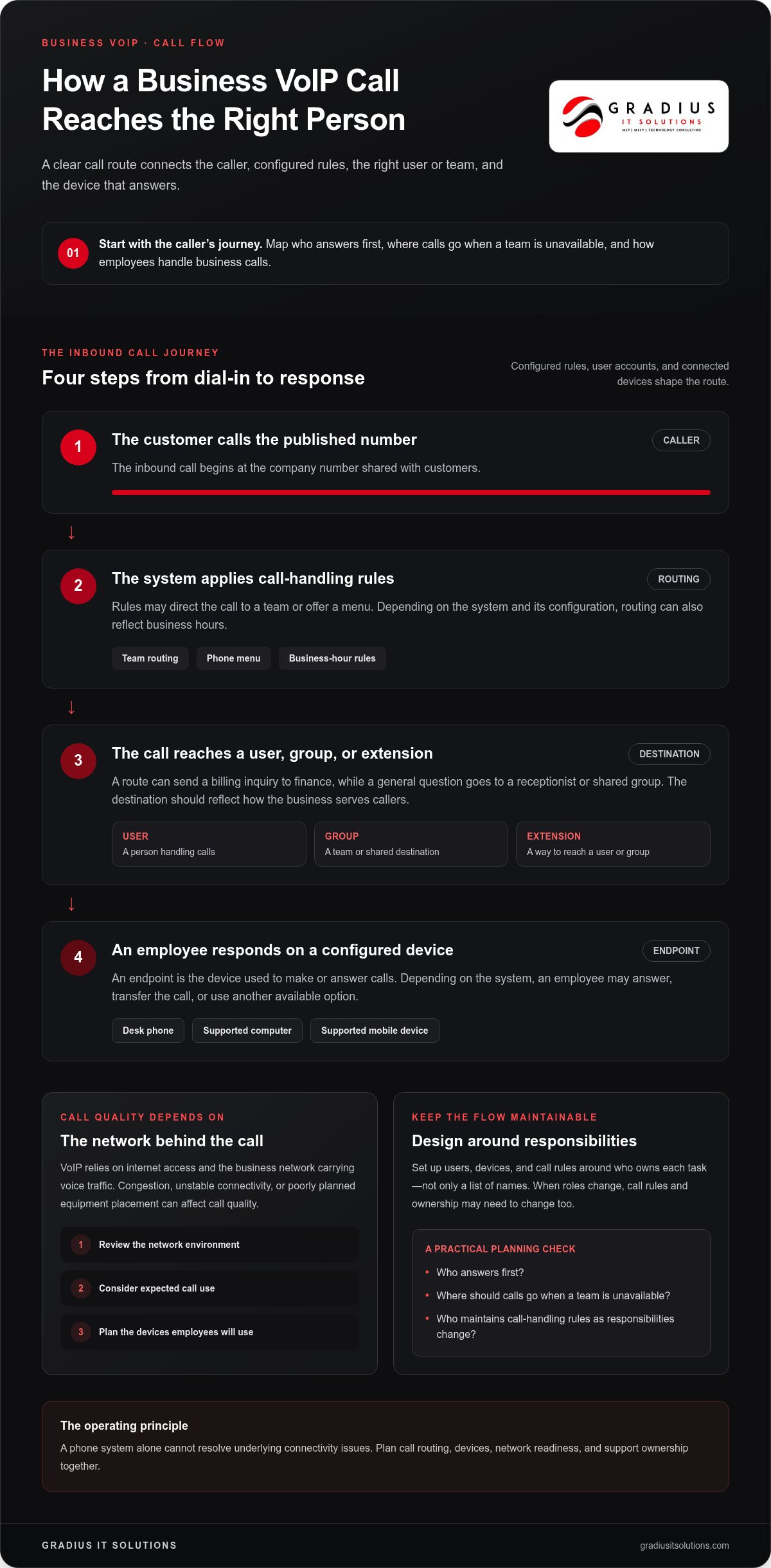
A call flow is the route a call takes from the moment someone dials a business number to the point an employee answers, transfers it, or sends it to voicemail. In business VoIP phone systems, configured rules, user accounts, and connected devices shape that route. A typical inbound call might move through these steps:
- A customer calls the company’s published number.
- The communications system applies rules, such as directing the call to a team or offering a menu.
- The call reaches a user, group, or extension based on the selected route.
- An employee answers on a configured device, transfers the call, or follows another available option.
Call-flow design affects whether callers reach the right department without confusion, employees know who owns the next step, and routine calls are handled consistently. The FCC’s guidance on VoIP explains the technology and its general operation.
How do call routing and business phone features work?
Routing rules can reflect how the company serves customers. For example, a billing inquiry could go to the finance team, while a general question reaches a receptionist or shared group. Depending on the system and its configuration, options may include a phone menu, business-hour routing, voicemail, and call transfers. These are examples, not universal features.
Users represent the people or teams handling calls. An extension provides a way to reach a user or group, while an endpoint is the device used to make or answer calls, such as a desk phone or supported computer or mobile device. Set these up around responsibilities, not just names on a list. When roles change, call rules and ownership may need to change too.
What does a VoIP system depend on to work well?
VoIP calls rely on internet access and the business network carrying voice traffic. Network congestion, unstable connectivity, or poorly planned equipment placement can affect call quality. Before deployment, review the network environment, expected call use, and the devices employees will use. Suitable configuration matters: a phone system alone can’t resolve underlying connectivity issues.
Network management helps teams monitor and maintain the environment that supports communications, but it can’t guarantee uninterrupted calling. Gradius IT Solutions coordinates communications planning with network management and infrastructure planning through its business VoIP and communications services.
Cloud, on-premises, or hybrid: compare business VoIP approaches
Choosing a deployment model means deciding where the phone-system infrastructure runs and who is responsible for managing it. Cloud-hosted, on-premises, and hybrid business VoIP phone systems divide those responsibilities differently. No model is automatically best. The right fit depends on your operational priorities, existing infrastructure, continuity needs, and available IT capacity.
| Approach | Ownership and management | Network dependency and flexibility |
|---|---|---|
| Cloud-hosted | The provider hosts the core system; the business manages users, settings, and its connection to the service. | Depends on internet connectivity. Centralized administration may suit organizations that want to manage communications across changing work locations. |
| On-premises | The organization maintains phone-system infrastructure at its premises, directly managing more of the environment or coordinating its support. | Relies on local infrastructure and network planning. It may suit businesses that prioritize direct control and have resources to maintain the system. |
| Hybrid | Responsibilities are shared across on-site and hosted components, so ownership needs to be clearly defined. | Combines elements of both models. Flexibility depends on how components are divided and supported. |
When might a hosted or cloud VoIP system fit?
A hosted system can suit organizations that prefer provider-hosted infrastructure and centralized administration over maintaining the core phone platform on-site. It may also align with teams whose employees work from different locations. But cloud calling still depends on connectivity. If your business relies on phone access, plan what employees will do if internet access or the hosted service is disrupted. Cloud delivery alone is not a continuity plan.
When might on-premises or hybrid VoIP deserve consideration?
On-premises infrastructure can give an organization more direct control, while also making it responsible for ongoing management, maintenance, and support coordination. That responsibility requires appropriate internal capacity or a defined support arrangement. A hybrid approach can combine hosted and on-site elements when operational needs call for more than one model, but shared environments also require clear ownership across components.
Decision rule: Choose the deployment model that best supports your operational priorities and continuity requirements while matching the IT capacity you can assign to ongoing management.
Before deciding, document existing infrastructure, who will manage changes, and how the business will respond to connectivity or system disruption. Gradius IT Solutions helps businesses assess communications needs alongside related IT operations, including business VoIP and unified communications services.
How to evaluate business VoIP systems before implementation
A clear evaluation starts with how people communicate, not with a catalog of features. Document the current call process, identify what needs to change, and assign ownership for decisions and ongoing support. This gives your team practical criteria for comparing business VoIP phone systems and reduces the chance that a key workflow gets missed during rollout.
Which requirements should a business document first?
Capture the basics before comparing options: teams and users, customer-facing numbers, call volumes where known, business hours, remote-work patterns, and the person responsible for system changes. Record essential call scenarios, such as a customer reaching the right department, an employee transferring a call, or a caller leaving a message when a team is unavailable.
Separate must-haves from preferences. A requirement is essential if its absence would disrupt customer access or daily operations. A desirable feature may improve convenience, but shouldn’t distract from core call handling, network readiness, security, and continuity. This distinction keeps the evaluation tied to business outcomes.
How can a business plan a controlled transition?
Use a staged process that connects planning to real workflows:
- Discover: Document users, existing numbers, call patterns, network conditions, and support responsibilities.
- Design: Map call flows and agree on how teams should handle routine and exception scenarios.
- Configure and test: Set up the agreed call paths, then test representative inbound and outbound calls, transfers, and voicemail where applicable.
- Prepare users: Explain what is changing, how employees will use their assigned devices, and where to report issues.
- Roll out and review: Move everyday operations according to a planned sequence, track issues, and clarify who owns follow-up.
Testing matters. Verify that calls reach the intended destination and employees understand their role in the workflow before relying on the new setup for routine business. Include security and continuity in the plan, such as who can make configuration changes and what employees should do if connectivity or calling is disrupted.
Define support ownership before deployment. Your team should know who handles user questions, who manages network-related issues, and how problems are reported and escalated. Gradius IT Solutions coordinates communications with related IT operations, including managed support. Its business VoIP and unified communications services can be part of your planning.
Ready to align your call workflows, network, and support plan? Schedule a technology consultation with Gradius IT Solutions.
Keep business VoIP reliable with coordinated IT support
A phone system depends on more than its calling platform. Connectivity, user setup, configuration changes, and issue response all shape how employees and customers experience business VoIP phone systems. Coordinating these responsibilities helps prevent communications problems from getting lost between the phone system, network, and help desk teams.
What should ongoing VoIP support cover?
Define who handles user questions, who approves call-flow or account changes, and who investigates network or service issues. When an issue crosses teams, assign clear escalation ownership so employees know where to report it and who coordinates the next step.
Keep system responsibilities and call flows documented. A simple record of key numbers, routing rules, change owners, and support contacts gives staff and IT teams a shared reference. It also makes routine updates easier when teams or responsibilities change. Gradius IT Solutions provides 24/7 Help Desk and SOC/NOC support alongside business communications services.
How can VoIP fit into a broader managed IT plan?
Include communications in routine network management, security reviews, and business continuity planning. For example, document what employees should do if internet connectivity or the calling system becomes unavailable, who communicates updates internally, and how urgent customer calls will be handled. These steps support a prepared response, but no plan can guarantee uninterrupted calling.
Managed IT brings phone operations into a wider view of technology responsibilities. Network monitoring can help teams identify connectivity concerns, while documented escalation paths clarify who investigates them. Security planning should also account for system access and configuration ownership. Together, these practices help keep communications aligned with the business’s broader IT environment.
Gradius IT Solutions works with businesses on VoIP and communications alongside network management and managed IT. The right support plan should fit the organization’s call workflows, internal capacity, and continuity needs. Clear ownership matters, whether employees need help with a device, a call-routing change, or a network issue affecting communications.
Schedule a free IT assessment with Gradius IT Solutions to review how your communications, network, and support responsibilities fit together. Request your IT assessment.
Build a communications system your team can rely on
The right business VoIP phone system starts with how your team works, not with a long feature list. Map call flows and user needs first, then compare cloud, on-premises, and hybrid models against your operational priorities and IT capacity. Before rollout, test key calls and assign clear ownership for support, network issues, and system changes.
Reliable communications also depend on the environment around the phone system. Coordinating VoIP with network management, managed IT support, and continuity planning gives your team a clearer way to respond when needs change or a disruption occurs. Gradius IT Solutions provides business VoIP and communications services alongside network management and managed IT support.
With a practical plan and accountable support, your communications can keep pace with the business as it grows.
Frequently Asked Questions
What is a business VoIP phone system, and how does it work?
A business VoIP phone system carries calls over an internet-based communications system. When someone calls your business, configured rules route the call to a user, team, or voicemail. Employees make and receive calls on supported devices. The system’s options depend on its design and configuration, so begin by mapping how customers and staff need to communicate and who should manage the call-handling rules.
Is a cloud-based VoIP phone system reliable for a small business?
A cloud-based VoIP system can support a small business, but its reliability depends on the service, internet connection, local network, and configuration. Cloud hosting doesn’t remove the need for continuity planning. Decide how employees will communicate if connectivity or the calling service is disrupted, and assign someone to coordinate the response. Review network readiness and test important call scenarios before moving everyday operations.
What internet connection does a business VoIP phone system need?
There isn’t one connection speed that fits every business VoIP phone system. Requirements depend on how many people may call at once and what else uses the network, such as video meetings and cloud applications. Stability matters as much as available bandwidth. Ask your IT team to assess expected simultaneous calls, network traffic, and usage during busy periods, then plan capacity around your actual needs.
Can a business VoIP system work with existing phones and network equipment?
It may, but compatibility depends on the phone models, system configuration, and network equipment. Older phones or devices designed for another system may need replacement or additional configuration. Before rollout, inventory existing phones and network hardware, note how each is used, and test representative devices with the proposed setup. This helps identify limitations before employees rely on the new system for everyday calls.
How do cloud, on-premises, and hybrid business VoIP systems differ?
Cloud systems host core phone infrastructure with a provider, while the business manages users, settings, and connectivity. On-premises systems keep more infrastructure at the organization and require more direct management. Hybrid models combine hosted and on-site elements, dividing responsibilities across both. Compare the approaches based on operational priorities, existing infrastructure, continuity requirements, and the IT resources available for ongoing support.
What security considerations matter when choosing business VoIP?
Choose a layered approach that limits access and helps protect accounts, devices, and communications. Apply Zero Trust principles by granting access only to verified users and limiting permissions to what each role needs. Use multi-factor authentication, strong unique passwords, endpoint protection, and email security to reduce common entry points. Train employees to recognize voice phishing attempts, and define who manages access, configuration changes, and security reviews.
How can a business prepare employees for a VoIP phone-system transition?
Prepare employees by explaining what will change, how their devices and call flows will work, and where to get help. Share concise instructions for everyday tasks such as answering, transferring, and returning calls. Test representative inbound and outbound scenarios before the transition, then give staff a clear way to report problems. Assign support ownership so questions and issues reach the right people promptly.

Article by
Robert Joyce
**Robert Joyce** is the Founder, CEO, and Chief Technology Officer of Gradius IT Solutions, a security first provider of Managed IT Services, Cybersecurity, Cloud, Compliance, and Secure AI solutions serving businesses throughout New Jersey, New York, Connecticut, and across the United States.
With more than 28 years of IT experience, including 23 years supporting hedge funds, global banks, and wealth management firms, Robert has built a career designing and managing secure, resilient, and highly available technology environments where uptime, cybersecurity, and business continuity are essential.
His expertise includes Microsoft 365, cloud computing, cybersecurity, networking, infrastructure, disaster recovery, compliance, virtualization, and strategic IT leadership. Following the events of September 11, Robert helped rebuild critical technology infrastructure for Merrill Lynch, an experience that reinforced the importance of resilience, planning, and operational excellence.
Robert founded Gradius IT Solutions to bring enterprise level technology and security services to small and midsized businesses at a predictable monthly cost. Today, the company delivers fully managed and co managed IT services, cybersecurity, Microsoft 365, cloud solutions, compliance consulting, Secure AI consulting, technology projects, and vCIO services. Through a U.S. based 24/7 Help Desk and a nationwide network of trusted technology partners, Gradius supports organizations across the country with responsive, security focused technology solutions.
Robert partners with business owners and executive leaders to align technology with business goals, reduce risk, strengthen cybersecurity, improve productivity, and create long term IT strategies that support growth. His mission is simple: provide every client with enterprise class technology, exceptional service, and a trusted advisor they can rely on as their business evolves.
Disclaimer
## Disclaimer
The information provided in this article is for general informational and educational purposes only and should not be considered professional IT, cybersecurity, legal, regulatory, or compliance advice. While Gradius IT Solutions strives to provide accurate and up to date information, technology, security threats, and regulatory requirements change frequently, and we cannot guarantee that all information will remain current or applicable to your specific situation.
Every organization has unique technology, security, compliance, and business requirements. Before implementing any recommendations discussed in this article, you should evaluate their suitability for your environment or consult with a qualified technology professional.
Gradius IT Solutions makes no warranties, express or implied, regarding the completeness, accuracy, reliability, or results obtained from the use of this information. Any actions you take based on this content are at your own risk. Gradius IT Solutions shall not be liable for any direct, indirect, incidental, or consequential damages arising from the use of, or reliance upon, the information contained in this article.
References to third party products, services, or vendors are provided for informational purposes only and do not constitute an endorsement unless explicitly stated.
If you would like guidance tailored to your organization, contact Gradius IT Solutions to schedule a consultation with one of our technology experts.