
Your cybersecurity plan shouldn’t depend on whether support is in the building. Businesses across the United States can get help through remote or on-site support, depending on the issue and the work required. The right approach combines a practical response with safeguards tailored to how your business operates.
It makes sense to want hands-on help when a security concern affects your team, devices, or network. Remote support can address many issues without an on-site visit, while ongoing monitoring and layered safeguards help reduce exposure between incidents. This article explains how managed IT support, cybersecurity assessments, remediation, compliance support, and tailored consulting work together. You’ll also learn what to consider when choosing a support model and how an IT partner can adapt its approach to your business goals.
Key Takeaways
- On-site and remote support can work together, with the right approach shaped by the issue and your business operations.
- Layered safeguards, employee awareness, and continuous monitoring help address cybersecurity risks across people, devices, and systems.
- Keep technology aligned with your compliance framework and organize documentation so it’s ready when needed.
- Use assessment findings to prioritize remediation and turn security gaps into practical next steps.
- Connect cybersecurity decisions to business goals, continuity needs, and the way your team works.
Managed IT support and cybersecurity services
Cybersecurity services should protect more than one layer. A business can combine multi-factor authentication, endpoint protection, email security, employee awareness, backups, and continuous monitoring. Zero Trust practices verify access instead of treating every device or user inside the network as trusted. A practical first step is to map key systems and identify who needs access to each one.
Homeowners and individuals can use safeguards such as multi-factor authentication, updated computer protection, and secure Wi-Fi settings. These measures help protect personal accounts and devices, while business managed IT support is built around organizational systems and work needs. Students can also learn to recognize suspicious messages and protect their personal accounts.
Businesses seeking managed security and continuous monitoring should look for services that explicitly include SOC monitoring. Clarify which systems are monitored, how alerts are reviewed, and how incidents are escalated. This helps establish what is being watched and how a security concern reaches the appropriate contact. Monitoring is different from user support, which handles requests such as login trouble or computer issues.
Flat-rate packages can make ongoing support more predictable by grouping agreed services under a recurring fee. Compare the scope, not the package label: check which users, computers, security controls, monitoring activities, and support channels are covered. A growing team or new office may change those needs, so the package should reflect the organization’s systems and operating model.
Students exploring cybersecurity education can consider whether a course covers networking, general IT knowledge, and practical security concepts. A program designed to prepare learners for an industry certification can provide a structured path into the field. For someone seeking immediate technical help, student support may instead include account-access assistance, device guidance, or help connecting securely to school systems.
For a business, the next step is to document its core systems, user access, and current protections. That inventory helps clarify whether the priority is remote support, on-site work, stronger security controls, or monitoring. Insurers’ underwriting process can also help an organization understand its cyber risk profile relative to peers and model losses, according to the U.S. Environmental Protection Agency.
Regulatory compliance and data protection
Compliance work starts by identifying which framework applies to your organization and what evidence it requires. Then map sensitive data, access, and recovery practices to that framework.
Protecting Sensitive Business Data
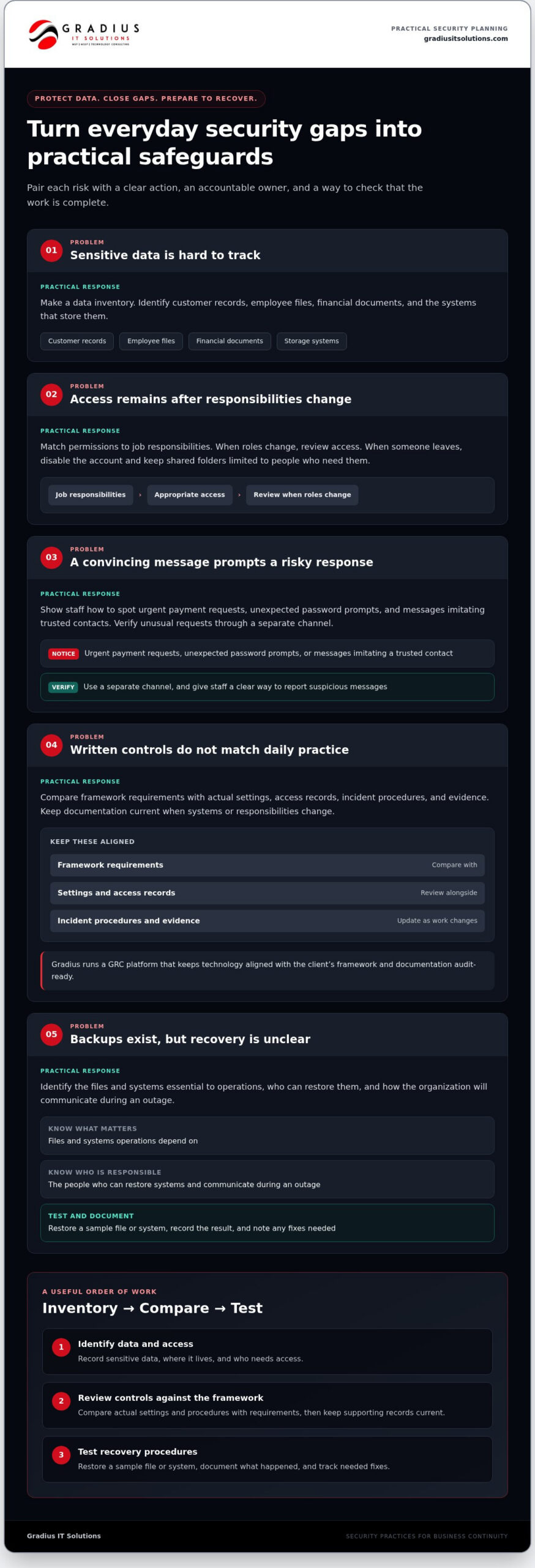
Start with a data inventory: identify customer records, employee files, financial documents, and the systems that store them. Assign access according to job responsibilities, then remove permissions when roles change. For example, disable a departing employee’s account while keeping shared folders limited to people who need them. Review network access, multi-factor authentication, and encryption settings as part of the same protection plan.
Employee awareness matters, too. A convincing email can lead someone to disclose credentials or open a harmful attachment. Give staff a clear way to report suspicious messages, and explain how to verify unusual requests through a separate channel. These everyday practices support technical safeguards such as endpoint protection, email filtering, and continuous monitoring.
Data Breach Prevention Consulting
Prevention consulting turns technical findings into prioritized work. A consultant can examine account permissions, remote access, network boundaries, email safeguards, and backup practices, then explain where controls overlap or leave gaps. Ask for recommendations that connect each risk to a practical action, an owner, and a way to track completion. This makes the advice usable, rather than just a list of technical observations.
Social engineering is a common organizational risk. Consulting can help staff recognize urgent payment requests, unexpected password prompts, and messages that imitate trusted contacts. Pair awareness guidance with multi-factor authentication and a clear escalation process. If an employee reports a suspicious message, preserve relevant details and review whether anyone interacted with it.
Compliance alignment requires more than collecting policies. Compare the selected framework’s requirements with actual settings, access records, incident procedures, and evidence. Keep documentation current as systems or responsibilities change. For example, if a team moves files to a cloud workspace, review who can access them and whether the documented process still matches how staff work. A GRC platform can help organize this alignment and keep supporting documentation audit-ready.
Backups support business continuity, but a backup plan also needs a recovery procedure. Identify which files and systems operations depend on, who can restore them, and how the organization will communicate during an outage. Test restoration with a sample file or system, then document the result and any fixes needed. Disaster readiness also means knowing how staff will continue essential work if the primary network or office systems become unavailable.
To put these practices into action, assign owners to three tasks: identify data and access, review controls against the relevant framework, and test recovery procedures. Keep records of decisions and follow-up tasks. This creates a practical foundation for protecting sensitive information without treating compliance documentation, breach prevention, and recovery as separate efforts.
Cybersecurity assessments and remediation
A useful assessment connects technical findings to business operations. It identifies exposure, prioritizes fixes, and helps confirm whether remediation closes the gaps.
Assessing Cybersecurity Risks
Small businesses can begin by listing business-critical systems, user accounts, devices, and sensitive information. Then review how staff access each resource, including through remote connections and shared accounts. Check whether safeguards cover the systems that matter most. This inventory can reveal gaps a general security checklist might miss.
Next, examine realistic scenarios: a staff member clicks a suspicious invoice, a former employee retains access, or a computer goes missing. Record the affected system, possible business impact, and existing safeguards. Prioritize issues that could interrupt essential work or expose sensitive records. Assign an owner and a specific corrective action to each priority.
Responding to Cyberattacks and Data Breaches
After a suspected attack, disconnect an affected device from Wi-Fi or the network. Avoid deleting files or messages that could help explain what happened. Using a separate, trusted device, change exposed passwords and secure associated accounts. Contact the relevant bank or account provider if financial information or payment access may be involved.
For a business incident, preserve alert messages, note what users observed, and notify the person responsible for IT or security. Don’t use a potentially compromised computer to change credentials. Keep a timeline of actions and affected systems, then review access and recovery steps before restoring normal operations.
Assessment findings need clear remediation, not just a report. Sort them into immediate containment, corrective work, and longer-term improvements. For example, disable an unused account, strengthen access controls, and review how account changes are handled. Document who owns each task and what evidence will show it is complete. Recheck the affected setting after the change, since a fix may not address every related system.
Technical testing should match the agreed scope. A review might inspect account permissions, remote access, network configuration, and endpoint coverage. A penetration test examines whether defined systems can be accessed through simulated attack techniques. Confirm authorization and scope before testing begins. Recommendations should distinguish verified findings from general improvements.
People and processes deserve attention alongside devices. Review how employees report suspicious messages, approve unusual payment requests, and escalate unexpected login prompts. A tabletop exercise can walk staff through a compromised email account scenario and reveal unclear decisions. Use the exercise to refine contact paths, responsibilities, and recovery priorities without exposing live systems.
After remediation, record the original issue, the change made, and the validation result. Revisit controls when systems, staff responsibilities, or remote-access needs change. This repeatable cycle connects assessment work to real operating changes instead of treating a completed review as a permanent security guarantee.
Cybersecurity consulting tailored to business goals
Cybersecurity decisions should support how a business operates. A firm handling client records has different priorities from a warehouse relying on connected systems. Consulting connects security choices to essential work, sensitive information, and the disruption the organization can tolerate.
Start by identifying business priorities with leadership and the people who use key systems. A consultant can ask which services must keep running, where important files are stored, and which roles need access. For example, a professional office may prioritize protecting client documents and keeping appointment systems available. A retailer may focus on securing payment workflows and maintaining access to inventory records.
Translate those priorities into a practical roadmap. Separate urgent control gaps from planned technology changes, then assign owners and review dates. The roadmap should explain why each action matters to the business, not just name a security setting. If remote access supports daily work, strengthen its safeguards without blocking legitimate staff. If a process depends on shared accounts, identify a safer way to manage access.
- Protect essential work: Identify systems that support customer service, operations, or financial workflows, then plan safeguards around their use.
- Reduce unnecessary access: Apply Zero Trust principles by granting access according to role and checking requests rather than assuming trust.
- Build layered controls: Pair multi-factor authentication with endpoint protection, email security, employee awareness, and continuous monitoring.
- Prepare for disruption: Connect backup and disaster recovery procedures to the systems the business needs to resume work.
A consulting plan should account for people and change, too. If a company introduces a cloud platform, map who can access its information and how staff will report suspicious activity. If employees adopt AI tools, define what information they may enter and who reviews proposed use. Clear guidance makes security part of the workflow instead of an obstacle added later.
Business goals also shape investment priorities. A growing company may need consistent access controls as new employees join. A firm pursuing a new contract may need to understand the relevant security framework and organize supporting records. Consulting can align technology decisions with those objectives, while the organization retains responsibility for its business choices and obligations.
To keep the plan useful, review it when systems, vendors, or work processes change. A new office, updated customer portal, or revised remote-work process can alter access paths and recovery needs. Track completed actions and unresolved decisions in one roadmap. This gives leadership a clear view of progress and helps teams focus on the next practical security improvement.
Are there cybersecurity consultants or IT security providers?
Yes. Businesses across the United States can work with cybersecurity consultants and IT security providers offering remote assistance, on-site work, or both. The right delivery method depends on the task. Reviewing account access can often happen remotely, while installing or examining physical network equipment may require an on-site visit.
Distance matters most when a task requires hands-on access to computers, network equipment, or office infrastructure. Remote support can help review security settings, investigate an account alert, or guide an employee through a process. Before work begins, define the issue, affected systems, access permissions, and whether an on-site visit is needed.
For businesses with multiple locations, clarify how support is coordinated across sites. Remote troubleshooting may help isolate a problem before an engineer visits to examine equipment or connectivity. For example, if employees lose access to a shared business system, support may begin by checking user access remotely and move to on-site network troubleshooting if needed.
Security coverage also varies by scope. Ask what the service monitors, which alerts are reviewed, and how incidents are escalated. If continuous SOC monitoring is included, clarify how alerts reach the appropriate contact. Monitoring differs from help desk support, which handles user requests such as login trouble or computer issues.
Useful coverage addresses prevention and response, not just troubleshooting. Review whether the service covers multi-factor authentication, endpoint protection, email security, employee awareness, backup, and recovery planning. A professional office might prioritize protecting client files and email accounts. A company dependent on shared systems might also focus on access controls and recovery procedures.
Bring practical details to an initial discussion: a list of critical systems, locations, remote-work needs, and known security concerns. Explain whether employees use personal devices, access cloud files, or share accounts. Those details help define remote and on-site work around business operations, rather than assumptions.
Ask for findings and next steps in plain language. A useful report connects each issue to the system involved, its potential business impact, and a recommended action. It should distinguish urgent fixes from longer-term improvements. That structure helps managers assign responsibility and track whether corrective work is complete.
Whether support is remote or on-site, clarify who can access business systems and how access is approved. Keep a record of work performed, changes made, and unresolved items. These steps give managers visibility into security activity and help employees know where to report concerns.
Gradius IT Solutions: Managed IT Services
Gradius IT Solutions helps businesses nationwide coordinate managed IT support with practical cybersecurity priorities. Its Managed IT Services and Cybersecurity & SOC address technology support and security monitoring. Compliance as a Service includes a GRC platform that keeps technology aligned with your framework and documentation audit-ready. Cloud & Microsoft 365 support can also help manage the systems your team relies on.
Consider this support when security work, everyday IT needs, or compliance documentation require coordinated attention. Gradius serves businesses nationwide, with remote and on-site support suited to business needs. A conversation can help clarify which services fit your environment.
To discuss your cybersecurity and managed IT needs, contact Gradius IT Solutions.
Turn security priorities into your next business decision
Make the next step specific to a decision your business already needs to make. Before changing systems, opening a new location, or adopting a new workflow, consider how the change affects access, data, and recovery. A strong cybersecurity plan for your business should fit those priorities and give the right people clear ownership.
Choose an upcoming technology decision and document its security implications. Identify who approves access, who handles concerns, and what information leadership needs to make a sound choice. This simple discipline keeps protection connected to business plans, rather than treating it as a separate technical task.
Clear priorities make progress easier to sustain. Take the next step with confidence and build security into the way your business moves forward.
Frequently Asked Questions
Can You Provide On-Site Support Or Is Everything Remote?
Support can include both on-site and remote work, depending on the issue. Remote assistance can handle account configuration or software troubleshooting, while physical network equipment or office infrastructure may require an engineer on-site. For example, a business can get remote help with user access and hands-on support for a network device. Agree on access permissions and the work scope before support begins.
How Do You Help Reduce Cyber Risk For A Small Business?
Reduce risk by assigning owners to security tasks and making them part of routine operations. For example, include account-access changes in employee onboarding and departure procedures, and review who can approve unusual payment requests. A managed IT partner can help coordinate technical safeguards and support. Leadership should also decide which business processes must continue during an outage, so recovery planning reflects actual priorities.
What is Cybersecurity?
Cybersecurity is the practice of protecting computers, networks, accounts, and information from unauthorized access, disruption, or misuse. For a business, it includes technical controls and people’s actions. A staff member who verifies an unexpected invoice request, for example, contributes to security alongside access restrictions and system protections. The aim is to reduce exposure and support a measured response when a concern arises.
What cybersecurity companies serve Bergenfield, NJ?
Gradius IT Solutions serves businesses nationwide, including organizations seeking cybersecurity support in Bergenfield. Its services include managed IT, Cybersecurity & SOC, Compliance as a Service, and Cloud & Microsoft 365. Support can involve remote work or on-site assistance, depending on the need. Businesses can describe their systems, locations, and security priorities to determine a suitable scope of support.
What cybersecurity services are available to Bergenfield businesses?
Businesses can use cybersecurity services covering security operations, managed IT, compliance support, and cloud and Microsoft 365 environments. Gradius IT Solutions offers Cybersecurity & SOC, with 24/7 monitoring applying to SOC and NOC monitoring. Compliance as a Service includes a GRC platform that helps keep technology aligned with a business’s framework and documentation audit-ready. The appropriate mix depends on systems, data, and operating needs.
How much do cybersecurity services cost in Bergenfield, NJ?
Cybersecurity service costs depend on scope, not a single standard package. Relevant factors include the number of users and devices, locations, systems requiring protection, monitoring coverage, compliance needs, and whether support includes on-site work. A business with several offices or specialized documentation needs may require a different scope from a single-location organization. Compare what each service covers, including monitoring, incident response, and ongoing maintenance.
What cybersecurity regulations apply to businesses in New Jersey?
Applicable requirements depend on the business’s industry, the information it handles, and its contractual relationships. A company working with healthcare, financial, or customer data may need to consider different frameworks and obligations. Start by identifying the data collected, where it is stored, and who can access it. Then map those activities against relevant legal and contractual requirements with qualified compliance or legal guidance.

Article by
Robert Joyce
Robert Joyce is the Owner and Chief Technology Officer of Gradius IT Solutions, a security-first provider of managed IT, cybersecurity, cloud, compliance, and secure AI solutions. Headquartered in New Jersey with satellite offices in the Midwest and South Florida, Gradius serves businesses across the Tri-State Area, Midwest, South Florida, and nationwide.
Robert brings 30 years of IT experience, including 23 years in hedge funds, global banks, and wealth management firms where uptime, security, and continuity are non-negotiable. He began in trade floor support at Caxton, Shell Trading, and Knight, provided senior trade floor support at RBC and SAC Capital, served as VP of IT at EntrustPermal, and was CTO of Gerstein Fisher. After September 11, he helped rebuild critical technology infrastructure for Merrill Lynch.
His expertise spans Microsoft 365, cloud, cybersecurity, networking, infrastructure, disaster recovery, compliance, and strategic IT leadership.
Robert founded Gradius to bring enterprise-level technology and security to small and midsized businesses at a predictable monthly cost. Gradius delivers managed and co-managed IT, cybersecurity, Microsoft 365 and cloud, compliance programs supported by a GRC platform, secure AI consulting, and vCIO services, with a full help desk, 24/7 NOC and SOC monitoring, and U.S.-based onsite engineers and SOC.
Robert works directly with business owners and executives as their single accountable point of contact. His philosophy: one trusted partner, complete IT accountability.
Disclaimer
## Disclaimer
The information provided in this article is for general informational and educational purposes only and should not be considered professional IT, cybersecurity, legal, regulatory, or compliance advice. While Gradius IT Solutions strives to provide accurate and up to date information, technology, security threats, and regulatory requirements change frequently, and we cannot guarantee that all information will remain current or applicable to your specific situation.
Every organization has unique technology, security, compliance, and business requirements. Before implementing any recommendations discussed in this article, you should evaluate their suitability for your environment or consult with a qualified technology professional.
Gradius IT Solutions makes no warranties, express or implied, regarding the completeness, accuracy, reliability, or results obtained from the use of this information. Any actions you take based on this content are at your own risk. Gradius IT Solutions shall not be liable for any direct, indirect, incidental, or consequential damages arising from the use of, or reliance upon, the information contained in this article.
References to third party products, services, or vendors are provided for informational purposes only and do not constitute an endorsement unless explicitly stated.
If you would like guidance tailored to your organization, contact Gradius IT Solutions to schedule a consultation with one of our technology experts.