

A security gap can put business data and daily operations at risk before anyone notices. For businesses searching for cybersecurity in Lodi, NJ, effective protection starts with identifying vulnerabilities, prioritizing risks, and putting layered safeguards around systems and information. A sound approach also connects security controls to relevant compliance needs and prepares the business to recover from disruption.
Cybersecurity can feel complex when employees, devices, email, and cloud platforms all play a role. But security does not have to mean a disconnected collection of tools and policies. Clear priorities and consistent practices make risks easier to manage.
This article explains how vulnerability reviews reveal weaknesses, how measures such as multi-factor authentication, endpoint protection, email security, and employee awareness reduce exposure, and why backups and recovery planning matter. You will also learn how continuous monitoring and compliance-focused documentation support a more resilient business, and when experienced IT support can turn findings into practical next steps.
Key Takeaways
- Map who can access business systems and data, then remove permissions that no longer match each person’s role.
- Use managed devices and named accounts to keep operational access separate from sensitive payroll or banking work.
- Keep one authoritative record for job updates so staff aren’t relying on outdated copies in personal messages or local folders.
- Connect security practices to the compliance framework your business follows, and keep supporting documentation organized.
- Use a cybersecurity consultation to turn identified gaps into a practical plan for protecting business data and maintaining operations.
Cybersecurity threat visibility and vulnerability management
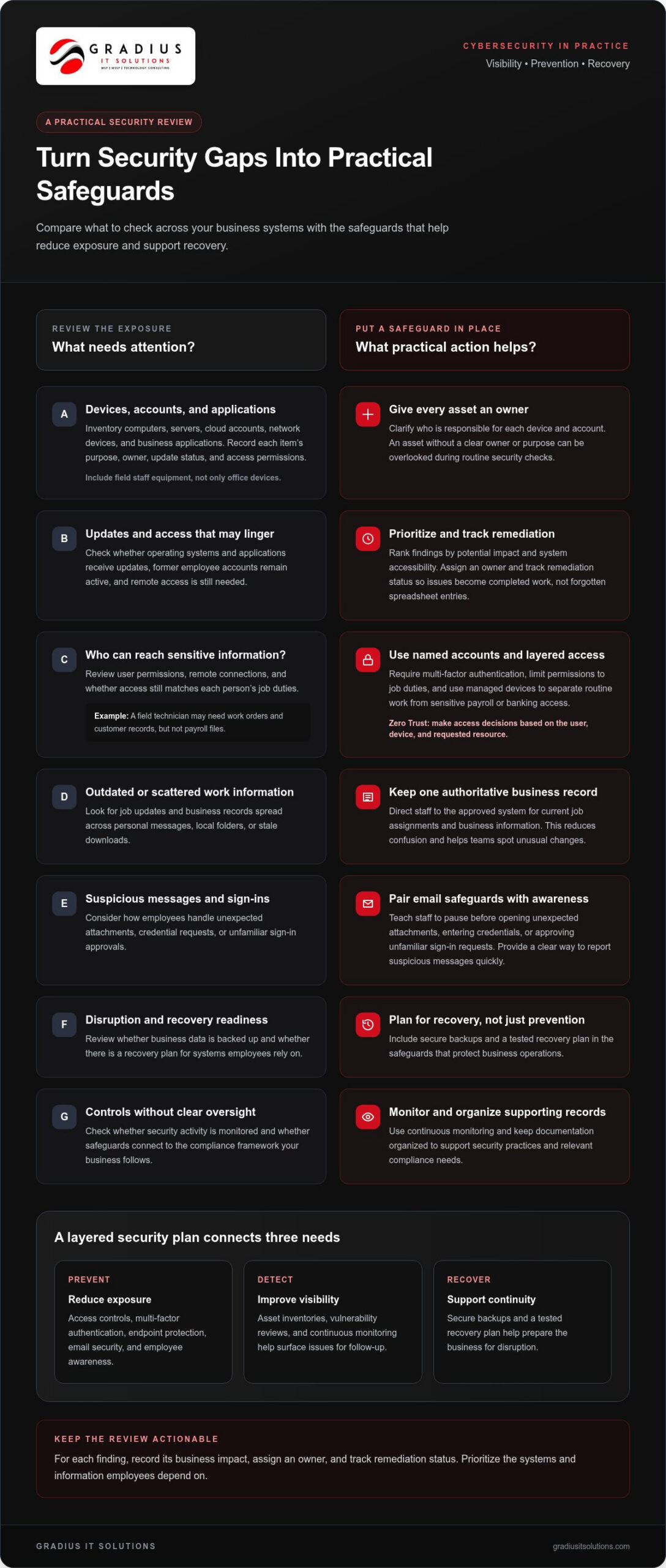
A useful security review starts with an inventory, not a software purchase. List every computer, server, cloud account, network device, and business application employees use. Record its business purpose, responsible owner, update status, and access permissions. Include equipment used by field staff across Lodi and Bergen County, not only devices inside the office. An asset without an owner or clear purpose can remain overlooked during routine security checks.
Next, look for weaknesses that could expose those assets. Check whether operating systems and applications receive updates, whether former employee accounts remain active, and whether remote access is still needed. Rank findings by potential impact and how accessible the affected system is. For example, an outdated laptop with access to shared files deserves attention before an isolated device with no business data. Track an owner and remediation status for each item so findings become completed work, not a forgotten spreadsheet.
Clear identity and device boundaries improve visibility. Give each worker a named account, require multi-factor authentication, and limit permissions to job duties. Use managed devices to separate routine access from sensitive payroll or banking access. A field technician may need work orders and customer records, but not payroll files. Zero Trust principles reinforce this approach: make access decisions based on the user, device, and requested resource rather than assuming every connection is safe.
Keep work information in an authoritative system. If a supervisor changes a job assignment, staff should use the approved business record, not an outdated copy in a personal message or local folder. This reduces confusion and helps teams spot unusual changes. Email security and employee awareness matter, too. Teach staff to pause before opening unexpected attachments, entering credentials, or approving unfamiliar sign-in requests, and provide a clear way to report suspicious messages quickly.
Managed cybersecurity services in Lodi, New Jersey can combine vulnerability reviews, endpoint protection, email safeguards, and continuous monitoring. Managed IT services can also coordinate updates and access changes, while a full help desk gives employees a clear place to report a locked account or suspicious computer behavior. For businesses seeking connected operational support, managed IT services for general business can bring device oversight and support into a practical plan.
Lodi residents can report suspected cybercrime to local law enforcement and notify the bank or service provider connected to affected accounts. Preserve relevant messages, transaction records, and account alerts, then change compromised passwords from a trusted device.
- Assign an owner and purpose to every business device and account.
- Prioritize vulnerabilities by data sensitivity, access, and operational impact.
- Separate work access from payroll or banking permissions.
- Keep job updates in one authoritative business record.
Cybersecurity services in Lodi, New Jersey
Cybersecurity services reduce risk by connecting prevention, detection, and recovery. Businesses can combine endpoint protection, email filtering, access controls, employee training, and continuous monitoring. Each layer addresses a different entry point. For example, filtering can flag a suspicious invoice, while multi-factor authentication can help block access after a password is exposed.
What cybersecurity companies and consultants serve growing businesses? Organizations can work with dedicated cybersecurity providers and consultants to secure their infrastructure. For network-level defense, technology providers like Lionic focus on advanced application visibility and web content filtering, while consultants help review security controls, monitor activity, and coordinate response when an incident affects business systems.
What cybersecurity services do modern businesses need most? Start with controls that protect everyday access and work: multi-factor authentication, endpoint protection, email security, employee awareness, secure backups, and a tested recovery plan. The right mix depends on the systems employees use and the data the business needs to protect.
What are the best-rated cybersecurity providers available today? Ratings vary across review platforms and over time, so a rating alone cannot show whether a provider fits your operational needs. Consider whether its services connect prevention, monitoring, incident response, and recovery.
Cybersecurity consulting turns broad concerns into prioritized actions. A consultant can review who has access to business information, how remote connections work, and whether security tasks have clear owners. The resulting plan should name each action, its business purpose, and the person responsible. For instance, a company with unmanaged laptops can prioritize device controls before expanding remote access.
Microsoft 365 and cloud services need practical safeguards, not just account setup. Review administrator permissions, sign-in protections, file-sharing settings, and retention practices. Limit access to sensitive folders by role, and remove permissions when responsibilities change. Cloud security also depends on knowing where the authoritative business records live, so staff don’t make decisions from stale downloads or personal copies.
Security planning should reflect how your staff work, whether in an office, warehouse, or customer location. A field employee may need schedules and job records on a managed phone, while finance staff need separate access to banking workflows. Define those roles, secure each device, and give employees a clear process for reporting suspicious activity or lost equipment.
- Map critical systems, data, and user access.
- Prioritize security controls around the business’s daily workflows.
- Assign owners to monitoring, updates, backups, and response tasks.
A proactive review can help translate those priorities into a working security plan. Explore cybersecurity services from Gradius IT Solutions that connect protection, monitoring, and response.
Ratings can change across platforms and over time. Weigh them alongside how well a provider’s services fit your operations and security needs.
Define those access boundaries in written procedures, and make sure staff know who approves changes and where to report problems. Ensuring secure access across remote work locations remains a critical consideration when staff operate from multiple sites.
Educational institutions continue to produce qualified talent entering the workforce with specialized degrees in cybersecurity and information technology, strengthening the talent pool available to organizations seeking dedicated security professionals.
Regulatory compliance and security certification
Compliance begins by identifying the information your business handles and the framework that applies. A healthcare organization, financial firm, and general business may face different expectations. Map systems that store sensitive records, assign an internal owner, and document how access is approved. Then compare current safeguards with the framework’s requirements. Organize evidence, such as access reviews, staff training records, and recovery procedures, with clear owners and dates.
A security risk and vulnerability assessment turns that comparison into action. Review network infrastructure, user permissions, software updates, Wi-Fi settings, backups, and monitoring coverage. Rank findings by the data involved, business impact, and ease of exploitation. For example, an exposed administrative account affecting customer records should take priority over a low-impact configuration issue. Record each finding, its remediation owner, and evidence that the fix is complete.
Where can I find cybersecurity training or certifications near Lodi, NJ? Felician University is located at 262 S. Main St. in Lodi, New Jersey 07644, and its cyber security program had three graduates in 2018. For workforce development, compare nearby educational programs with role-specific training, then match coursework to responsibilities such as security analysis, network administration, or incident response.
Information security analyst career opportunities were projected to grow 31% through 2029. That outlook underscores the value of practical skills, but a credential alone doesn’t secure an organization. Staff need to understand their environment, document decisions, and follow procedures. Businesses can use tabletop exercises to rehearse who isolates a device, preserves evidence, contacts leadership, and restores operations after a disruption.
What cybersecurity risks commonly affect businesses and residents in Lodi, NJ? Common risks include deceptive emails, stolen credentials, unpatched devices, exposed remote access, and insecure Wi-Fi. A compromised password can expose business email or personal accounts, while an unsegmented guest network can create unnecessary paths toward internal systems. Use separate guest and business networks, strong administrator authentication, current device updates, and monitoring for unusual access.
Wi-Fi security also depends on configuration and ownership. Change default administrative credentials, restrict management access, and remove obsolete accounts. Review connected devices when staff or equipment changes. For compliance, document who can approve network changes and how they are recorded. These controls create a useful trail for internal reviews, but a certificate is not a substitute for ongoing security work.
- Identify the framework relevant to your business activities.
- Track assessment findings, owners, and completed corrective actions.
- Separate guest Wi-Fi from systems holding business information.
- Pair training credentials with role-specific practice and documented procedures.
Fairleigh Dickinson University’s MS in Cyber Security and Information Assurance is a 30-credit degree program. An additional five New Jersey schools had National Security Agency and Department of Homeland Security-approved National Center of Academic Education programs but no graduates in 2018. Salem Community College’s on-campus AS in Criminal Justice Cyber Security program is 59 credits.
When considering education or financial support, compare program content with the skills needed for a specific role, and confirm eligibility and application requirements directly with the institution or scholarship provider. Practical exercises and clear documentation can help learners connect coursework to the security responsibilities they may take on.
Business cybersecurity
A practical security program ties safeguards to employees’ daily work. Name an owner for security decisions, then document who approves access, software changes, and vendor connections. For example, a payroll employee may need access to payroll records, while a maintenance contractor needs only the systems required for a specific task. Clear boundaries reduce unnecessary exposure without blocking routine work.
Train employees with realistic scenarios, not abstract warnings. Use a sample invoice email to show staff how to inspect the sender, question unexpected payment changes, and report suspicious messages. Provide a known reporting channel and explain what details to include, such as the sender, time received, and affected device. Managers should reinforce the process during onboarding and whenever work procedures change.
Apply layered controls to business accounts and devices. Require multi-factor authentication for remote access, protect endpoints, and use email safeguards to reduce exposure to malicious attachments. Zero Trust means granting access according to identity, device, and task rather than assuming a connection is safe. Review access after role changes, and remove temporary vendor permissions when the work ends.
Backups matter only if the business can restore usable data. Identify critical records, protect backup access separately from everyday accounts, and test recovery steps. A practical exercise could restore a working set of files after a simulated outage, then confirm employees can use the restored information. Pair the test with a disaster recovery plan that names decision-makers, communication steps, and essential business processes.
What cybersecurity resources are available to small businesses in New Jersey? The New Jersey Cybersecurity and Communications Integration Cell (NJCCIC) provides cybersecurity information and alerts, while businesses can also use employee training, internal security reviews, and incident response exercises. Assign someone to review relevant guidance and translate useful recommendations into specific workplace procedures.
Business partners and vendors also affect security. Before granting access, document the business reason, approved systems, responsible contact, and removal date. For example, a vendor supporting a payment system should not automatically receive access to shared files or employee accounts. Review those permissions when a contract or project changes. This makes third-party access easier to explain and control.
- Give each security responsibility a named owner and written process.
- Practice reporting, recovery, and decision-making with realistic scenarios.
- Review vendor permissions when work begins, changes, or ends.
- Connect every security control to a business task or information asset.
A partner can help an organization specialize its safeguards around its actual workflows, whether teams operate in Lodi, Hackensack, or elsewhere in New Jersey. Keep the plan actionable: assign owners, record decisions, test recovery, and update procedures when systems or responsibilities change.
Data protection consultation
A data protection consultation should produce decisions, owners, and practical next steps. Begin by mapping the information your organization creates, receives, and stores. Include customer records, employee files, invoices, contracts, and operational documents. For each category, record its business purpose, storage location, who needs access, and retention approach. This inventory gives leaders a clear view of what needs protection and why.
Then trace how information moves. A Bergen County business might receive customer details by email, enter them into a cloud application, and share reports with an outside accountant. Each transfer creates a question: who can access the data, where does it reside, and how is access removed when work ends? Map those steps before selecting controls. The goal is safeguards that match real workflows, not a policy employees can’t follow.
Use the consultation to turn findings into a prioritized plan. Separate immediate corrections from longer-term improvements, and assign an owner to each action. For example, restrict access to sensitive folders, remove accounts that no longer need access, and document who approves new permissions. Check that backup coverage includes the information employees need to restore essential work. A recovery test should confirm restored files are usable, not merely present.
Employee training should relate directly to the data people handle. Finance staff can practice verifying an unexpected payment change through an established channel. Managers can learn how to report a lost device and restrict access quickly. Office teams can review safe file-sharing steps for customer documents. Short, role-based exercises make protection procedures easier to apply during everyday work, especially when employees are busy or remote.
Technology consulting can also help leaders weigh security against business continuity. Consider a firm that wants to adopt a new cloud workflow. Before rollout, identify the information involved, set access rules, document recovery needs, and decide who reviews changes. For Microsoft 365, that could include reviewing file permissions and administrative roles. Record each decision so future updates don’t rely on memory or an individual employee’s inbox.
Keep the resulting plan usable. Review it when the business changes processes, adds a vendor, or moves information to a new system. Track unresolved actions and evidence of completed work in one controlled location. A consultation is most useful when leaders leave with a clear sequence, named responsibilities, and criteria for measuring progress. That creates a repeatable process rather than a one-time document.
- Build an inventory of information, systems, owners, and access needs.
- Map data movement before choosing or changing safeguards.
- Assign an owner and completion evidence to each priority.
- Use role-based training tied to actual employee tasks.
Schedule a data protection consultation
Gradius IT Solutions: Managed IT Services
Gradius IT Solutions helps businesses turn security priorities into coordinated technology practices. Its Managed IT Services and Cybersecurity & SOC support can help address system protection, threat monitoring, and day-to-day IT needs. Businesses can also use Cloud & Microsoft 365 services to support secure access to work tools and information.
For organizations working toward a security framework, Gradius provides Compliance as a Service to help keep technology aligned with the client’s framework and documentation audit-ready. This support is useful when a business needs clearer oversight of controls and evidence, while retaining responsibility for its own compliance decisions.
Consider support when vulnerabilities lack clear owners, security tasks are difficult to coordinate, or cloud access needs closer review. Contact Gradius IT Solutions to discuss a cybersecurity assessment for your business.
Make your next security decision actionable
A stronger security plan starts with a clear next move, not another disconnected tool. Choose one priority from your current security work, assign an owner, and define what completion looks like. That could mean reviewing access to sensitive files, documenting a recovery step, or planning employee training around suspicious messages. A defined action makes progress visible and easier to maintain.
Gradius IT Solutions connects this work with Managed IT Services, Cybersecurity & SOC, and Compliance as a Service. These services can help when security responsibilities are scattered, monitoring needs attention, or technology controls need alignment with your framework.
Build from the priorities that matter to your organization. Contact Gradius IT Solutions to discuss what to address first and how managed IT and cybersecurity support can fit your business.

Article by
Robert Joyce
Robert Joyce is the Owner and Chief Technology Officer of Gradius IT Solutions, a security-first provider of managed IT, cybersecurity, cloud, compliance, and secure AI solutions. Headquartered in New Jersey with satellite offices in the Midwest and South Florida, Gradius serves businesses across the Tri-State Area, Midwest, South Florida, and nationwide.
Robert brings 30 years of IT experience, including 23 years in hedge funds, global banks, and wealth management firms where uptime, security, and continuity are non-negotiable. He began in trade floor support at Caxton, Shell Trading, and Knight, provided senior trade floor support at RBC and SAC Capital, served as VP of IT at EntrustPermal, and was CTO of Gerstein Fisher. After September 11, he helped rebuild critical technology infrastructure for Merrill Lynch.
His expertise spans Microsoft 365, cloud, cybersecurity, networking, infrastructure, disaster recovery, compliance, and strategic IT leadership.
Robert founded Gradius to bring enterprise-level technology and security to small and midsized businesses at a predictable monthly cost. Gradius delivers managed and co-managed IT, cybersecurity, Microsoft 365 and cloud, compliance programs supported by a GRC platform, secure AI consulting, and vCIO services, with a full help desk, 24/7 NOC and SOC monitoring, and U.S.-based onsite engineers and SOC.
Robert works directly with business owners and executives as their single accountable point of contact. His philosophy: one trusted partner, complete IT accountability.
Disclaimer
## Disclaimer
The information provided in this article is for general informational and educational purposes only and should not be considered professional IT, cybersecurity, legal, regulatory, or compliance advice. While Gradius IT Solutions strives to provide accurate and up to date information, technology, security threats, and regulatory requirements change frequently, and we cannot guarantee that all information will remain current or applicable to your specific situation.
Every organization has unique technology, security, compliance, and business requirements. Before implementing any recommendations discussed in this article, you should evaluate their suitability for your environment or consult with a qualified technology professional.
Gradius IT Solutions makes no warranties, express or implied, regarding the completeness, accuracy, reliability, or results obtained from the use of this information. Any actions you take based on this content are at your own risk. Gradius IT Solutions shall not be liable for any direct, indirect, incidental, or consequential damages arising from the use of, or reliance upon, the information contained in this article.
References to third party products, services, or vendors are provided for informational purposes only and do not constitute an endorsement unless explicitly stated.
If you would like guidance tailored to your organization, contact Gradius IT Solutions to schedule a consultation with one of our technology experts.