

Disconnected systems can make it difficult to see who owns each part of your IT. All-in-one IT solutions for business bring infrastructure, cloud services, software, cybersecurity, and support into a coordinated operating model, with clear accountability across those functions.
It makes sense to want fewer gaps, less duplication, and technology that can keep pace as your business grows. The goal isn’t simply to put every tool under one roof. It’s to make systems work together, build security into daily operations, and ensure support understands how your environment fits together.
This article explains what an all-in-one IT approach can include, how to coordinate infrastructure, cloud, software, and cybersecurity, and what to consider when choosing a provider. You’ll also learn how ongoing planning and accountable support can help your technology adapt as your teams and needs change.
Key Takeaways
- Map how your infrastructure, cloud services, software, and security depend on one another before bundling support.
- As your business grows, review whether support can adapt to changing users, systems, and operational needs.
- Look for overlapping tools and disconnected workflows, then assess whether integration would simplify daily operations.
- Define ownership for support, security, and technology decisions so issues don’t get lost between teams or vendors.
- Compare an external provider with an in-house team based on the expertise, control, and coverage your business needs.
Scalable support for startups and enterprises
Support should fit the company’s current systems and adapt as teams, locations, and workloads change. For startups and enterprises, scalable service means a clear support process, defined ownership, and documented steps for adding employees or technology.
Technical Support and Troubleshooting
Technical support typically covers employee access, devices, connectivity, business applications, and network issues. A useful process records the affected user and system, symptoms, and business impact, then assigns an owner and tracks progress through resolution.
For example, if a new employee can’t access a shared document, support should check the account, permissions, device, and connection. Confirm that the process includes remote assistance, escalation for infrastructure issues, and clear updates when a specialist needs to act. That visibility helps prevent separate teams from repeating diagnostic steps.
Customer Support and Implementation
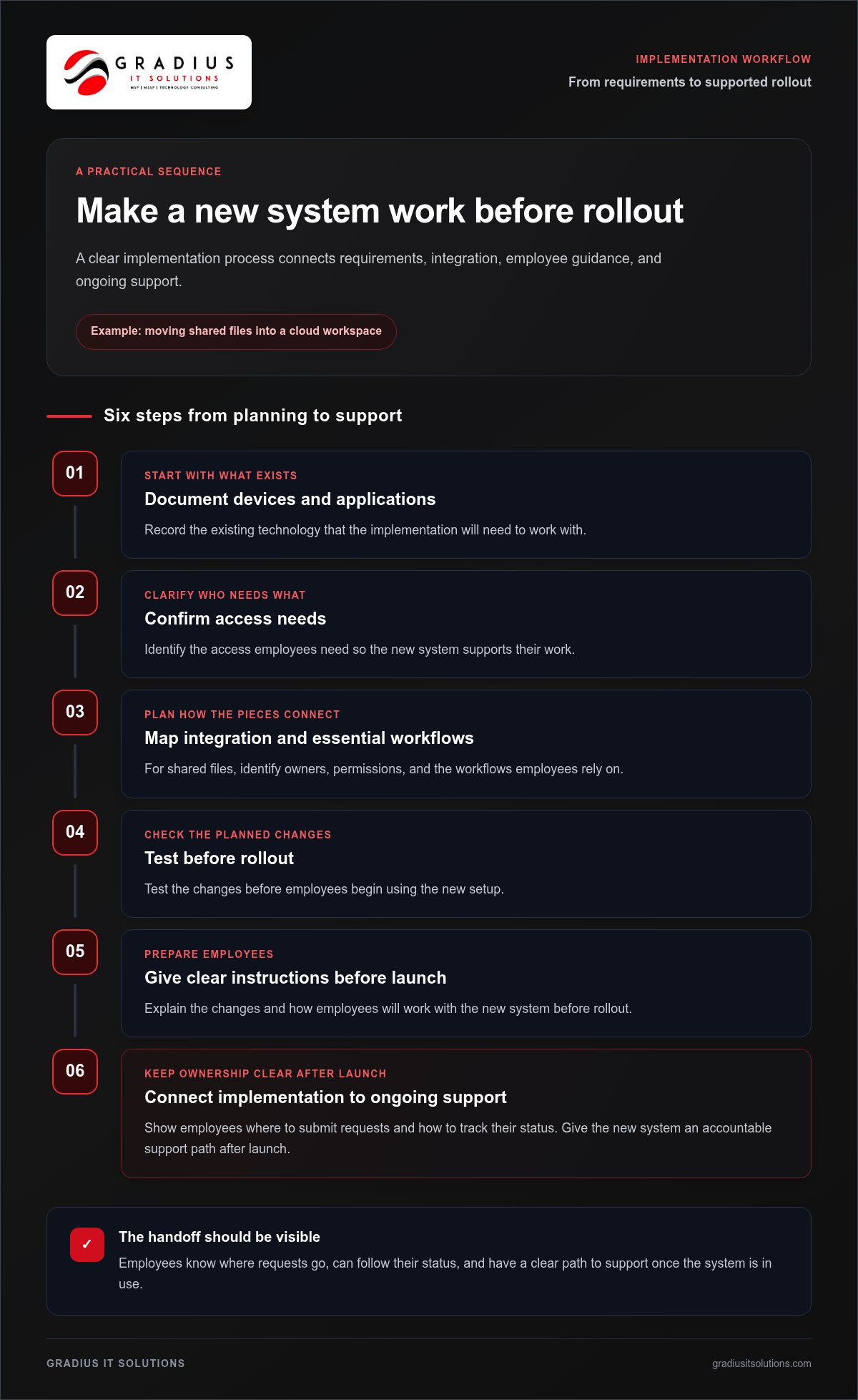
Implementation should turn agreed requirements into working systems, not leave employees to figure out changes on their own. A practical sequence is to document existing devices and applications, confirm access needs, plan integration, test changes, and give employees instructions before rollout.
For example, before moving shared files into a cloud workspace, identify owners, permissions, and essential workflows. Support should also explain where employees submit requests and how to track their status. Managed IT services can connect implementation tasks with ongoing support, giving new systems an accountable support path after launch.
Service Levels and Response Times
An IT service-level agreement should define response targets by issue priority, support hours, escalation steps, and communication expectations. It should distinguish the time to acknowledge a request from the time to resolve it, since a complex network fault may require more investigation than a password reset.
So, what response times should an IT provider guarantee? The agreement should set explicit targets for each priority and state when coverage applies. Compare those commitments with the impact an outage could have on employees, customers, and essential systems.
Ask how the provider classifies urgent incidents, who receives escalations, and how status updates are shared. For a general-business support model, review the scope described on the general-business managed IT services page.
To test scalability, map the support process against a specific change, such as opening an office or onboarding a department. Identify who approves access, prepares devices, handles integration, and updates the relevant documentation. Then review how requests move from the helpdesk to technical specialists. These steps show whether the model can support growth without leaving employees unsure where to turn.
Potential cost savings from bundled services
Bundling can reduce duplicated administration when related systems have clear ownership. Using one provider also concentrates risk, so protect access, documentation, and exit options with written agreements.
Challenges of Fragmented Providers
A fragmented setup can leave separate vendors responsible for networks, cloud services, software, and support. When an application fails, each may investigate its own area first. That can slow diagnosis and make responsibility harder to track. For example, a connectivity issue affecting a cloud application may involve both network and software support.
Start by listing each provider, system, renewal, and operational owner. Then identify overlapping tools and services. A business may manage 7-12 different tools, creating multiple interfaces, support processes, and records. A unified arrangement may improve clarity, but only if responsibilities and integrations are documented. Compare the work involved in maintaining separate relationships with the coordination needed under one agreement.
In-House Team Comparisons and Provider Risks
An in-house team offers direct organizational knowledge and internal oversight. A provider can supply broader support across defined functions, while your employees retain responsibility for business decisions and priorities. Compare the capabilities each model covers, including projects, daily requests, and specialized troubleshooting. The right fit depends on what your internal team needs to own.
What are the risks of using one provider for all business IT services? A service interruption, unclear contract terms, or difficult transition can concentrate operational risk. Reduce exposure by requiring current system documentation, clear access ownership, defined escalation paths, and usable data exports. Keep internal leaders involved in approvals and critical decisions.
Bundled services can also simplify professional IT projects. For a cloud migration, define the project scope, dependencies, testing responsibilities, employee communications, and handoff to ongoing support. Track those items in a project document so teams can see what work is included, who owns each task, and how project decisions affect productivity.
IT consolidation does not replace tax planning or CFO services. A tax professional evaluates tax matters, while a CFO guides financial planning and reporting. Keep those responsibilities distinct. You can still connect technology plans with finance priorities by sharing the proposed project timeline and operational goals with financial leaders before approval. This provides useful context without treating technology support as financial advice.
To assess potential savings, compare administrative effort, overlapping functions, and productivity impacts before and after consolidation. Include time spent coordinating providers, managing separate access processes, and resolving issues across service boundaries. Avoid judging a bundle by its service count alone. Review the scope, accountability, and transition terms, then consider whether managed IT services align with the support your organization needs.
IT infrastructure, cloud migration, software, and cybersecurity
Connected infrastructure, cloud platforms, business software, and security controls need a coordinated plan. To migrate with minimal downtime, inventory systems, sequence dependencies, test a pilot, and move workloads in stages with a rollback plan.
IT Infrastructure and Software
Start by inventorying networks, devices, cloud accounts, applications, and business owners. Record dependencies, such as payroll software relying on employee accounts and network access. This map helps teams plan integration, identify outdated connections, and avoid moving a critical application before its supporting services.
Next, classify applications by business impact and migration readiness. A collaboration platform may move separately from a database that supports order processing. Test access, permissions, file sharing, and key workflows with a small employee group before broad deployment. Document test results and assign an owner to unresolved issues.
Cybersecurity Services
Build security into each layer, including user identities, endpoints, email, networks, cloud services, and backups. Use multi-factor authentication for access, endpoint protection for company devices, and email security to reduce exposure to malicious messages. Continuous monitoring can help teams identify unusual activity and coordinate investigation.
Employee awareness matters, too. Train staff to report unexpected login prompts, suspicious attachments, and unusual requests involving payroll changes. A Zero Trust approach verifies access based on identity and context instead of assuming every user or device is safe. Backup and disaster recovery planning help teams prepare for data loss or service disruption.
During migration, avoid moving every system at once. First, confirm the inventory, access owners, integrations, and business-critical workflows. Then schedule a pilot, validate the results, and move related services in planned stages. For example, test a cloud file workspace with a small team before transferring shared department folders. Keep the previous environment available during the transition, and define who can approve a rollback if a core workflow fails.
Coordinate technical work with employees’ daily tasks. A payroll system change, for instance, needs tested access for authorized staff before the next payroll run. A collaboration platform migration needs working permissions, shared documents, and clear instructions. Automate repeatable setup tasks where practical, but test access before applying changes broadly.
Provider reviews should cover more than the migration checklist. The National Institute of Standards and Technology recommends assessing security controls, switching costs, supply-chain risk, performance, and stability. Translate those areas into practical questions: who controls administrator accounts, how are dependencies documented, and how can the business retrieve its data if services change?
Finally, track completion against business workflows, not just technical milestones. Confirm that employees can sign in, access required applications, share documents, and complete tasks such as submitting payroll information. Record remaining issues, owners, and escalation steps. This gives IT and business leaders a clear view of readiness before retiring the old environment.
Single-provider accountability
One accountable owner can connect support requests, system changes, and technology decisions. Accountability works when your organization can trace each issue from intake to resolution, with named owners and documented actions.
Small business owners may find it difficult to know what hired IT personnel are doing or whether to trust them, according to the U.S. Government Publishing Office. A shared record helps address that concern: employees can see who owns a request, what happens next, and when an escalation occurs. It also gives leaders a concrete basis for reviewing service.
Set governance processes before work begins. Define who approves access, planned changes, emergency actions, and exceptions. For example, a department manager might approve a new employee’s application access, while a designated technical owner implements the request and records the change. Clear boundaries keep business decisions with the organization and technical execution with assigned specialists.
- Request tracking: Record the issue, affected system, business impact, owner, status, and resolution.
- Change records: Document the requested change, approver, implementation steps, and any follow-up work.
- Escalation paths: Identify who handles a network outage, an access concern, or a recurring application fault.
- Decision rights: Name the people authorized to approve new accounts, permissions, and system changes.
- Review meetings: Use a regular operations review to examine open issues, recurring problems, and planned work.
These records make performance discussions specific. Rather than relying on a general impression, leaders can review ticket history, repeated disruptions, overdue decisions, and completed changes. Ask for plain-language summaries explaining the business impact, action taken, and any remaining risk. This keeps decision-makers informed without requiring them to interpret technical logs.
Accountability also depends on keeping access and documentation under business control. Maintain an internal record of administrator accounts, system owners, key dependencies, and recovery procedures. If the person who manages a shared business application is unavailable, for example, another authorized employee should know where its access details and operating instructions are maintained.
Ground the relationship in observable outcomes. Choose measures tied to actual operations, such as whether requests receive updates, changes have approval records, and recurring issues lead to corrective work. Review those measures alongside upcoming business changes, including new locations or software integrations. A single point of responsibility is useful only when ownership stays visible and the business retains informed oversight.
All-in-one IT providers vs. in-house IT teams
Build an IT operating plan around the work your organization needs done. Start with business processes, essential systems, and planned changes. Then identify the skills, decisions, and time each responsibility requires. This shifts the discussion from job titles to practical coverage, priorities, and results.
Map technology responsibilities across areas such as user access, cloud administration, cybersecurity, application support, and project delivery. For each area, identify the business owner, required expertise, and expected outcome. For example, a customer-facing application may need a business owner for its workflow and a technical lead for updates, access, and issue resolution.
Use this review to expose gaps and competing demands:
- Operational workload: Identify recurring requests and maintenance tasks that consume attention.
- Specialist work: Note projects that require focused skills, such as cloud migration or security configuration.
- Business priorities: Rank planned changes by their impact on employees and essential workflows.
- Knowledge needs: Record which systems require specialized business or technical context.
- Capacity planning: Review upcoming projects alongside ongoing support responsibilities.
Before adopting a new customer relationship system, for example, document which departments will use it, the data it needs, and the business decisions it supports. Identify who owns workflow design, access approvals, technical setup, employee instructions, and post-launch review. Clear assignments help prevent implementation tasks from disappearing between planning and daily operations.
Keep technical knowledge useful beyond individual projects. Maintain system diagrams, configuration records, operating procedures, and a current list of application owners. For each business application, document how employees access it, which systems connect to it, and where its data is stored. These references help teams investigate incidents and plan changes with less reliance on informal knowledge.
Review the plan whenever business priorities shift. A new location, acquisition, application, or security requirement can change which skills and responsibilities matter most. Use a quarterly planning meeting to compare the project backlog with ongoing operational needs, assign accountable owners, and record decisions. This helps leadership understand how technology work supports business goals and what needs attention next.
Keep the plan focused on outcomes: reliable workflows, secure access, effective use of technology, and clear ownership of decisions. Discuss your IT support model.
Gradius IT Solutions: Managed IT Services
Gradius IT Solutions can help when growing support demands or disconnected technology make ownership unclear. Its Managed IT Services coordinate ongoing IT support, while Cybersecurity & SOC provides security monitoring and protection.
Cloud & Microsoft 365 services support cloud environments and Microsoft 365 administration. For compliance-related technology needs, Gradius runs a GRC platform that keeps your technology aligned with your framework and documentation audit-ready.
Start by identifying the systems causing the most disruption and the decisions that need clearer ownership. Then discuss how support can fit your existing environment and business priorities.
Schedule a free IT assessment with Gradius IT Solutions through the contact page.
Build Your Next IT Plan With Confidence
Let your next technology decision start with the work your business needs to do. Identify a priority, such as strengthening security, improving cloud access, or clarifying ownership of ongoing support. Then connect that need to a practical plan, with clear responsibilities and technology that can adapt as operations change. That’s how all-in-one IT solutions for your business become a foundation for informed decisions, not just a collection of bundled services.
Gradius IT Solutions offers Managed IT Services, Cybersecurity & SOC, and Compliance as a Service. These services can help organizations coordinate IT operations, security, and technology with their compliance needs. A conversation can help you identify your priorities and a practical next step.
Take the next step with a clear view of your priorities. A more connected IT plan can give your team room to focus on what’s ahead.
Frequently Asked Questions
How to find all these functions and bring them together?
Start with a process that crosses departments, such as onboarding a new employee. Trace each handoff, from approval and account creation to application access and equipment setup. Note where information is entered twice or ownership becomes unclear. This workflow map gives decision-makers a practical starting point for coordinating technology around an actual business task.
What Are All-in-One Business Solutions?
All-in-one business solutions coordinate services or tools that support related operations. The phrase can refer to a software platform, connected applications, or an IT service model. For example, a business may use separate payroll and collaboration applications while coordinating their access, security, and support processes. Clarify which meaning applies before comparing approaches.
What Makes a Great All-in-One Platform?
A capable platform supports the tasks employees need to complete without adding unnecessary steps. Assess whether its workflows fit existing operations, whether information can move between required applications, and whether administrators can control user permissions. For example, test how a manager approves a request and how that decision appears in the relevant workflow. A realistic trial can expose gaps before broader use.
Why Choose All In One IT Solution?
A coordinated model can simplify how teams handle related technology responsibilities. It can help when employees face inconsistent processes across systems or aren’t sure where to direct an issue. Define the business outcome first, such as smoother employee onboarding or more consistent application access. Then shape the service model around that outcome, with clear ownership of internal decisions.
What services are included in all-in-one IT solutions for businesses?
Common service areas include helpdesk support, network administration, cloud services, cybersecurity, and technology planning. Some arrangements also address business communications or documentation aligned with an organization’s framework. The right scope depends on business needs. For example, a company expanding its cloud use may need application administration and employee access support alongside network operations.
What types of businesses benefit most from all-in-one IT services?
Organizations that rely on several connected applications may benefit from coordinated IT functions. A professional-services firm, for example, might depend on shared document access, secure client communications, and reliable employee accounts. Businesses with distributed teams can also benefit from consistent processes across locations. The key indicator is operational complexity: disconnected responsibilities can make everyday work harder to coordinate.
How much do all-in-one managed IT services cost per user or device?
This article focuses on service scope and operating models, not billing. For planning, identify the users, devices, applications, and business processes that need support. Also note which responsibilities your organization will retain internally. A precise scope clarifies what the service needs to address and provides a useful basis for discussing an appropriate arrangement.
What should businesses look for when choosing an all-in-one IT provider?
Choosing a provider calls for a focused review of your organization’s requirements and responsibilities. Consider the systems your teams depend on, the support processes that need coordination, and the business decisions that must remain internal. Keep the review grounded in actual operating needs rather than generic feature lists. A defined scope makes the discussion specific and relevant.

Article by
Robert Joyce
Robert Joyce is the Owner and Chief Technology Officer of Gradius IT Solutions, a security-first provider of managed IT, cybersecurity, cloud, compliance, and secure AI solutions. Headquartered in New Jersey with satellite offices in the Midwest and South Florida, Gradius serves businesses across the Tri-State Area, Midwest, South Florida, and nationwide.
Robert brings 30 years of IT experience, including 23 years in hedge funds, global banks, and wealth management firms where uptime, security, and continuity are non-negotiable. He began in trade floor support at Caxton, Shell Trading, and Knight, provided senior trade floor support at RBC and SAC Capital, served as VP of IT at EntrustPermal, and was CTO of Gerstein Fisher. After September 11, he helped rebuild critical technology infrastructure for Merrill Lynch.
His expertise spans Microsoft 365, cloud, cybersecurity, networking, infrastructure, disaster recovery, compliance, and strategic IT leadership.
Robert founded Gradius to bring enterprise-level technology and security to small and midsized businesses at a predictable monthly cost. Gradius delivers managed and co-managed IT, cybersecurity, Microsoft 365 and cloud, compliance programs supported by a GRC platform, secure AI consulting, and vCIO services, with a full help desk, 24/7 NOC and SOC monitoring, and U.S.-based onsite engineers and SOC.
Robert works directly with business owners and executives as their single accountable point of contact. His philosophy: one trusted partner, complete IT accountability.
Disclaimer
## Disclaimer
The information provided in this article is for general informational and educational purposes only and should not be considered professional IT, cybersecurity, legal, regulatory, or compliance advice. While Gradius IT Solutions strives to provide accurate and up to date information, technology, security threats, and regulatory requirements change frequently, and we cannot guarantee that all information will remain current or applicable to your specific situation.
Every organization has unique technology, security, compliance, and business requirements. Before implementing any recommendations discussed in this article, you should evaluate their suitability for your environment or consult with a qualified technology professional.
Gradius IT Solutions makes no warranties, express or implied, regarding the completeness, accuracy, reliability, or results obtained from the use of this information. Any actions you take based on this content are at your own risk. Gradius IT Solutions shall not be liable for any direct, indirect, incidental, or consequential damages arising from the use of, or reliance upon, the information contained in this article.
References to third party products, services, or vendors are provided for informational purposes only and do not constitute an endorsement unless explicitly stated.
If you would like guidance tailored to your organization, contact Gradius IT Solutions to schedule a consultation with one of our technology experts.