

The smartest automation project may use less AI, not more. AI process automation can interpret information and handle work that calls for judgment, while traditional automation is better suited to repeatable tasks governed by fixed rules. Business process automation consulting helps identify the right approach for each workflow and connect its steps, approvals, and data.
It makes sense to want repetitive work handled faster, but automating a process before understanding it can preserve unnecessary steps or errors. A sound assessment examines how work actually moves through the business, where delays or handoff problems occur, and which decisions need human review.
This article explains what AI process automation does, when a consultant can help, and how AI agents compare with traditional automation. It also covers how to assess workflow suitability, measure value, and plan for governance, security, and compliance before expanding automation across a business.
Key Takeaways
- Match the automation method to the task: use fixed rules for repeatable steps and AI where information needs interpretation.
- Assess how work actually flows before automating it, including handoffs, unnecessary steps, data quality, and the impact of errors.
- Start with a focused workflow pilot, then use completion time, exceptions, and staff feedback to guide improvements.
- Build governance into the workflow with appropriate access controls, monitoring, and clear ownership for changes.
- Use a consultant when processes span systems or teams, require specialized skills, or carry meaningful operational or compliance risks.
What is AI process automation?
AI process automation combines software workflows with AI to handle tasks that involve interpreting information, such as sorting incoming requests. Traditional automation follows fixed rules, while workflow automation coordinates actions, approvals, and data across people and systems.
Start with the process, not the tool. Map the steps, identify where judgment is needed, and decide how to measure success before implementation.
Automation Strategy and Implementation
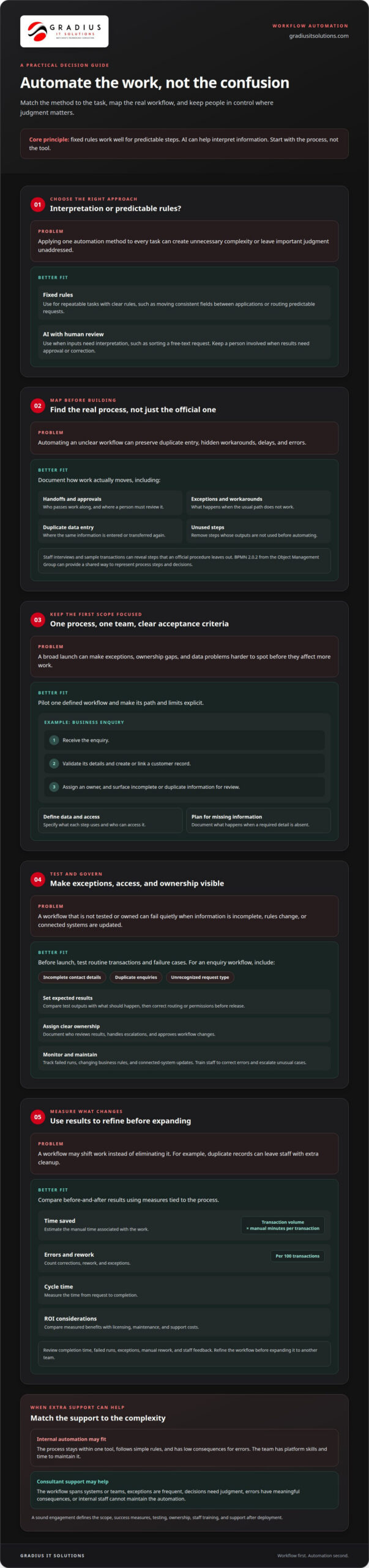
A practical strategy ranks processes by transaction volume, rule clarity, data structure, complexity, and the consequences of errors. For example, moving consistent fields between applications may suit rule-based automation, while interpreting a free-text request may require AI and human review.
Next, define a focused engagement: one process, one team, and clear acceptance criteria. A pilot might receive a business enquiry, validate its details, create or link a customer record, and assign an owner. This scope makes exceptions visible before expansion.
Workflow Mapping and Design
Map how work happens in practice, including handoffs, approvals, exceptions, and duplicate data entry. An official procedure may omit a manual workaround that staff rely on, so interviews and sample transactions can reveal the real sequence.
Design the future workflow before automating it. Remove steps whose outputs are unused, identify where a person must approve or correct a result, and document the new path. The Object Management Group’s BPMN 2.0.2 can provide a shared way to represent process steps and decisions.
Implementation Scope and Tool Selection
Choose tools based on the workflow’s needs. Integrations move data between connected systems; robotic process automation (RPA) can mimic user actions when an application lacks an API. AI is useful when inputs need interpretation, while predictable tasks generally call for explicit rules.
Keep the initial scope to a defined process and its necessary systems. Specify the data each step uses, who can access it, and what happens when information is missing. Automation also depends on reliable access to core systems, so managed IT services for general business can address the broader technology environment supporting workflows.
Automation Lifecycle and ROI Measurement
Implementation typically moves from discovery and process mapping to design, configuration, testing, pilot launch, and refinement. Before launch, test routine transactions and exceptions, such as incomplete records or duplicate requests. Document ownership, escalation paths, and changes so staff understand how the workflow behaves.
After launch, monitor completion time, failed runs, exceptions, and manual rework. Estimate time saved by multiplying transaction volume by the manual minutes required per transaction, then compare the result before and after automation. Track errors by counting corrections, rework, and exceptions per hundred transactions. Measure cycle time from request to completion. To assess ROI, compare these benefits with licensing, maintenance, and support costs. Use the results to refine the workflow before expanding it to another team.
When should a business hire an automation consultant?
Hire a consultant when repetitive manual work crosses teams, depends on judgment, or leads to costly errors. Choose a firm that maps the real process, defines testing and ownership, and explains how it will support the workflow after deployment. Ask for a clear scope, documented success measures, and staff training.
Internal automation can work when a process stays within one tool, follows simple rules, and carries low consequences for errors. A team with platform skills and time to spare may automate a routine report or move approved data between forms. Partner support becomes valuable when workflows span systems, exceptions are frequent, or internal staff cannot maintain the automation.
Use cases vary by department. In sales, automation can route incoming enquiries, update customer records, and flag missing details for review. In HR, it can coordinate onboarding tasks, send forms, and notify the right person when information is incomplete. Reporting workflows can gather recurring inputs and prepare a consistent draft, while customer support can classify requests and direct them to the right queue. AI is most useful when content needs interpretation; fixed rules suit predictable routing and updates.
A consultant should assess whether automation will eliminate work or merely shift it. For example, an enquiry workflow that creates duplicate records still leaves staff with cleanup. The engagement should identify exception paths, human approval points, and the person responsible for each handoff. Training should show employees how to review outputs, correct errors, and escalate unusual cases. This turns automation into a supported business process, not an isolated software launch.
Test routine cases and potential failures before deployment. A sales workflow, for example, can be tested with incomplete contact details, duplicate enquiries, and an unrecognized request type. The consultant can document expected results, compare them with actual outputs, and correct routing or permissions before release. After launch, support should track failed runs, changing business rules, and connected-system updates. Maintenance keeps the workflow useful as forms, responsibilities, and processes evolve.
For workflows that span business systems or need sustained technical planning, technology planning support can help align implementation and ongoing operations. The decision should account for staff capacity, process complexity, data access, and the consequences of an automation failure.
Automation governance and compliance
Automation can expose sensitive data, repeat inaccurate decisions, or make responsibility unclear. Common challenges include excessive access, weak records, unreviewed changes, and workflows that preserve existing errors.
Governance and Change Management
Governance assigns an owner to each automated process, defines approval steps, and sets performance checks. For a finance workflow, the owner might review exceptions while finance staff approve sensitive transactions. Document who can change rules, who approves releases, and how teams report problems.
Change management keeps software aligned with current procedures and compliance needs. Before changing a workflow, record its purpose, affected systems, data inputs, and expected results. Test the revised process and update its documentation. This gives staff and reviewers a clear record of what changed and why.
Governance should also cover performance monitoring, process optimization, control standards, risk mitigation, and continuous improvement. Assign responsibility for reviewing failures and deciding whether a rule needs adjustment. A documented review process helps prevent small workflow changes from bypassing approval or creating untracked effects.
Consider a process that routes supplier invoices. Changing approval thresholds can affect finance, purchasing, and recordkeeping. The change process should identify affected teams, validate the updated routing, and preserve evidence of approval. Clear ownership makes accountability part of the workflow, not an afterthought.
Automation Risks and Common Challenges
Automating a flawed process can make its problems happen faster or more consistently. The U.S. Environmental Protection Agency notes that automating before streamlining can lock in or worsen errors and inefficiency. Process analysis should therefore identify unnecessary steps and unresolved exceptions before software is configured.
Access is another risk. Give an automation only the permissions it needs for its assigned process, and limit the data it can use. For example, an invoice workflow may need supplier and payment details, but not unrelated employee records. Manage credentials securely and review access when responsibilities change.
AI introduces additional control questions because its outputs may require interpretation. Define which decisions need human review, what information the system may use, and how staff should handle uncertain results. In customer or finance workflows, retain a clear path for correcting errors and escalating unusual cases.
Test normal transactions, missing information, duplicates, and denied access. Record expected outcomes, compare test results, and document how failures are handled. Continuous monitoring can reveal unusual activity or repeated exceptions after release. These controls help teams respond before an issue spreads across connected systems.
Business process automation consulting and assessment
An assessment turns an automation idea into a decision-ready project brief. It should clarify the business objective, affected teams, decision owners, system dependencies, and how the organization will judge whether it is ready to proceed.
There is no single standard fee for business process automation consulting in the United States. Scope depends on deliverables, stakeholder involvement, technical dependencies, testing expectations, and the support requested. A proposal should explain these elements so decision-makers understand what the engagement includes.
Discovery should gather evidence from the people who perform and oversee the work. A consultant can compare staff accounts with available records, such as approval logs, forms, and exception notes. If the sources conflict, that gap becomes a finding to resolve before committing to implementation.
An assessment should also establish decision rights. For example, a department manager may own the business outcome, while a system administrator controls access and a risk lead reviews sensitive data use. Naming these roles early prevents unresolved approvals from delaying design or leaving important decisions without an accountable owner.
Record technical dependencies clearly. An assessment can identify which applications hold required information, who controls each connection, and whether a planned change affects other teams. A customer intake workflow, for example, may rely on a shared mailbox, a customer database, and an approval queue managed by different owners.
Define exclusions as well as the proposed scope. If an initial engagement covers intake and routing but excludes customer decisions, state that boundary in the project brief. Clear exclusions prevent teams from assuming automation will make judgments or handle work outside the agreed process.
Readiness involves people and operations, not just software. The assessment should identify who will own the workflow after launch, how staff will report unexpected behavior, and what internal support is available. If a department has no designated owner, settle that responsibility before implementation begins.
The final deliverable should help leaders make a grounded decision. It can document the business objective, findings, dependencies, responsibilities, scope boundaries, open questions, and proposed acceptance measures. This gives stakeholders a shared basis for approving, revising, or deferring the project.
A thorough assessment reduces ambiguity before work begins. Its practical outcome is a clear project decision, with ownership and constraints visible to the people responsible for delivery.
What problems can business process automation consultants solve?
Consultants can help when teams know performance is uneven but cannot pinpoint the cause. They examine how results vary across locations, departments, or customer channels, then identify where process design or disconnected information creates inconsistent outcomes. The goal is a specific operational diagnosis, not automation for its own sake.
Different teams may define success differently. Sales might prioritize response speed, while operations focuses on complete records and finance needs accurate reporting. A consultant can help stakeholders agree on shared outcomes and identify tradeoffs. That alignment gives future workflow changes a common purpose and helps prevent one department’s improvement from creating new work elsewhere.
Reports may also fail to show what is happening across a process. One team might count a request when it arrives, while another measures only completed work. A consultant can examine how those measures are produced and where records become difficult to compare. Clear definitions make operational reviews more useful and help leaders distinguish a real change from a reporting difference.
Some workflows depend heavily on knowledge held by one experienced employee. This creates a continuity concern when responsibilities shift or staff are unavailable. A consultant can identify decisions that rely on individual judgment, document relevant business rules, and distinguish routine work from decisions that should remain with qualified staff.
Technology constraints can limit a proposed improvement even when the business process is clear. For example, a system may restrict which records can be exported or how updates are shared. A consultant can identify these constraints early, explain their operational effect, and help stakeholders decide whether to adjust the process or change the project scope.
Unclear outcomes can also make an automation project difficult to evaluate. A team may expect faster service, fewer corrections, and better reporting without agreeing on which result matters most. Consultants can help define the primary business outcome and connect it to observable operational evidence. This makes project decisions more grounded and less vulnerable to competing expectations.
Organizations seeking guidance on business process automation can learn more about secure AI and automation services.
The practical value is a clearer explanation of what is holding performance back and which changes address the cause. Consultants help turn scattered symptoms into decisions stakeholders can act on, making implications and tradeoffs visible before implementation begins.
Gradius IT Solutions: Secure AI & Automation Services
Gradius IT Solutions helps businesses assess and implement secure automation for their workflows. Its Secure AI & Automation Services connect automation decisions with practical needs, including data access, process ownership, and ongoing support.
Turn to Gradius when a workflow spans systems, involves sensitive information, or requires clear oversight across teams. IT Consulting & vCIO Strategy can support technology planning for implementation, while Managed IT Services can help maintain the wider environment workflows depend on. For voice-related processes, VoIP & Communications may also be relevant.
Start with the process causing the most friction, then discuss its steps, systems, exceptions, and desired outcome. Explore secure AI and automation services as part of that planning.
Contact Gradius IT Solutions to discuss your automation needs.
Turn automation planning into a focused next step
Choose a workflow that matters to your team, then connect the improvement to clear ownership, secure access, and a defined business outcome. Thoughtful business process automation consulting can turn that priority into an implementation plan suited to your systems and operational needs.
Gradius IT Solutions brings together Secure AI & Automation Services with relevant support across Managed IT Services, Cybersecurity & SOC, and Compliance as a Service. That broader view helps connect automation decisions with the technology environment and governance needs around them.
Start with the challenge you want to address and the result your team needs. A focused conversation can help clarify the right next step.
Move forward with a workflow that works for your people and your business.
Frequently Asked Questions
How long does it take to see results?
Useful results begin with an agreed definition of “result.” An early sign might be fewer status inquiries from employees, while a broader operational benefit may depend on stable adoption across the team. Seasonal demand, staff training, and approval cycles can affect when changes become visible. Separate early indicators from longer-term outcomes so leaders can tell whether the workflow is being used as intended.
What is the difference between RPA and workflow automation?
RPA recreates user actions within software interfaces, while workflow automation organizes how work progresses between tasks and participants. Think of RPA as operating an application and workflow automation as coordinating the process around it. A process may use RPA for a legacy screen interaction, with workflow rules managing notifications and approvals. The key distinction is the layer being automated, not whether both can be part of one solution.
What should an automation consulting proposal include?
Beyond describing the work, a proposal should clarify who owns the resulting workflow and its configuration. It should explain how requested changes are handled, what documentation and knowledge transfer are delivered, and how acceptance is recorded. These details matter when internal staff will maintain the process or another team will inherit it. A proposal that covers operational handover helps avoid dependence on undocumented decisions after launch.
What does an automation consulting engagement include?
An engagement can include organizational readiness work, such as identifying staff training needs, communications, and affected job responsibilities. It may also examine whether teams have clear ownership for reviewing automated outputs. For example, a department introducing automated document classification may need guidance on correcting misclassified files. Consider how employees will interact with the new process, not just how the technology will be configured.
How do consultants price automation projects: hourly, fixed-fee, or retainer?
Hourly, fixed-fee, and retainer models allocate uncertainty differently. For hourly work, clarify how time is reported and approved. For a fixed fee, identify how scope changes affect the agreement. For a retainer, define the included support, response process, and rules for unused capacity. Compare these terms alongside deliverables and ownership rather than assuming one billing model automatically offers better value.
Business process automation consulting vs. RPA consulting: what is the difference?
RPA consulting centers on software robots that perform interface-based actions. Broader automation consulting can assess whether those actions fit the organization’s operating model, recordkeeping practices, and future plans. This distinction matters when a proposed robot depends on a screen or process likely to change. A broader view considers maintainability and operational ownership, while RPA expertise focuses on implementing and supporting the robotic task.
What are the steps in an automation engagement?
Organizations can structure an engagement around decision gates: approve the problem definition, authorize the design, accept test results, and confirm operational handover. At each gate, a named business owner can resolve open decisions before the next phase proceeds. This approach is useful when finance, operations, and technology teams share responsibility. It makes accountability visible without requiring every stakeholder to manage technical implementation.
Which business processes are best candidates for automation?
Processes are stronger candidates when their inputs come from dependable sources and staff can explain what a correct outcome looks like. Consider recurring work with consistent records, such as preparing a standard internal status pack from approved data. Unclear source information can produce polished but unreliable output. Assess data ownership and accuracy alongside operational value before selecting a workflow for automation.

Article by
Robert Joyce
Robert Joyce is the Owner and Chief Technology Officer of Gradius IT Solutions, a security-first provider of managed IT, cybersecurity, cloud, compliance, and secure AI solutions. Headquartered in New Jersey with satellite offices in the Midwest and South Florida, Gradius serves businesses across the Tri-State Area, Midwest, South Florida, and nationwide.
Robert brings 30 years of IT experience, including 23 years in hedge funds, global banks, and wealth management firms where uptime, security, and continuity are non-negotiable. He began in trade floor support at Caxton, Shell Trading, and Knight, provided senior trade floor support at RBC and SAC Capital, served as VP of IT at EntrustPermal, and was CTO of Gerstein Fisher. After September 11, he helped rebuild critical technology infrastructure for Merrill Lynch.
His expertise spans Microsoft 365, cloud, cybersecurity, networking, infrastructure, disaster recovery, compliance, and strategic IT leadership.
Robert founded Gradius to bring enterprise-level technology and security to small and midsized businesses at a predictable monthly cost. Gradius delivers managed and co-managed IT, cybersecurity, Microsoft 365 and cloud, compliance programs supported by a GRC platform, secure AI consulting, and vCIO services, with a full help desk, 24/7 NOC and SOC monitoring, and U.S.-based onsite engineers and SOC.
Robert works directly with business owners and executives as their single accountable point of contact. His philosophy: one trusted partner, complete IT accountability.
Disclaimer
## Disclaimer
The information provided in this article is for general informational and educational purposes only and should not be considered professional IT, cybersecurity, legal, regulatory, or compliance advice. While Gradius IT Solutions strives to provide accurate and up to date information, technology, security threats, and regulatory requirements change frequently, and we cannot guarantee that all information will remain current or applicable to your specific situation.
Every organization has unique technology, security, compliance, and business requirements. Before implementing any recommendations discussed in this article, you should evaluate their suitability for your environment or consult with a qualified technology professional.
Gradius IT Solutions makes no warranties, express or implied, regarding the completeness, accuracy, reliability, or results obtained from the use of this information. Any actions you take based on this content are at your own risk. Gradius IT Solutions shall not be liable for any direct, indirect, incidental, or consequential damages arising from the use of, or reliance upon, the information contained in this article.
References to third party products, services, or vendors are provided for informational purposes only and do not constitute an endorsement unless explicitly stated.
If you would like guidance tailored to your organization, contact Gradius IT Solutions to schedule a consultation with one of our technology experts.