IT support should clear obstacles, not create another queue for your team. Effective B2B IT support solutions connect responsive, account-focused help with the technical expertise, automation, and integration work that keeps business systems moving.
It’s reasonable to expect more than a fix for the issue in front of you. Support should also help teams reduce repeat problems, protect business operations, and make technology easier to use across departments.
This article explains what to look for: consistent support that understands your environment, expertise matched to complex IT needs, AI-assisted automation for routine work, and integration consulting that helps systems work together. You’ll also see how these pieces fit into practical support for cybersecurity, cloud services, Microsoft 365, and business continuity. The goal is a clear view of how a coordinated approach can give your team more time to focus on its work, with fewer technology issues getting in the way.
Key Takeaways
- Consistent, account-focused support helps keep business needs and responsibilities visible across teams.
- Match technical expertise and project delivery to your environment, security priorities, and business goals.
- Use AI-assisted automation for routine support tasks while keeping people involved in complex or sensitive issues.
- Plan system integrations around how information and workflows need to move between business applications.
- Align support services with your operational needs, from managed IT and cybersecurity to cloud, Microsoft 365, and compliance support.
Account-centric support and multi-stakeholder visibility
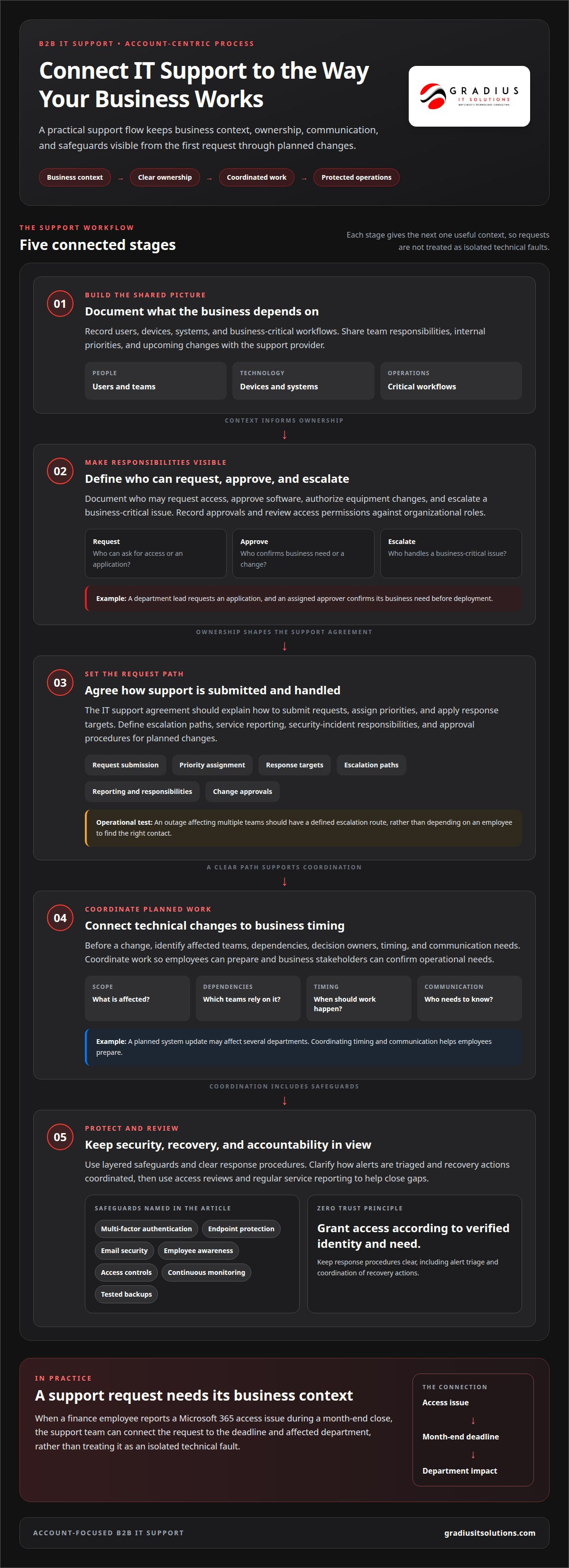
Account-centric support gives business teams a consistent contact who understands their systems, priorities, and operating context. For example, if a finance employee reports a Microsoft 365 access issue during a month-end close, the support team can connect the request to the deadline and affected department. That context helps shape the response, rather than treating every ticket as an isolated technical fault.
A dedicated account manager coordinates recurring needs, open issues, and planned changes across your organization. They can track who owns each decision, which teams depend on a system, and whether an approval is pending. A shared view of requests helps operations and leadership see progress without relying on scattered email threads or informal updates.
Account permissions and purchasing approvals should reflect your organization’s roles. A provider can document who may request access, approve software, authorize equipment changes, or escalate a business-critical issue. For example, a department lead might request an application, while an assigned approver confirms its business need before deployment. Role-based access and recorded approvals reduce confusion and unnecessary privileges.
Account-centric IT support connects technical work with business priorities. Teams can share information about critical workflows, internal responsibilities, and upcoming changes with their support provider. For example, a planned system update may affect several departments, so coordinating timing and communication helps employees prepare. Clear ownership and regular communication also help ensure that technical decisions reflect operational needs.
To organize IT support effectively, document the users, devices, systems, and business-critical workflows that need attention. Clarify which teams handle requests, security concerns, and planned changes, and identify the people authorized to approve access or equipment updates. Reviewing these details with your provider helps establish shared expectations and keeps support aligned with business needs as they change.
An IT support agreement should explain how to submit requests, assign priorities, and apply response targets. It should also set out escalation paths, service reporting, responsibilities for security incidents, and approval procedures for planned changes. For example, an outage affecting multiple teams should have a defined escalation route, rather than relying on an employee to find the right contact.
Providers can reduce cyber risk with layered safeguards and clear response procedures, including multi-factor authentication, endpoint protection, email security, employee awareness, access controls, continuous monitoring, and tested backups. A Zero Trust approach grants access according to verified identity and need. Ask how alerts are triaged and recovery actions coordinated.
Outsourcing can create risks when responsibilities, access permissions, or communication paths are unclear. A provider may lack context about a critical workflow, or teams may not know who approves an urgent change. A named account contact, documented ownership, access reviews, and regular service reporting help close these gaps while keeping internal decision-makers involved.
During migration, a provider typically documents users, devices, software, access, and critical workflows. The teams then agree on responsibilities, escalation routes, and transition priorities. The provider organizes onboarding and support processes, while business owners confirm approvals and operational needs. A staged handover preserves context and gives employees a clear way to report issues.
Small and midsize U.S. businesses can organize support around their internal capacity and priorities. For example, a business with an internal administrator may coordinate that person’s work with specialist security and network monitoring, while a leaner organization may need broader day-to-day coverage. Documenting who handles each responsibility helps teams coordinate support and keep business-critical systems in view.
Professional expertise, certifications, and project delivery
Technical expertise matters when it turns a business requirement into a working, supportable system. A cloud project, for example, can affect identity, data access, employee workflows, and recovery planning. A project lead should explain how design choices affect each area and identify decisions that need business approval. That connection helps stakeholders understand operational consequences before work begins.
Certifications can offer useful context about security practices, but they don’t tell the whole story. SOC 2 Type II and ISO 27001 are examples buyers may encounter when reviewing a provider’s security credentials. Check what organization or service the certification covers and how it relates to the work being considered. Then look for clear explanations of project ownership, data handling, incident communication, and ongoing support responsibilities.
Purchasing friction often comes from unclear scope or decisions that reach stakeholders too late. A project proposal should translate technical work into an understandable sequence. For a Microsoft 365 migration, for instance, it can identify affected departments, data dependencies, access changes, testing responsibilities, and communication milestones. Finance may approve a workflow change, while operations confirms that essential systems remain available to staff.
Before delivery begins, create a shared record of scope, owners, dependencies, and acceptance criteria. For a network upgrade, it might identify affected locations, planned work windows, rollback steps, and the person authorized to approve a change. During delivery, status updates should flag decisions needed from business stakeholders. At handoff, administrators need current system records and clear ownership for ongoing maintenance.
- Expertise: Match the project team’s technical skills to the systems and risks involved.
- Scope: Document responsibilities, dependencies, approvals, and completion criteria.
- Communication: Set direct routes for questions, decisions, and escalations.
- Handoff: Record configuration changes, support ownership, and relevant system documentation.
Environmental, health, and safety (EHS) projects need input from people who understand workplace requirements. EHS specialists define what a platform needs to support, such as training records or incident reporting. Technology professionals can translate those needs into system access, integrations, and reliable workflows. This division grounds technical decisions in operational expertise without confusing system implementation with EHS consulting.
A strong delivery approach makes ownership clear from planning through handoff. Stakeholders know which decisions they must make, technical teams understand the required outcomes, and project records preserve important context. This clarity helps organizations move from approval to implementation with fewer avoidable misunderstandings and a stronger foundation for maintaining the finished system.
When implementing comprehensive b2b it support solutions, Gradius IT Solutions ensures that every deployment aligns seamlessly with your unique business workflows. More than 90 percent of B2B leaders believe that providing a great customer experience is key to reaching their company’s goals.
AI-assisted support automation
AI can help support teams sort requests, surface relevant knowledge, and handle routine actions. For example, an employee with a locked account could receive guided troubleshooting before a technician takes over. The aim isn’t to replace human judgment, but to reduce repetitive steps and route complex issues to the right person sooner.
McKinsey’s customer care research says 65% of support tasks can be automated. That figure describes potential tasks, not a target every organization should pursue. A password reset and a request for software instructions may suit automation. A suspected account compromise needs careful review and a clear path to a security specialist.
Automation works best when it follows a defined workflow. First, the system classifies a request by its topic and details. Next, it retrieves approved knowledge or asks for missing information. Then it suggests a safe action or routes the request to a technician with relevant context. An access request, for example, can include the affected application and error message.
A reliable knowledge base gives automation useful, consistent material. Support teams can organize approved instructions by application, user role, and task, such as joining a Microsoft 365 meeting or requesting access to a shared folder. They should assign owners to each article and review it after a software change. Outdated instructions can misdirect employees and create extra tickets.
- Automate: Repetitive, low-risk requests with documented steps, such as locating an approved setup guide.
- Route: Requests involving unusual errors, multiple systems, or missing details to a support professional.
- Escalate: Security concerns, suspected data exposure, and business-critical outages for direct human review.
- Review: Resolved tickets for patterns that may reveal unclear instructions or recurring system problems.
Security controls must shape how an AI support workflow uses information. Access permissions should limit what each user can retrieve, while sensitive requests should move to an authorized person. A B2B customer may ask an assistant to summarize an internal procedure. The answer should draw only from approved sources. Clear boundaries help prevent convenience from becoming uncontrolled access.
Human handoff matters, too. If an automated assistant can’t resolve a request, it should preserve the conversation, troubleshooting completed, and the employee’s reported impact. That context helps a technician avoid repeating questions. For instance, an employee reporting a failed payroll application can explain the deadline once, and that information can accompany the escalated ticket.
Evaluate performance using practical indicators: whether requests reach the right queue, employees have to repeat information, and suggested answers need correction. Support teams can review these patterns before extending automation to new workflows. This measured approach helps keep automated assistance useful, secure, and aligned with employees’ actual work.
IT consulting and architecture for system integration
System integrations connect applications so business information moves through the right workflows. In B2B commerce, pricing, availability, customer entitlements, and order workflows need to stay synchronized across commerce and operational systems. If inventory changes but the sales platform keeps showing old availability, teams may act on conflicting records. Architecture planning identifies where each value originates and which system should own it.
A technical consultant should map the process before choosing a connector. An order, for example, may start in a commerce platform, pass to order management, and then reach fulfillment. The design should document which fields move at each handoff, who uses them, and what happens if an update fails. This gives the team a practical picture of system relationships before implementation.
Integration planning can follow a clear sequence:
- Map the workflow: Record how a request moves from entry through approval and completion.
- Assign data ownership: Identify the system responsible for customer, inventory, and order records.
- Define handoffs: Specify which information each integration sends or receives.
- Plan exceptions: Decide how teams handle missing fields, duplicate records, or failed updates.
- Test business scenarios: Confirm that a changed order or entitlement appears correctly downstream.
Mapping the sequence helps reveal dependencies before a change affects operations. A new customer entitlement, for instance, may need to update both the commerce platform and the service system. If one integration misses the update, employees could see different access rights. A sound design assigns ownership, makes errors visible, and defines how to correct the record.
Architecture also needs to account for identity and security. A consultant can map which applications exchange data, which accounts authorize those exchanges, and what access each connection requires. Applying least privilege limits integrations to the permissions needed for their tasks. For a Microsoft 365 workflow connected to a customer platform, the design should identify the data involved and the business owner responsible for access decisions.
Integration work continues after launch. A software update, new business unit, or revised approval path can change how connected systems behave. Documenting interfaces, dependencies, and support ownership gives your organization a reference for future changes. The project team can test affected workflows before release instead of discovering a broken handoff through delayed orders or manual re-entry.
Ground the business case in measurable workflow needs. Define the delays, duplicate entries, or visibility gaps the integration should address, then agree on how to assess the results. The scope should specify which systems, interfaces, testing, and support handoffs are included. These decisions help stakeholders understand the technical work and its operational purpose without adding unnecessary complexity.
What services do B2B IT support providers offer?
B2B IT support can combine daily user assistance with technical work that keeps business systems secure and available. A provider may handle employee requests, monitor infrastructure, maintain cloud platforms, and plan improvements. The right scope depends on the organization’s systems, internal capacity, and operational priorities.
A help desk manages requests such as account access, software errors, and device issues. For example, when an employee can’t open a shared Microsoft 365 file, support can diagnose permissions or application problems and record the resolution. According to the U.S. Bureau of Labor Statistics, computer support services may need to be available 24 hours daily.
Managed IT services provide ongoing oversight beyond individual tickets. This can include system maintenance, network management, device administration, and technology planning. If your offices have recurring connectivity problems, a provider can investigate network performance and recommend corrective work instead of treating every employee report as a separate issue.
Cybersecurity services focus on prevention, detection, and recovery. Common measures include multi-factor authentication, endpoint protection, email security, employee awareness, and continuous monitoring. A layered approach matters: if an employee clicks a suspicious email, access controls and endpoint safeguards can help limit exposure while responders investigate.
- Support and operations: Help desk, network monitoring, device administration, and system maintenance.
- Security and continuity: Preventive controls, incident response coordination, backups, and recovery planning.
- Cloud and collaboration: Microsoft 365 administration, cloud configuration, and access support.
- Planning and governance: Technology roadmaps, documentation, and alignment with business requirements.
Cloud and Microsoft 365 support can cover user accounts, permissions, collaboration settings, and service configuration. For example, a growing organization may need consistent access rules as employees join new departments. Clear ownership and documented changes help prevent permission gaps and reduce confusion during staff transitions.
Business continuity and disaster recovery planning address how operations resume after disruption. A provider can document the systems essential to your work, establish backup processes, and coordinate recovery responsibilities. If your company relies on customer records, the recovery plan should account for data access and the order in which affected services return.
Compliance-related IT support can help align technology controls and records with your organization’s framework. Consulting can also connect technical decisions to business plans, such as sequencing a cloud migration or prioritizing network upgrades. A defined scope should identify responsibilities, approvals, reporting, and covered systems.
Before agreeing on a service scope, document the systems it covers, the tasks assigned to internal staff, and how requests and planned changes are handled. This gives business and technical teams a shared reference and helps them spot gaps or overlaps before they disrupt operations.
Gradius IT Solutions
Gradius IT Solutions helps business teams bring day-to-day IT support, security, and technology planning together. Its Managed IT Services support ongoing operations, while Cybersecurity & SOC services help protect business systems. Cloud & Microsoft 365 support can address collaboration and platform needs as teams work across applications.
For organizations managing formal requirements, Gradius runs a GRC platform that keeps technology aligned with the client’s framework and documentation audit-ready. Consider this support when recurring IT issues, security priorities, or disconnected systems distract from core work. A conversation can clarify your needs and identify a practical next step.
Contact Gradius IT Solutions to discuss your business IT needs.
Put your next IT decision into motion
Turn your support needs into a clear operating plan. Identify who owns technology decisions, which risks need attention first, and what business teams require from their systems. Include upcoming changes, such as a new location or a shift in how employees collaborate. This gives your organization a practical basis for discussing scope, responsibilities, and priorities with a support partner.
Effective B2B IT support solutions should fit the way your teams work and evolve with business needs. Gradius IT Solutions offers Managed IT Services, Cybersecurity & SOC, and Compliance as a Service. A focused conversation can connect relevant services to your operational priorities without adding unnecessary complexity.
Bring forward the issues affecting productivity, security, or technology planning. A clear starting point helps shape support around your business rather than a generic checklist. Then you can discuss the outcomes that matter and agree on a practical next step.
Frequently Asked Questions
Why B2B Solutions?
B2B solutions are designed around how organizations buy, use, and govern technology. A business may need separate access for employees, managers, and vendors, plus documented approval before systems change. For example, a new employee’s account setup can involve identity access, device configuration, and department-specific software. Coordinated business support connects those tasks to operational roles, reducing handoff confusion and helping teams keep work moving.
What are B2B IT support solutions?
B2B IT support solutions are professional services that help organizations operate and protect their technology. They can include user assistance, system administration, cybersecurity, cloud support, and technology planning. The scope should reflect the business’s actual environment. For example, a firm using specialized client-record software may need support that understands how access, updates, and data recovery affect staff workflows, not just general computer troubleshooting.
How do businesses choose a B2B IT support provider?
Define the outcomes and responsibilities you need before selecting support. Identify essential systems, internal decision-makers, security priorities, and how service issues should be escalated. Then review the proposed scope, project ownership, reporting, and transition approach. If employees rely on a line-of-business application, for example, clarify who coordinates with its vendor and how incidents are tracked through resolution.

Article by
Robert Joyce
Robert Joyce is the Owner and Chief Technology Officer of Gradius IT Solutions, a security-first provider of managed IT, cybersecurity, cloud, compliance, and secure AI solutions. Headquartered in New Jersey with satellite offices in the Midwest and South Florida, Gradius serves businesses across the Tri-State Area, Midwest, South Florida, and nationwide.
Robert brings 30 years of IT experience, including 23 years in hedge funds, global banks, and wealth management firms where uptime, security, and continuity are non-negotiable. He began in trade floor support at Caxton, Shell Trading, and Knight, provided senior trade floor support at RBC and SAC Capital, served as VP of IT at EntrustPermal, and was CTO of Gerstein Fisher. After September 11, he helped rebuild critical technology infrastructure for Merrill Lynch.
His expertise spans Microsoft 365, cloud, cybersecurity, networking, infrastructure, disaster recovery, compliance, and strategic IT leadership.
Robert founded Gradius to bring enterprise-level technology and security to small and midsized businesses at a predictable monthly cost. Gradius delivers managed and co-managed IT, cybersecurity, Microsoft 365 and cloud, compliance programs supported by a GRC platform, secure AI consulting, and vCIO services, with a full help desk, 24/7 NOC and SOC monitoring, and U.S.-based onsite engineers and SOC.
Robert works directly with business owners and executives as their single accountable point of contact. His philosophy: one trusted partner, complete IT accountability.
Disclaimer
## Disclaimer
The information provided in this article is for general informational and educational purposes only and should not be considered professional IT, cybersecurity, legal, regulatory, or compliance advice. While Gradius IT Solutions strives to provide accurate and up to date information, technology, security threats, and regulatory requirements change frequently, and we cannot guarantee that all information will remain current or applicable to your specific situation.
Every organization has unique technology, security, compliance, and business requirements. Before implementing any recommendations discussed in this article, you should evaluate their suitability for your environment or consult with a qualified technology professional.
Gradius IT Solutions makes no warranties, express or implied, regarding the completeness, accuracy, reliability, or results obtained from the use of this information. Any actions you take based on this content are at your own risk. Gradius IT Solutions shall not be liable for any direct, indirect, incidental, or consequential damages arising from the use of, or reliance upon, the information contained in this article.
References to third party products, services, or vendors are provided for informational purposes only and do not constitute an endorsement unless explicitly stated.
If you would like guidance tailored to your organization, contact Gradius IT Solutions to schedule a consultation with one of our technology experts.