
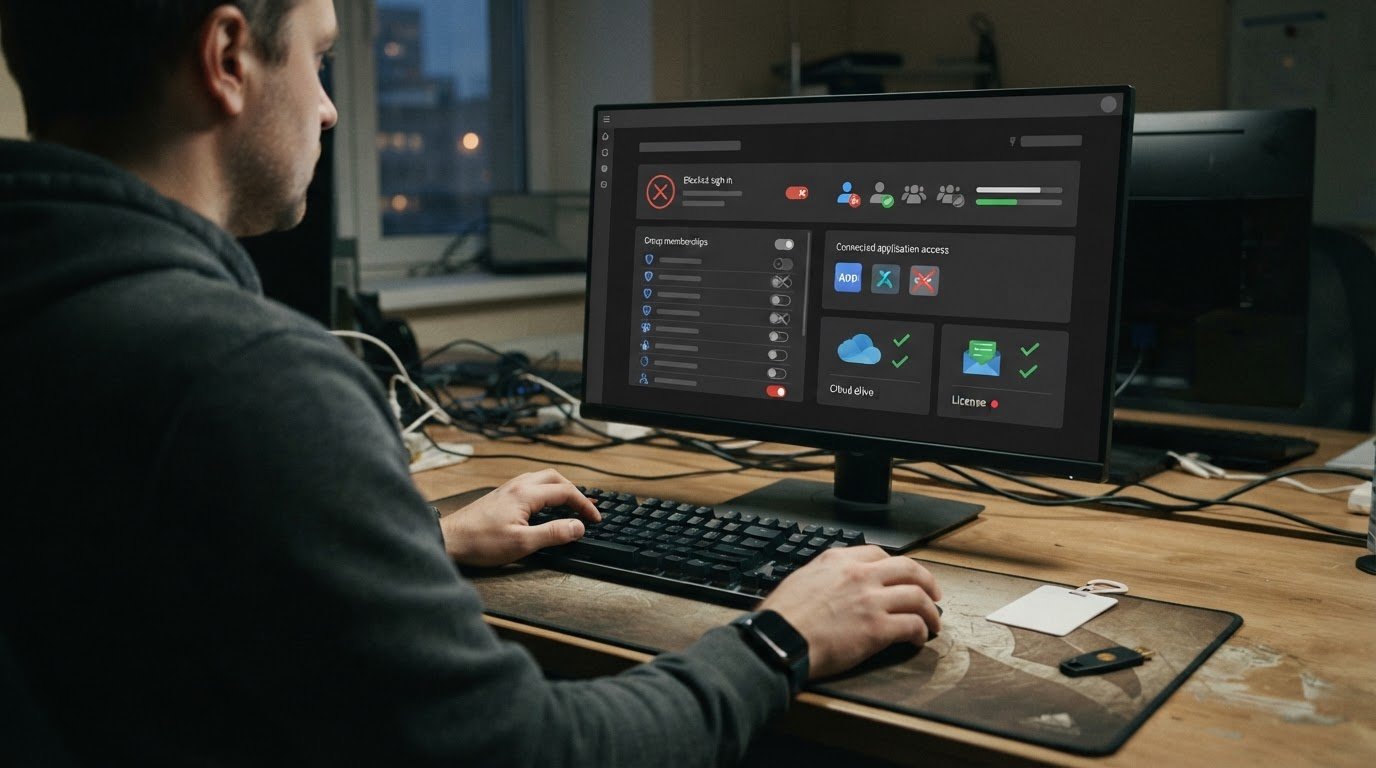
Access should change as quickly as an employee’s role does. Automating user provisioning and deprovisioning connects identity data to applications and applies predefined rules to create, update, or remove accounts and permissions as employees join, change roles, or leave.
Manual account changes can leave gaps: new hires may wait for needed access, while former employees may retain access they no longer need. A well-designed workflow links changes to a trusted employee record, assigns permissions by role, and specifies what happens to mailboxes, OneDrive data, groups, and licenses during offboarding.
This article explains how IT teams connect applications to identity systems, define role and access rules, and test workflows before relying on them. It also covers the information an IT team needs, common automation failures, and how clear offboarding policies make access changes consistent and auditable. The goal is practical: streamline onboarding, reduce lingering access, and clarify who can reach which business resources.
Key Takeaways
- Map application access to job roles so account changes follow what employees need to do.
- Connect onboarding, role changes, and departures to consistent account updates across systems.
- Define what happens to mailboxes, OneDrive files, group memberships, and licenses during offboarding.
- Use clear workflows and access-change records to reduce manual errors and support reviews.
- Test provisioning and removal scenarios, then monitor results to catch gaps and refine access policies.
How IT pros set up automatic app provisioning
IT teams connect an identity source to applications, then map employee attributes to access rules. For example, a sales role can trigger approved access to customer systems without granting access to finance systems.
Role-Based Access Assignment
Role-based access gives employees permissions according to defined job functions. An IT professional maps each role to the applications, groups, and data resources needed for the work. A sales employee might receive access to a customer platform, while an accountant receives access to a finance system. This structure applies access consistently and limits permissions that do not fit an employee’s responsibilities.
Custom Provisioning Rules and Access Levels
Custom provisioning rules translate organizational policies into conditions for creating, changing, or removing access. An IT professional can use attributes such as department, role, or employment status to determine group membership and application permissions. Access levels can distinguish read-only access from editing rights. Clear rules reflect actual workflows, giving employees the access they need without granting broader permissions than their roles require.
Setup starts with the identity source, often an employee record in an HR information system. The IT professional connects it to the organization’s identity directory and applications, then maps relevant attributes, such as department and job role, to application account fields and access groups. When a new employee record meets the defined conditions, the workflow can create accounts and assign the appropriate permissions. A role change can update those assignments rather than leaving outdated access in place.
Offboarding rules are just as important as onboarding rules. When an employee leaves, a change in employment status can trigger account suspension or removal across connected applications. Promptly removing access reduces the risk that a former employee can use organizational credentials or retain unneeded permissions. The workflow should cover application accounts, security groups, file servers, databases, and cloud resources. It can also revoke active sessions, so an authenticated session does not remain open after access changes.
Communication tools and shared data need explicit instructions. For example, an offboarding workflow can disable email and collaboration access while removing the employee from groups that grant access to team files. The organization can define separate actions for each resource, such as transferring mailbox ownership or restricting OneDrive access. These choices depend on business processes and retention needs. Make each action part of the workflow rather than assuming that disabling one account removes every connected permission.
Before activation, IT professionals test representative cases: a new hire, a department transfer, and a departure. They confirm that the right accounts and groups change while unrelated access remains untouched. Testing should include active sessions and communication tools, not just the primary application login. Rules also need review when an identity source, application, or role changes. This keeps automated decisions aligned with current responsibilities and helps identify gaps before employees retain excess access.
Automated user account creation, updates, and deletion
Account lifecycle automation connects changes in employee records to user accounts across an organization’s systems. During onboarding, a new record can trigger account creation; a department transfer can update profile details; and a departure can disable accounts. The aim is to streamline these changes while keeping each account linked to an active business need.
An IT professional first defines which identity source drives each change. For example, an HR information system can supply an employee’s name, department, manager, and employment status. A directory or identity platform then uses those attributes to create or update accounts in connected applications. Careful field mapping helps ensure that a department change updates the correct profile instead of creating a duplicate account.
Each change needs a defined outcome. A new employee may need accounts created before onboarding is complete. A role or name change may require profile updates, group changes, or account corrections. When an employee leaves, the departure signal should disable or delete connected accounts according to the organization’s retention and access policies. The workflow should report failures, such as an application rejecting an update, so IT can resolve the exception instead of assuming every account changed successfully.
Accounts outside the provisioning process create a different risk. A worker might use an application that is not connected to the identity system, leaving IT without a reliable link between the account and an employee. Zombie accounts remain active after their owner leaves or no longer needs access. They may retain access to business data and communication systems. Regular account reports help identify accounts without an active owner, unexpected activity, or permissions that no longer match current responsibilities.
Start discovery by comparing application account lists with authoritative employee records and directory entries. IT can investigate unmatched accounts, confirm whether they belong to a service, contractor, or former employee, and document the appropriate action. A service account should not be treated like a departing employee’s personal account: identify its purpose and owner before making changes. This review can also reveal applications missing from automated workflows.
CMS has a specific historical requirement: the CMS Information Security and Privacy Program’s requirement that CMS accounts be removed, disabled, revoked, or otherwise secured no later than 30 days after a user’s termination or transfer was repealed. Organizations should distinguish that repealed requirement from their own current policies and applicable obligations. Clear ownership, tested triggers, and exception reporting make account changes easier to trace. Secure automation work can also be supported through secure automation services.
Explicit deprovisioning of mailboxes, OneDrive data, groups, and licenses
An IT provider can coordinate a human resources information system, an identity platform, directory services, and connected applications. SCIM, the System for Cross-domain Identity Management, provides a common user schema for moving users into, out of, and around applications. Microsoft 365 is one platform where offboarding policies can address mailboxes, OneDrive, groups, and licenses.
Define what happens to each resource when an employee leaves. For a mailbox, the workflow might disable sign-in while preserving access for an approved business purpose. It can assign a delegate or route incoming messages according to organizational policy. Make these choices deliberately: disabling an employee’s account alone may not address business continuity, records access, or responsibility for messages after departure.
OneDrive needs its own offboarding decision. A company may need to preserve work files, transfer ownership, or restrict access while a manager reviews the data. The provisioning solution should specify who can access those files, what happens to shared links, and how the action is recorded. Treating OneDrive as an automatic byproduct of account deletion can make important project documents inaccessible or expose files to unintended users.
Group rules link employee attributes to membership and application permissions. For example, a department change can remove someone from a finance security group and add them to a sales group. Offboarding rules should remove departing employees from groups that grant access to applications, shared folders, or collaboration spaces. Targeted changes help prevent lingering permissions without disrupting other members or deleting a group the organization still needs.
SCIM can carry user and group changes between an identity system and applications that support the specification. An IT professional maps the organization’s identity attributes to each application, then checks how the provisioning solution handles departures, role changes, and failed updates. Some applications may need a separate workflow. Maintain an application inventory and clear exception handling rather than assuming one connection removes access everywhere.
Microsoft 365 licensing also needs an explicit decision. The workflow can remove a license, retain it temporarily under an approved policy, or assign it elsewhere when appropriate. The timing depends on the organization’s access, retention, and operational requirements. IT should record the decision alongside mailbox and OneDrive actions, so an account change does not unintentionally disrupt business records or leave unused access active.
These practices create a traceable offboarding sequence: apply the identity change, adjust groups and application permissions, address mailbox and OneDrive access, then process the license. A reviewer can see which action completed and which needs attention. That visibility helps organizations find gaps that could leave accounts or data exposed, reducing the opportunity for stale access to contribute to breaches. Microsoft 365 and cloud services can be part of the platform design when these access decisions involve Microsoft applications.
Manual provisioning delays and audit-trail gaps
In the United States, access review schedules and evidence depend on applicable sector obligations, contracts, and adopted frameworks, so no single schedule applies universally. Consistent records of account creation, permission changes, approvals, and removal can support audits involving frameworks such as SOX and HIPAA.
A manual onboarding request often passes from HR to a manager, then to IT and application owners. Each handoff can leave a new employee waiting while staff re-enter the same identity details in several systems. For example, a department change might require separate updates to a directory, a finance application, and a shared folder. If one task is missed, the employee’s access may no longer match the role.
Automation reduces repeated data entry by passing approved identity information through connected systems. An identity management workflow can use an employee record to start account creation, then record whether each connected application accepted the request. IT still needs a way to handle exceptions, such as missing manager approval or an application rejecting a profile field. This prevents staff from assuming a request is complete when a system did not update.
Manual access management also raises the risk of inconsistent changes. An administrator may grant broader permissions than requested, overlook a group removal, or disable an account without revoking active sessions. A defined identity and access workflow applies consistent rules to additions and removals. For instance, it can require an approved role before enabling a sensitive application and record any exception for review.
An audit trail should show what changed, who or what initiated it, the approval, and the outcome. A record that says “account updated” offers little context. A useful entry identifies the employee, application, permission change, request or trigger, and completion status. If a manager questions a former employee’s access, these records help IT trace the change instead of piecing events together from email threads and separate system logs.
Reviewing the workflow matters as much as deploying it. IT can compare a sample of access requests with application permissions, then investigate mismatches and failed updates. Logs of provisioning actions can provide audit evidence relevant to frameworks such as ISO 27001, GDPR, SOX, and HIPAA. The organization should also track internal audit findings and helpdesk requests after rollout. Rising correction requests may point to unclear role definitions or a workflow that needs adjustment.
Manual processes can still suit unusual approvals or applications without an automated connection. A stronger approach combines automated routine changes with documented human review of exceptions. This preserves accountability without requiring staff to re-enter every identity detail or rely on disconnected records.
Automated provisioning and deprovisioning
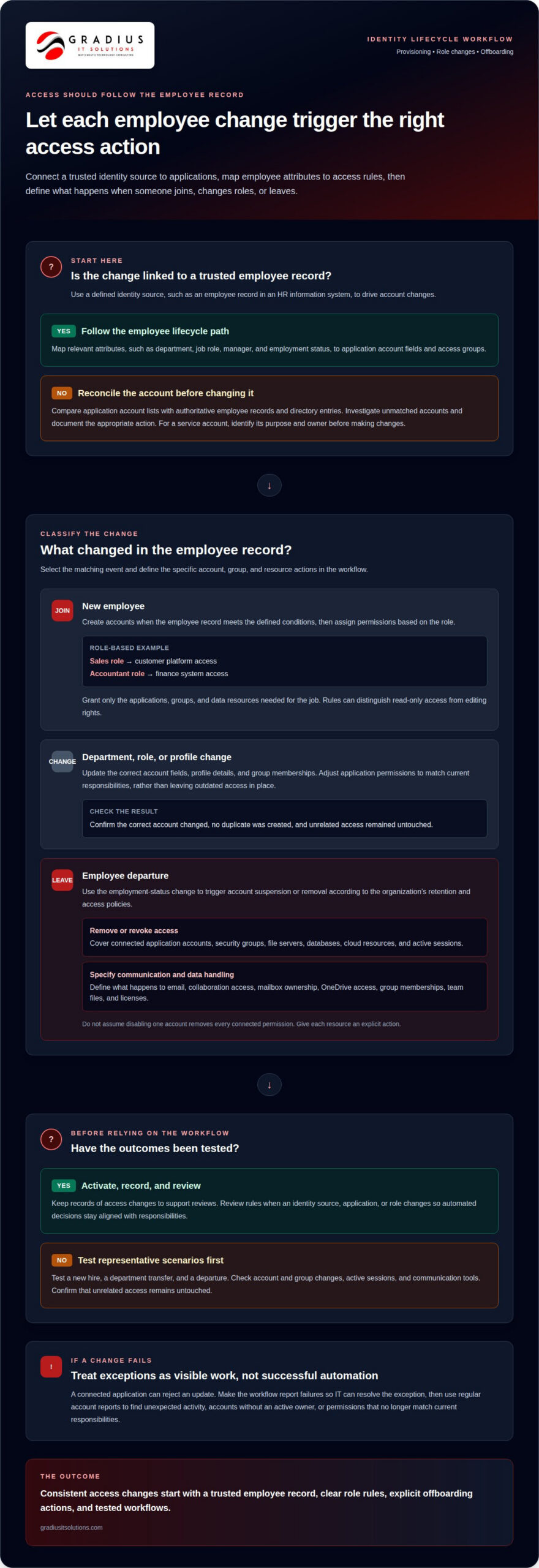
Automated user provisioning and deprovisioning uses identity changes to trigger account and permission updates across connected systems. During onboarding, a workflow can assign approved access; during offboarding, it can revoke permissions and disable accounts. Results depend on clear policies, reliable identity data, and tested connections between directories and applications.
Start implementation by mapping the employee lifecycle to system actions. An IT professional identifies the authoritative identity source, then connects it to directories and applications. A new employee record can trigger account creation and role-based access. A department change can update group membership. A departure can disable accounts, revoke permissions, and alert IT if an application rejects a change.
Policies should distinguish routine changes from exceptions. For example, a role change may require manager approval before access to a sensitive financial application is added. A departure may trigger account suspension, session revocation, and removal from security groups. The workflow should record each action and its outcome. If an application cannot process automated removal, assign an IT owner a clear task to handle the exception.
Offboarding speed matters, but requirements can depend on the organization and its obligations. The U.S. Department of Labor Office of Inspector General states that access must be removed within 10 business days after a voluntary employee action or within 4 hours after an involuntary employee action. Organizations should treat applicable requirements as workflow conditions, not as assumptions applied universally to every business.
Automation reduces repeated manual changes but does not eliminate the need for oversight. A misspelled identity attribute, outdated manager field, or incorrect role mapping can spread an error across connected applications. IT should test representative cases, including a new hire, a transfer, and an involuntary departure. Confirm account status, group membership, active sessions, and completion alerts in each connected system.
Monitoring shows whether the workflow is working as intended. IT can review failed tasks, unusual permission changes, and accounts that remain active after an employee leaves. A monthly review is one possible policy, but its schedule should reflect the organization’s risks and applicable framework. Clear logs help explain who initiated a change, which systems received it, and where human review resolved an exception.
The strongest takeaway: automate repeatable access changes, then keep human accountability for exceptions, policy decisions, and testing. Plan managed IT support for access workflows
Gradius IT Solutions
Gradius IT Solutions helps organizations bring identity changes, application access, and offboarding workflows into a clearer operating plan. Turn to its Managed IT Services and Cybersecurity & SOC when disconnected systems, manual account changes, or unclear ownership make access harder to control. Secure AI & Automation Services can also support efforts to streamline repeatable processes while keeping human review in the workflow where decisions require it. The focus is practical: align access rules with business roles, identify gaps between systems, and make account changes easier to track. For organizations with framework requirements, Gradius runs a GRC platform that keeps technology aligned with the client’s framework and documentation audit-ready. Contact Gradius IT Solutions to discuss your access workflow.
Make Access Changes Part of Your Operating Rhythm
Treat access governance as an ongoing business process, not a one-time technology project. As teams, roles, and applications change, keep ownership of each access rule clear. This gives IT and business leaders a way to revisit decisions, address exceptions, and align identity workflows with actual responsibilities.
Automating user provisioning and deprovisioning works best with clear ownership, documented decisions, and regular review. Consider how a new application, department restructure, or change in employment practices affects existing access policies. A measured review keeps workflows useful as the organization evolves, without relying on assumptions or disconnected account changes.
Gradius IT Solutions can assess your current access process and help identify practical next steps. Schedule a Free Assessment with Gradius IT Solutions.
Clear ownership and consistent follow-through create a stronger foundation for secure, productive work.
Frequently Asked Questions
What is user provisioning?
User provisioning is the administration of a person’s digital identity and access to organizational systems. It can include creating an account, assigning permissions, and updating profile details. For example, an authorized contractor might receive a business email account and access to a project workspace, but not employee-only resources. The organization defines which identity details and approvals are required before accounts become active.
How do provisioning and deprovisioning work?
Provisioning establishes or changes access; deprovisioning removes or disables it when it is no longer appropriate. A typical workflow receives an approved identity change, applies the corresponding account action, and records whether it succeeded. For example, a transfer between teams might update access to a shared application. A departure might suspend sign-in while a separate process handles retained business records.
What is SCIM?
SCIM, or System for Cross-domain Identity Management, is a specification for exchanging identity information between systems. It provides a common user schema that compatible applications can use to receive account and group changes. For organizations, this can reduce the need to maintain separate identity formats for every connected app. Application support and field mappings still affect how a SCIM connection works.
What is user deprovisioning?
User deprovisioning is the process of withdrawing or restricting a person’s access to organizational accounts and resources. It may involve disabling sign-in, removing a user from an application, or deleting an account. These actions are not interchangeable: a business may need to block access while retaining files or records. The right treatment depends on the resource, its owner, and the organization’s retention practices.
How does automated user provisioning work with identity providers, directories, and SaaS apps?
An identity provider can authenticate a person, while a directory stores identity records and group membership. A connected SaaS app can receive account or group updates from those systems through supported integrations. For example, an app may grant access to a project space based on directory group membership. Single sign-on can simplify authentication, but it does not necessarily create or remove application accounts by itself.
Which protocols and standards support user provisioning, such as SCIM and SAML?
SCIM supports identity data exchange and account lifecycle changes between compatible systems. SAML supports federated authentication, allowing an identity provider to send an authentication assertion to an application. They serve different purposes: SAML can support sign-in, while SCIM can manage account information. An IT professional selects connections based on the application’s supported standards and the organization’s identity architecture.
How do IT professionals automate employee onboarding and offboarding step by step?
IT professionals first identify the authoritative employee record and approved role data. They map those details to application accounts, define required approvals, and configure lifecycle triggers. Next, they test a new hire, a role change, and a departure in connected systems. They review failed actions and exceptions, then monitor workflow records after launch. This approach checks successful changes as well as gaps requiring human attention.
How can provisioning automation integrate with HR systems and IT service management platforms?
An HR system can provide a status or role change that starts an identity workflow. An IT service management platform can route exceptions, approvals, and tasks to the responsible team. For example, a delayed start date can hold account activation, while a missing application connection creates a task for IT. Integrations should preserve a clear record of the initiating event, approvals, completed actions, and unresolved tasks.

Article by
Robert Joyce
Robert Joyce is the Owner and Chief Technology Officer of Gradius IT Solutions, a security-first provider of managed IT, cybersecurity, cloud, compliance, and secure AI solutions. Headquartered in New Jersey with satellite offices in the Midwest and South Florida, Gradius serves businesses across the Tri-State Area, Midwest, South Florida, and nationwide.
Robert brings 30 years of IT experience, including 23 years in hedge funds, global banks, and wealth management firms where uptime, security, and continuity are non-negotiable. He began in trade floor support at Caxton, Shell Trading, and Knight, provided senior trade floor support at RBC and SAC Capital, served as VP of IT at EntrustPermal, and was CTO of Gerstein Fisher. After September 11, he helped rebuild critical technology infrastructure for Merrill Lynch.
His expertise spans Microsoft 365, cloud, cybersecurity, networking, infrastructure, disaster recovery, compliance, and strategic IT leadership.
Robert founded Gradius to bring enterprise-level technology and security to small and midsized businesses at a predictable monthly cost. Gradius delivers managed and co-managed IT, cybersecurity, Microsoft 365 and cloud, compliance programs supported by a GRC platform, secure AI consulting, and vCIO services, with a full help desk, 24/7 NOC and SOC monitoring, and U.S.-based onsite engineers and SOC.
Robert works directly with business owners and executives as their single accountable point of contact. His philosophy: one trusted partner, complete IT accountability.
Disclaimer
## Disclaimer
The information provided in this article is for general informational and educational purposes only and should not be considered professional IT, cybersecurity, legal, regulatory, or compliance advice. While Gradius IT Solutions strives to provide accurate and up to date information, technology, security threats, and regulatory requirements change frequently, and we cannot guarantee that all information will remain current or applicable to your specific situation.
Every organization has unique technology, security, compliance, and business requirements. Before implementing any recommendations discussed in this article, you should evaluate their suitability for your environment or consult with a qualified technology professional.
Gradius IT Solutions makes no warranties, express or implied, regarding the completeness, accuracy, reliability, or results obtained from the use of this information. Any actions you take based on this content are at your own risk. Gradius IT Solutions shall not be liable for any direct, indirect, incidental, or consequential damages arising from the use of, or reliance upon, the information contained in this article.
References to third party products, services, or vendors are provided for informational purposes only and do not constitute an endorsement unless explicitly stated.
If you would like guidance tailored to your organization, contact Gradius IT Solutions to schedule a consultation with one of our technology experts.