
Automation fails when a new tool is expected to fix disconnected processes on its own. Effective automation services start by identifying the workflow to improve, connecting the systems involved, and preparing people to use the new process. The result is automation designed around how the business actually operates.
It’s reasonable to expect automation services to save time, but adoption can stall when teams lack support or systems don’t work together. This article explains how to plan implementation, integrate business applications, and automate routine IT service desk tasks while protecting security and employee experience. You’ll also learn what to look for in an integration partner and how to identify workflows ready for automation.
Key Takeaways
- Start with a clearly defined workflow problem and prepare employees for the change, rather than automating a process simply because the technology is available.
- Plan integration across systems, people, and security so automated workflows work reliably from end to end.
- Identify opportunities in both business operations and IT service desk tasks, then prioritize work that reduces repetitive manual steps.
- Assess project scope, integrations, ongoing support, and complexity when weighing the investment involved.
- Choose between a platform and a tailored approach based on how well each fits your workflows, existing systems, and need for flexibility.
Automation adoption challenges
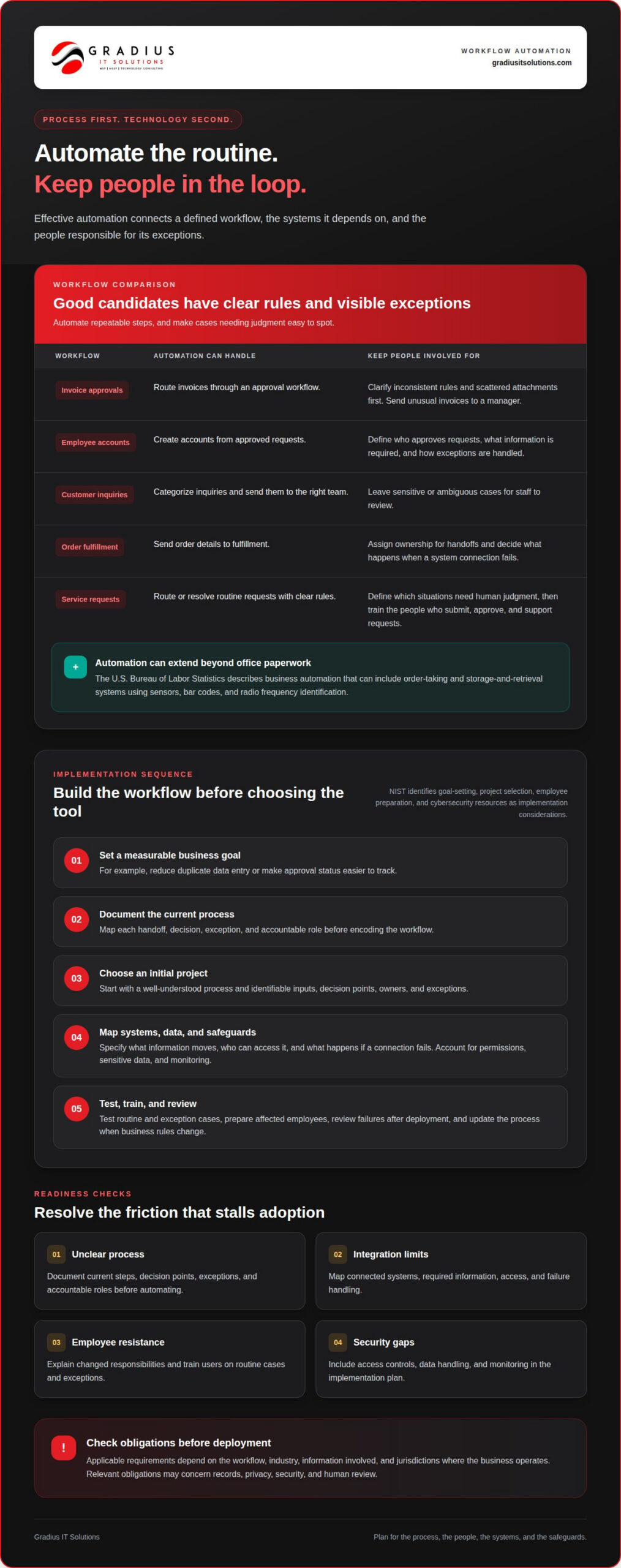
Applicable U.S. requirements depend on the workflow, industry, information involved, and jurisdictions where a business operates. Before deployment, identify relevant obligations for records, privacy, security, and human review. A workflow handling employee information needs different safeguards from one routing routine equipment alerts.
Adoption can stall when automation is treated as a software purchase rather than a process change. A team might automate invoice approvals but still rely on inconsistent rules and scattered email attachments. The system then moves confusion faster instead of removing it. Map each handoff, exception, and decision before selecting a tool to reveal unclear ownership and steps that need redesign.
Employee experience is another consideration. If staff don’t understand what’s changing, they may create manual workarounds or overlook exceptions. For an automated service request, define which cases the workflow can resolve and which need human judgment. Train the people who submit, approve, and support requests. Assign an owner to review failures and update the workflow when business rules change.
System integration can also affect adoption. A process may involve accounting software, email, identity access, and a customer database. If those systems don’t exchange accurate information, duplicate records and delays can persist. Specify what information moves between systems, who can access it, and what happens if a connection fails. Automation services should account for permissions, sensitive data, and monitoring from the start.
The National Institute of Standards and Technology (NIST) identifies goal-setting, project selection, employee preparation, and cybersecurity resources as implementation considerations. Apply these steps to a defined process before expanding automation. For example, start with a well-understood approval workflow, document exceptions, and test what happens when required information is missing. Track whether the process achieves its intended result, not just whether it runs.
- Unclear processes: Document current steps, decision points, exceptions, and accountable roles before automation.
- Integration limits: Map connected systems and the information each workflow needs, including failure handling.
- Employee resistance: Explain changed responsibilities and train users on routine cases and exceptions.
- Security gaps: Include access controls, data handling, and monitoring in the implementation plan.
A readiness review connects business goals to process ownership, system dependencies, employee preparation, and security needs. Automation services are most useful when they address these operational barriers alongside technology. For businesses coordinating core systems, general business IT services can support the environment behind the workflow. Clear preparation helps teams deliver a process that fits real work instead of adding another disconnected tool.
Applicable requirements vary by workflow, industry, information handled, and jurisdictions of operation. Relevant obligations may concern records, privacy, security, and human review.
ew should also assess workforce skills: 61% cite lack of experience as a primary challenge to automation adoption, making employee preparation an important part of planning.
Full-service automation integration
Integration connects a business goal with the processes, systems, people, and safeguards needed to achieve it. A provider should address the whole workflow, not just install a tool.
Automatable Business Processes
Start with recurring processes that follow clear rules and move information between people or systems. Examples include routing invoices for approval, creating employee accounts from approved requests, sorting customer inquiries, and sending order details to fulfillment. Good candidates have identifiable inputs, decision points, owners, and exceptions.
Some work requires human judgment. An automated workflow can route an unusual invoice to a manager rather than approve it automatically. For a customer inquiry, it might categorize the request and send it to the right team, while leaving sensitive or ambiguous cases for staff. Make exceptions visible instead of hiding them.
The U.S. Bureau of Labor Statistics describes business automation that can include order-taking and storage-and-retrieval systems using sensors, bar codes, and radio frequency identification. This illustrates how automation can extend beyond office paperwork to physical operations. Match the method to the task, whether it involves digital records, equipment, or both.
Implementation Steps
Begin implementation with a measurable business goal, such as reducing duplicate data entry or making approval status easier to track. Document the current workflow, choose an initial project, and map its systems, decision rules, data, and exceptions. This helps prevent technology from encoding inconsistent processes.
The National Institute of Standards and Technology (NIST) identifies goal-setting, project selection, employee preparation, and cybersecurity resources as parts of automation implementation. After planning, configure the workflow, test routine and exception cases, and train affected employees. Review performance after deployment, correct failures, and update the process when business requirements change.
Choosing an Integration Provider
Choose a provider that can explain how it will assess the workflow, connect systems, address security, prepare employees, and support improvements after launch. Ask for clear responsibilities and deliverables, including who owns exceptions and how failed integrations are handled. Practical experience with relevant business systems matters more than a broad promise to automate everything.
Integration also relies on dependable connections among platforms. For example, employee onboarding may require approved information to move between an HR system, identity controls, and collaboration tools. Specify the data each connection uses and the access each step requires. Include backup procedures for critical records and monitoring to identify stalled or failed tasks.
Before expanding automation, test one defined workflow with representative users and realistic exceptions. Confirm that it completes correctly, routes unusual cases to the right person, and preserves appropriate access controls. A focused review can reveal integration and training needs before the workflow becomes essential to daily operations.
For businesses planning connected digital workflows, secure automation integration can help align technology, process design, and safeguards.
What types of business automation services are available?
Business automation can support digital workflows, communication, data handling, and physical operations. The right approach depends on the task, the systems involved, and where employees need to make decisions.
Workflow automation moves requests through defined steps. A purchase request, for example, can go to a budget owner and then an authorized approver, with status updates recorded for both. Teams can automate reminders and routine handoffs while leaving decision authority with the responsible people. This works best when each stage has a clear owner and defined conditions.
Application integration transfers information between business systems. A new customer record might trigger a task in a service platform, while an approved employee request could begin account setup. Automation services can connect these steps, but effective integration also requires consistent data fields, suitable permissions, and a plan for errors. If required information is missing, flag the record for review.
Robotic process automation handles repetitive actions through existing software interfaces. For instance, it can copy information from a standardized form into a business application and create a review task. This suits stable, rules-based work. Changes to screen layouts or business rules may disrupt the process, so assign responsibility for testing and maintenance.
IT service desk automation can classify incoming requests, route them to the right team, and send updates. A software access request, for example, can follow an approval path before access changes. Set permission checks and require human review for sensitive actions. This keeps routine requests moving without treating every action as safe to approve automatically.
Data and reporting automation gathers information from approved sources and prepares recurring summaries. A manager might receive a consolidated view of open requests, pending approvals, or inventory changes. Identify the source of truth for each field and limit report access to appropriate users. Otherwise, automation may simply reproduce inconsistencies in source records.
Physical operations automation can connect digital records with equipment and inventory tasks. The U.S. Bureau of Labor Statistics describes automated order-taking and storage-and-retrieval systems using sensors, bar codes, and radio frequency identification. In a warehouse, these methods can help identify and retrieve items. Equipment compatibility, site layout, and exception handling affect how the system fits.
AI-assisted workflows can classify text or prepare drafts for employee review. An incoming request, for example, might be grouped by topic before a staff member confirms where it should go. Define which information the system may process and keep people responsible for consequential decisions. These controls make the workflow easier to oversee.
Different types of automation can work together. A request might be classified, routed for approval, and recorded in a report. Map the full sequence, including exceptions and access controls, before deciding which automation services suit the work. This keeps the design focused on the business task, not just the available technology.
How much do automation services cost in the United States?
Automation projects in the United States don’t have a single standard scope. The work depends on the process, connected systems, security requirements, testing, and ongoing support. A simple approval route differs from a workflow linking inventory, order processing, and reporting across several applications. Define the desired outcome first, then identify what implementation must include.
Consider an invoice workflow. Routing submissions and recording approvals are different tasks from checking duplicate entries, connecting accounting software, and preserving decision records. Each additional requirement affects planning, integration, and testing. A clear project brief shows which tasks are essential and which can wait for a later phase.
Process complexity shapes project scope. A workflow with consistent inputs and stable rules is easier to map than one with frequent exceptions. Employee onboarding is a practical example. Creating an account after approval is straightforward. Managing different roles, access permissions, start dates, and approval paths requires more coordination. Document each variation so the design reflects real operating conditions.
Existing systems also matter. Connecting two applications with compatible data fields differs from joining platforms that store information inconsistently. A customer support workflow might rely on a CRM, email, and ticketing system. Integration planning should address data mapping, user permissions, error handling, and what happens when a connection stops working.
- Application environment: Identify the systems, data sources, access controls, and required connections.
- Process readiness: Define decision rules, duplicate steps, exceptions, and human review points.
- Security requirements: Determine who can access information and which actions need approval.
- Ongoing ownership: Assign responsibility for monitoring, maintenance, and future changes.
Documentation and security requirements can add important work. A process involving employee records, for example, needs carefully defined access and testing. If a business must retain approval records, identify those requirements during planning. This lets the workflow account for accountability and information handling from the start.
Support after deployment also belongs in the project scope. A workflow may need adjustments when roles change, an application is updated, or business rules evolve. For an approval process, clarify who can request a change, who authorizes it, and how updates are tested before use. Automation services should define these responsibilities rather than treating launch as the final step.
Compare project proposals by matching each deliverable to a business need. Look for process mapping, integration, exception testing, employee preparation, and post-launch support. You can then assess automation services by the work they cover and the operational outcomes they are designed to support. A focused first workflow helps set practical priorities for future projects.
When comparing proposals, check whether the quoted work involves genuine agent-driven orchestration or repackaged generative AI layered onto existing systems. Gartner states that more than 90% of so-called agentic AI solutions are repackaged generative AI layered atop legacy systems, while around 130 vendors among thousands deliver genuine agent-driven orchestration. These figures make it important to ask what the service actually automates and which integrations are included. The page reports that 71% cite the capital cost of robots as a primary challenge to adoption, so clarify whether hardware costs are part of the proposal or separate from implementation and support.
How do automation platforms and custom automation services compare?
Automation platforms provide configurable tools for building workflows across supported applications. Custom automation services focus on adapting workflows or connections to specific business requirements. The practical choice depends on how closely a platform’s features match your processes, systems, and governance needs.
A platform may suit a process built from familiar steps. For example, a facilities team could route maintenance requests, assign categories, and notify a technician through a configured workflow. Standard templates and built-in connectors can help teams get started without designing every component from scratch. The tradeoff is that the process may need to fit the platform’s available actions and supported integrations.
A tailored approach can help when existing systems or business rules don’t fit standard configurations. Imagine reconciling records from two internal applications with different field names and approval logic. The workflow may need specific data mapping, exception handling, and review steps. Define those requirements carefully, including how the process should respond to missing or conflicting information.
Platforms can simplify ongoing changes when administrators can adjust rules through available configuration options. For example, a department might change who receives a request after a role change. However, every platform has limits. Unsupported connectors, restricted data controls, or rigid workflow logic can make a standard setup unsuitable for a business-critical process.
Tailored workflows can provide more control over specialized requirements, but they need clear documentation and ownership. A change to an upstream application may affect a connection or automated task. Plan how updates will be tested, who approves changes, and how staff will report failures. Security reviews should examine access permissions and the information each step can expose.
Some organizations combine both approaches. A platform can handle routine routing, while a tailored integration bridges a gap between existing systems. For instance, a standard request workflow might pass approved information to an application through a configured connection. The design should maintain consistent records and flag failures for review.
Use these decision points to compare options:
- Process fit: Determine whether available workflow rules handle normal cases and exceptions.
- Integration: Identify which systems connect directly and where data mapping is needed.
- Control: Review permissions, approval points, audit records, and information handling.
- Adaptability: Establish how administrators can update rules as roles or processes change.
- Ownership: Assign responsibility for testing, documentation, and ongoing maintenance.
Choose the simplest approach that meets the workflow’s requirements without weakening oversight. A process with stable rules and supported applications may fit a platform. Distinctive workflows, complex connections, or specialized controls may call for tailored implementation. A documented review of requirements helps make that distinction before deployment, and secure automation support can help align the approach with the workflow.
Gradius IT Solutions: Managed IT Services
Gradius IT Solutions helps businesses connect automation goals with the systems and safeguards that support daily operations. Turn to the team when workflows cross platforms, need stronger security, or require ongoing IT coordination.
Its Secure AI & Automation Services support practical automation planning, while Managed IT Services and Cloud & Microsoft 365 help maintain the technology those workflows depend on. Cybersecurity & SOC adds security support for organizations protecting connected systems and business data.
For compliance, Gradius runs a GRC platform that keeps technology aligned with your framework and documentation audit-ready. For example, a business automating request approvals across Microsoft 365 and other applications may need support aligning access, integration, and oversight.
Contact Gradius IT Solutions to discuss your automation and IT needs.
Turn a Clear Workflow Into Your Next Step
Choose one workflow where better coordination would make work easier to manage. Define the outcome, identify who owns each decision, and agree on how success will be reviewed. This gives your team a practical starting point for automation services without requiring every department to change at once.
Gradius IT Solutions can connect this work to the technology around it. Managed IT Services support the environment automation depends on. Cybersecurity & SOC can address security needs, while Compliance as a Service supports technology alignment with your framework and audit-ready documentation. Start with a conversation about your process, systems, and priorities.
Take the next step by scheduling a free technology consultation with Gradius IT Solutions.
With a defined goal and the right support, your team can move forward with greater clarity and confidence.
Frequently Asked Questions
What are automation services?
Automation services use technology to carry out repeatable business tasks with less manual handling. They can include configuring workflows, connecting applications, routing requests, and supporting automated data entry. For example, a system could send an approved purchase request to the right team and record its status. The aim is to make routine work more consistent while keeping people responsible for decisions that require judgment.
What are the risks and limitations of automation services?
Automation can repeat errors quickly if its rules or source data are wrong. A misrouted access request, for example, could delay work or expose information to the wrong person. Systems may also fail when an application changes or an unusual case falls outside the workflow. Reduce these risks with role-based access, human review for sensitive actions, documented ownership, and regular testing of routine and exception cases.
What U.S. laws and regulations apply to business process automation?
Applicable U.S. requirements vary by workflow, industry, information handled, and jurisdictions of operation. Before deployment, identify relevant obligations concerning records, privacy, security, and human review.

Article by
Robert Joyce
Robert Joyce is the Owner and Chief Technology Officer of Gradius IT Solutions, a security-first provider of managed IT, cybersecurity, cloud, compliance, and secure AI solutions. Headquartered in New Jersey with satellite offices in the Midwest and South Florida, Gradius serves businesses across the Tri-State Area, Midwest, South Florida, and nationwide.
Robert brings 30 years of IT experience, including 23 years in hedge funds, global banks, and wealth management firms where uptime, security, and continuity are non-negotiable. He began in trade floor support at Caxton, Shell Trading, and Knight, provided senior trade floor support at RBC and SAC Capital, served as VP of IT at EntrustPermal, and was CTO of Gerstein Fisher. After September 11, he helped rebuild critical technology infrastructure for Merrill Lynch.
His expertise spans Microsoft 365, cloud, cybersecurity, networking, infrastructure, disaster recovery, compliance, and strategic IT leadership.
Robert founded Gradius to bring enterprise-level technology and security to small and midsized businesses at a predictable monthly cost. Gradius delivers managed and co-managed IT, cybersecurity, Microsoft 365 and cloud, compliance programs supported by a GRC platform, secure AI consulting, and vCIO services, with a full help desk, 24/7 NOC and SOC monitoring, and U.S.-based onsite engineers and SOC.
Robert works directly with business owners and executives as their single accountable point of contact. His philosophy: one trusted partner, complete IT accountability.
Disclaimer
## Disclaimer
The information provided in this article is for general informational and educational purposes only and should not be considered professional IT, cybersecurity, legal, regulatory, or compliance advice. While Gradius IT Solutions strives to provide accurate and up to date information, technology, security threats, and regulatory requirements change frequently, and we cannot guarantee that all information will remain current or applicable to your specific situation.
Every organization has unique technology, security, compliance, and business requirements. Before implementing any recommendations discussed in this article, you should evaluate their suitability for your environment or consult with a qualified technology professional.
Gradius IT Solutions makes no warranties, express or implied, regarding the completeness, accuracy, reliability, or results obtained from the use of this information. Any actions you take based on this content are at your own risk. Gradius IT Solutions shall not be liable for any direct, indirect, incidental, or consequential damages arising from the use of, or reliance upon, the information contained in this article.
References to third party products, services, or vendors are provided for informational purposes only and do not constitute an endorsement unless explicitly stated.
If you would like guidance tailored to your organization, contact Gradius IT Solutions to schedule a consultation with one of our technology experts.