

Choosing an Azure partner is a business decision, not just a technical one. Businesses across the United States can get help with Azure planning, setup, management, and ongoing support. The right scope depends on your workloads, security needs, existing systems, and internal IT capacity.
A partner should do more than resolve technical issues. Good planning connects cloud decisions to business priorities, while ongoing management keeps security, performance, and continuity in view. The challenge is finding a team with relevant expertise and a clear, accountable approach.
This article explains what Azure support can include, how planning and setup work, and what to consider when choosing a consulting partner. It also covers how cloud management fits into the bigger picture, helping you assess your needs and decide on a practical next step.
Key Takeaways
- Map Azure workloads, security priorities, and business needs before planning setup or ongoing management.
- Consider how Azure infrastructure and Microsoft 365 productivity tools fit together across your organization.
- Assess a consulting partner’s relevant expertise, project evidence, and understanding of your industry needs.
- Clarify how monitoring, support processes, and continuity planning will help keep business systems resilient.
- Use a technology consultation to identify where cloud management and broader IT support can reduce complexity.
Azure planning, setup, management, and support
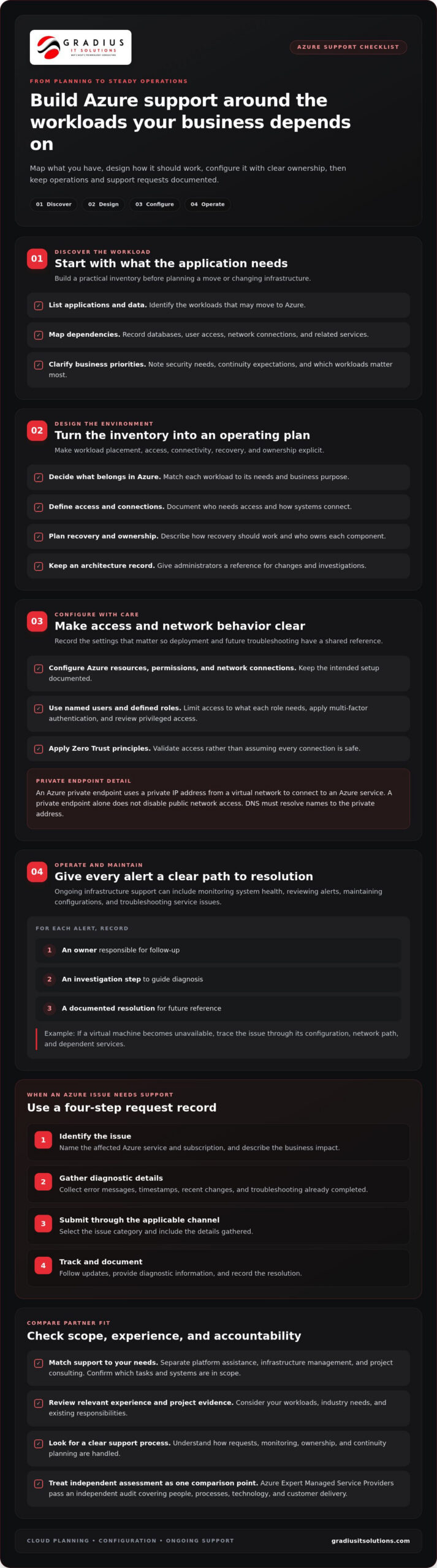
Azure support can cover cloud planning, configuration, daily operations, and troubleshooting. Start by inventorying applications, data, dependencies, and business priorities. Before moving an application, for example, map its database, user access, and network connections. This gives the project team a practical picture of what the workload needs in its new environment.
Planning turns that inventory into a workable design. Decide which workloads belong in Azure, who needs access, how systems connect, and how recovery should work. Document the architecture and who owns each component. Administrators can then refer to the plan when infrastructure changes or an issue needs investigation.
Setup may include configuring Azure resources, permissions, network connections, and security controls. Microsoft defines an Azure private endpoint as a network interface that uses a private IP address from a virtual network to connect to an Azure service. A private endpoint alone does not disable public network access. DNS must resolve names to the private address.
Managed infrastructure support can include monitoring system health, reviewing alerts, maintaining configurations, and troubleshooting service issues. For each alert, assign an owner, an investigation step, and a documented resolution. If a virtual machine becomes unavailable, support can trace the issue through its configuration, network path, and dependent services.
Government, healthcare, and other regulated organizations can use Azure support. Cloud design should account for each organization’s security controls, data handling needs, and applicable framework. A partner familiar with those requirements can connect technical decisions to the organization’s operating environment.
Microsoft offers Azure support plans, while consulting and managed cloud arrangements address different needs. Compare the support process and included scope with your workloads and internal responsibilities. The right choice depends on which systems need assistance and which operational tasks you expect support to cover.
When comparing Microsoft Azure support options, focus on the services included and the assistance your organization needs. Consider whether you need help with platform issues, infrastructure management, or project consulting. These factors help identify an arrangement that fits your operating model.
Migration and troubleshooting services may include workload discovery, dependency mapping, migration planning, configuration, and issue diagnosis. A migration can begin by identifying application dependencies, sequencing the move, and testing access after deployment. For an Azure issue, record the affected service, observed behavior, recent changes, and relevant error details.
To open and manage an Azure support request, follow a clear process:
- Identify the affected Azure service, subscription, and business impact.
- Gather error messages, timestamps, recent changes, and troubleshooting completed.
- Submit the request through the applicable support channel and select its issue category.
- Track updates, provide diagnostic details, and record the resolution.
Azure Expert Managed Service Providers pass an independent audit covering their people, processes, technology, and customer delivery. Use that assessment as one point of comparison, alongside relevant Azure experience and a clearly defined support process.
Enterprise support across Microsoft technologies
Enterprise support works best when Microsoft Azure, Microsoft 365, identity, devices, and business applications operate as connected parts of one technology environment. A change to user access, for example, can affect cloud resources and Microsoft 365 services. Map those dependencies before deployment, then assign an owner to each platform and its support process.
Start security configuration with named users, defined roles, and access limited to what each role needs. Apply multi-factor authentication, review privileged access, and use Zero Trust principles to validate access rather than assume every connection is safe. In Azure, document network paths, security settings, and alert ownership. This makes it clearer how to respond when a configuration change causes an issue.
Microsoft 365 administration brings a different set of decisions. Business Basic includes web-based Office applications, Exchange email, Teams, and OneDrive, but not desktop app installation. Business Premium includes the features in Business Standard plus advanced security, compliance, and device management features. Match licenses to actual work needs, then review assigned users and service access as roles change.
A Microsoft Azure rollout should follow a controlled sequence: assess application dependencies, prepare the target environment, deploy workloads, and test user access and business workflows. For example, before relying on a newly migrated internal application, validate its data connections and sign-in process. Keep deployment notes and ownership records current for future administrators.
To contact Microsoft Azure support, submit a request through the Azure portal and describe the affected service, business impact, and troubleshooting completed. You can also work with a Microsoft Azure partner for consulting, deployment, or ongoing technical support. Keep request details and follow-up actions in one record so ownership stays clear.
Microsoft Marketplace is a place to find Microsoft Azure consulting services. Microsoft Azure partners may hold independently validated advanced specializations in specific solution areas. Use those designations as one comparison point, then assess how the partner’s capabilities match your deployment and operational needs.
For a focused partner review, compare how a provider addresses the wider Microsoft environment:
- Security: Ask how identity, endpoint protection, email security, and monitoring fit together.
- Administration: Clarify how license assignments and user changes are handled.
- Deployment: Look for a documented rollout, testing, and handoff process.
- Support: Understand how issues are recorded, prioritized, escalated, and resolved.
Businesses seeking connected cloud and productivity support can explore Cloud and Microsoft 365 services from Gradius IT Solutions as part of their technology planning, ensuring that both deployment and incident response are handled effectively. When choosing a Microsoft Azure partner, review case studies, success stories, and measurable outcomes from past projects. STF Consulting reports 100% MFA adoption across its managed cloud environments. STF Consulting describes Microsoft 365 as a productivity and collaboration platform and Azure as a cloud infrastructure platform for services such as servers, storage, and networking.
If a Microsoft 365 account is compromised, change the password and revoke active sessions promptly. Enable or verify multi-factor authentication, then review the account’s mail rules, forwarding settings, and sent mail for unauthorized activity. These steps help contain access and identify whether messages or settings were altered, while clear ownership supports follow-up across the connected environment.
Choosing an Azure consulting partner
Match a partner’s Azure experience to the work your organization needs. Migration, security redesign, and ongoing optimization call for different skills. Write down your goals, current systems, sensitive data, and internal support capacity. This brief helps you compare proposals against the same business requirements.
Ask for case studies, success stories, and measurable outcomes from relevant projects. Look for examples involving similar workloads or operational challenges, then review what the partner delivered and how success was measured. A case study about application migration, for instance, should explain the scope, deployment approach, and resulting business capability.
Technical credentials offer another useful signal. Microsoft Azure partners may hold independently validated advanced specializations in specific solution areas. Microsoft advises customers to look for Solution Partner Designations or Advanced Specializations. Ask how a credential relates to your planned work, such as cloud infrastructure design or application deployment.
Certifications can also indicate relevant expertise. Consider whether the proposed team includes professionals with credentials such as Solutions Architect Expert or DevOps Engineer Expert. Then match those qualifications to specific project responsibilities. An architect might lead environment design, while an engineer handles deployment workflows and the operational handoff.
Industry experience matters because business needs shape technical decisions. A healthcare organization, government agency, or manufacturer may have distinct data handling and compliance requirements. Ask how the partner will account for those needs when designing access, backups, monitoring, and recovery. A credible plan describes practical controls, not just broad promises to protect the Azure environment.
Use a consistent review checklist for each candidate:
- Scope: Identify what the partner will plan, deploy, manage, and document.
- Security: Review identity controls, multi-factor authentication, endpoint protection, email security, and continuous monitoring.
- Operations: Clarify who reviews alerts, handles incidents, and tracks unresolved issues.
- Continuity: Examine backup and disaster recovery responsibilities, including how recovery procedures are documented and tested.
- Communication: Confirm how remote support, onsite work, escalation, and status updates fit your operating model.
Microsoft support and consulting providers serve different roles. Microsoft can address Azure platform support requests, while a provider can coordinate consulting, deployment, and support across your organization’s wider technology environment. Choose based on the work you need covered, rather than assuming either option handles every responsibility.
Before signing an engagement, review its boundaries, deliverables, ownership, and reporting process. Confirm, for example, who approves production changes and who maintains architecture records. Clear answers make it easier to protect workloads, manage risk, and plan future Azure optimization.
When choosing an Azure partner, consider advanced Azure certifications such as Solutions Architect Expert and DevOps Engineer Expert. Also assess the partner’s experience with your industry’s needs and compliance requirements.
24/7/365 Professional support
In this context, 24/7/365 refers only to SOC and NOC monitoring, not every support service. Monitoring can surface alerts about an Azure service interruption or unusual activity. A separate support process determines who investigates, communicates with staff, and coordinates recovery. Define these roles before relying on monitoring to support business operations.
Microsoft Azure support response times and severity levels depend on the support plan and the issue’s business impact. A broad outage affecting a production application warrants higher priority than a routine configuration question. When submitting a request, describe the affected service, users impacted, business consequences, and troubleshooting completed.
Monitoring helps teams detect problems, but it does not replace incident response. An alert about a failed database connection, for example, needs an assigned responder, a way to assess application dependencies, and a clear escalation path. Document these steps before an incident, including who can approve production changes.
For organizations using Microsoft 365 alongside Azure, distinguish platform issues from access or device problems. A sign-in failure may involve identity settings, a user account, or a cloud application. Recording affected users, error details, and recent changes helps support teams investigate without making unrelated configuration changes.
Define monitoring, incident handling, planned maintenance, and user assistance as separate responsibilities. Establish how alerts are reviewed, how urgent events reach the right technical owner, and how updates are communicated. For remote teams, a shared incident record helps staff track status and the next action.
Operational needs can change during an Azure migration or implementation. Project teams may focus on deployment checks and access testing, while operations teams prepare to manage the live environment. Before launch, document application dependencies, recovery steps, escalation contacts, and the handoff from project work to routine operations.
Use these steps to make response expectations practical:
- Define a critical incident, such as an unavailable production workload.
- List the details support needs, including service name, impact, and error information.
- Assign incident ownership and escalation roles for infrastructure, identity, and applications.
- Record updates, decisions, and recovery actions in one incident log.
- Review resolved incidents and refine procedures when recurring issues expose gaps.
Business continuity takes more than monitoring. Document backup responsibilities, disaster recovery procedures, and who makes recovery decisions. For an Azure workload that supports customer service, identify which functions to restore first and how staff will receive updates during an interruption.
A clear support model connects detection to action. Defined severity criteria, named owners, and documented procedures help coordinate Azure and Microsoft 365 support while keeping monitoring coverage distinct from user assistance.
What does Azure support mean for businesses in New Jersey?
For a business, Azure support connects cloud systems to daily operations. Office staff, field teams, and remote employees may rely on the same application. Support helps plan access, resolve technical problems, and keep workloads aligned with business needs. The useful measure is not simply whether Azure runs, but whether staff can use the systems they need securely and reliably.
Operational needs shape the support model. A company with field staff, office employees, and remote users needs consistent sign-in and access procedures. Map each group’s applications, devices, and network connections, then identify the services essential to customer work. This gives support teams context when an issue affects one department, one location, or the entire organization.
Cloud infrastructure also connects with the tools employees use every day. For example, a business application in Azure may rely on Microsoft 365 accounts for access and communication. Documenting that relationship helps teams troubleshoot issues without treating each platform as isolated. Clear ownership also helps staff know where to report a problem and what details to include.
Security and continuity require operational decisions, not just initial setup. Make multi-factor authentication, role-based access, endpoint protection, and email security part of a layered approach. Document backup responsibilities and disaster recovery procedures. For a business-critical workload, identify who can approve recovery actions and how employees will receive updates during an interruption.
Organizations can make Azure support more useful by connecting it to concrete business processes:
- Customer service: Identify the cloud applications employees need to access customer records and respond to requests.
- Remote work: Define how staff sign in, access approved resources, and report device or connectivity issues.
- Business continuity: Document recovery priorities for systems that support essential operations.
- Change control: Record who approves production changes and how teams communicate planned updates.
- Ongoing improvement: Review recurring support issues and determine whether configuration, training, or documentation needs attention.
If a sales team loses access to a cloud-hosted application, for example, support needs to distinguish an account issue from an application or network problem. The incident record should capture affected users, error details, recent changes, and business impact. This helps technical teams investigate efficiently and gives managers a clearer view of operational effects.
Azure planning can also improve productivity. Review repeated manual tasks and consider whether existing cloud tools can simplify them safely. Include employee awareness, access controls, and recovery planning in the discussion. A sound decision connects the proposed change to a real workflow, assigns an owner, and documents how the business will assess its impact.
Gradius IT Solutions: Managed IT Services
Gradius IT Solutions helps organizations nationwide connect Azure planning and support with broader IT operations, including dedicated azure support nj services. Its Managed IT Services can support businesses that need coordinated oversight of cloud systems, user needs, and day-to-day technology. For Microsoft environments, Cloud & Microsoft 365 services address cloud and productivity platforms.
When security needs extend beyond configuration, Cybersecurity & SOC brings security services and SOC monitoring into the support picture. Compliance as a Service includes a GRC platform that keeps technology aligned with the organization’s framework and documentation audit-ready. It supports alignment and recordkeeping, while the organization retains responsibility for its compliance decisions.
Consider this approach when Azure changes affect multiple systems, internal teams need technical coordination, or cloud operations need to fit a broader technology plan. Cloud and Microsoft 365 services can be a relevant starting point for businesses seeking support with those platforms.
Visit gradiusitsolutions.com to contact Gradius IT Solutions.
Turn your Azure plans into a clear next step
Azure support in New Jersey can be an opportunity to make cloud operations fit your business priorities, not just resolve today’s technical issue. Start by identifying the workload or process you want to improve, who owns it, and what needs to happen next. That gives a technology conversation a practical focus.
Gradius IT Solutions provides Managed IT Services and Cybersecurity & SOC to support business technology and security needs. Its Compliance as a Service includes a GRC platform that keeps technology aligned with your framework and documentation audit-ready. These services can help when Azure decisions connect to broader operational, security, or documentation needs.
A useful next step is to discuss your current Azure environment, upcoming changes, and which support responsibilities your team wants covered. Clear priorities make it easier to develop a practical path forward.
With a focused plan, you can turn your next cloud decision from uncertainty into a defined business action.
Frequently Asked Questions
Do you offer Azure support across New Jersey?
Yes. Gradius IT Solutions supports businesses nationwide with cloud and Microsoft 365 services, including assistance for organizations using Azure. Support can help connect cloud operations with your business systems and internal technology needs. For example, if an Azure application depends on employee accounts or Microsoft 365 workflows, explain those connections when discussing the support your team needs.
Looking For Fast Support?
For an urgent Azure issue, contact your support provider through its designated request channel and describe the business impact clearly. Include the affected application or service, who cannot access it, any visible error, and recent changes. If a production system is unavailable, say so upfront. These details help the support team understand the urgency and begin with useful diagnostic information.
Are there Microsoft Azure partners or consultants in New Jersey that provide support?
Yes. Microsoft Azure partners and consultants provide services such as cloud planning, deployment, and ongoing technical assistance. Microsoft Marketplace is a place to find Azure consulting services. Compare providers by reviewing relevant project examples, Microsoft credentials, and familiarity with your industry’s operational needs. Ask how the proposed scope handles implementation, documentation, and support ownership after a project goes live.

Article by
Robert Joyce
Robert Joyce is the Owner and Chief Technology Officer of Gradius IT Solutions, a security-first provider of managed IT, cybersecurity, cloud, compliance, and secure AI solutions. Headquartered in New Jersey with satellite offices in the Midwest and South Florida, Gradius serves businesses across the Tri-State Area, Midwest, South Florida, and nationwide.
Robert brings 30 years of IT experience, including 23 years in hedge funds, global banks, and wealth management firms where uptime, security, and continuity are non-negotiable. He began in trade floor support at Caxton, Shell Trading, and Knight, provided senior trade floor support at RBC and SAC Capital, served as VP of IT at EntrustPermal, and was CTO of Gerstein Fisher. After September 11, he helped rebuild critical technology infrastructure for Merrill Lynch.
His expertise spans Microsoft 365, cloud, cybersecurity, networking, infrastructure, disaster recovery, compliance, and strategic IT leadership.
Robert founded Gradius to bring enterprise-level technology and security to small and midsized businesses at a predictable monthly cost. Gradius delivers managed and co-managed IT, cybersecurity, Microsoft 365 and cloud, compliance programs supported by a GRC platform, secure AI consulting, and vCIO services, with a full help desk, 24/7 NOC and SOC monitoring, and U.S.-based onsite engineers and SOC.
Robert works directly with business owners and executives as their single accountable point of contact. His philosophy: one trusted partner, complete IT accountability.
Disclaimer
## Disclaimer
The information provided in this article is for general informational and educational purposes only and should not be considered professional IT, cybersecurity, legal, regulatory, or compliance advice. While Gradius IT Solutions strives to provide accurate and up to date information, technology, security threats, and regulatory requirements change frequently, and we cannot guarantee that all information will remain current or applicable to your specific situation.
Every organization has unique technology, security, compliance, and business requirements. Before implementing any recommendations discussed in this article, you should evaluate their suitability for your environment or consult with a qualified technology professional.
Gradius IT Solutions makes no warranties, express or implied, regarding the completeness, accuracy, reliability, or results obtained from the use of this information. Any actions you take based on this content are at your own risk. Gradius IT Solutions shall not be liable for any direct, indirect, incidental, or consequential damages arising from the use of, or reliance upon, the information contained in this article.
References to third party products, services, or vendors are provided for informational purposes only and do not constitute an endorsement unless explicitly stated.
If you would like guidance tailored to your organization, contact Gradius IT Solutions to schedule a consultation with one of our technology experts.