

What if the massive data hoard you’re paying to store is actually a ticking legal time bomb rather than a corporate asset? You’ve likely watched your monthly storage bills climb while your team struggles to locate specific records during audits. It’s exhausting to manage exponential data growth when you’re unsure if your current business data archiving solutions even meet the latest SEC or FINRA requirements. Most executives feel the weight of this complexity, yet they’re stuck paying premium prices for “hot” storage that holds years of stagnant information.
We’ll show you how to transform this growing data liability into a secure, compliant, and cost-effective strategic asset. This guide clarifies the dangerous confusion between backups and archives while providing a roadmap to meet strict 2026 regulatory standards. You’ll discover how to reclaim your primary storage capacity, reduce business risk, and ensure your organization is ready for any audit. Let’s move beyond reactive storage management and start building a high-performance data strategy that protects your bottom line.
Key Takeaways
- Stop treating data as a liability. Learn how to offload stagnant files to reduce primary storage costs and improve system performance.
- Navigate the 2026 regulatory landscape. Implement business data archiving solutions that meet strict SEC, FINRA, and HIPAA requirements.
- Master the critical distinction: backup is for disaster recovery, while archiving is for legal discovery and long-term compliance.
- Follow a streamlined 5-step framework to audit your data and establish defensible retention policies that protect your firm from legal risk.
- Eliminate tool fatigue. Discover why you’ll need a single accountable partner to manage your security and compliance needs under one roof.
The Growing Burden of Business Data: Why Archiving is No Longer Optional
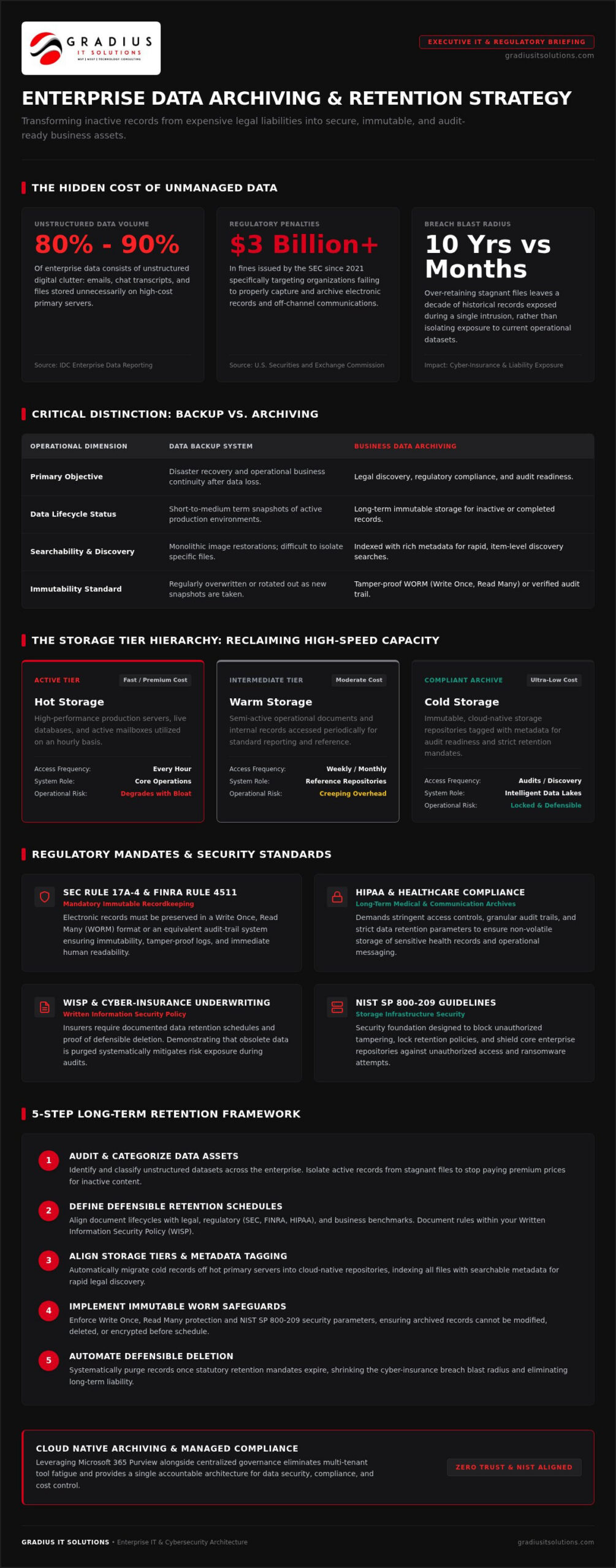
Data volume isn’t just growing; it’s accelerating. IDC reports that 80% to 90% of enterprise data is now unstructured, consisting of millions of emails, chat transcripts, and documents. When you store this digital clutter on your primary servers, system performance inevitably tanks. Your active databases and email environments shouldn’t be used as a digital attic. Business data archiving is the secure preservation of inactive data for legal and operational needs.
Implementing business data archiving solutions moves this burden from expensive, high-speed storage to secure, long-term repositories. This is a strategic shift. It’s about protecting your organization from the security risks of over-retention. If you store ten years of data you don’t need, a single breach exposes a decade of history instead of just a few months. Moving inactive records out of your primary environment keeps your daily operations lean and your risk profile low.
To better understand this concept, watch this helpful video:
The Regulatory Reality: SEC, FINRA, and HIPAA Requirements
Regulated firms like RIAs and wealth managers face strict mandates. SEC Rule 17a-4 and FINRA Rule 4511 require that electronic records remain immutable. You can’t just save an email. You must preserve it in a WORM (Write Once, Read Many) format or a verified audit-trail system. Since 2021, the SEC has issued over $3 billion in fines for failing to archive off-channel communications. If your records aren’t human-readable and tamper-proof, you aren’t just disorganized; you’re non-compliant.
Cyber-Insurance Readiness and Data Governance
Modern insurers have moved beyond simple checklists. They now demand proof of documented data retention policies and active governance. This is where a Written Information Security Policy (WISP) becomes essential. By archiving and then defensibly deleting obsolete data, you reduce the blast radius of a potential breach. Insurers view this as a sign of high-performance risk management. It shows you’re a proactive guardian rather than a reactive victim. Proper archiving ensures that when an auditor or insurer asks for proof, you have it ready in minutes, not weeks.
Deciphering Business Data Archiving Solutions: From Cold Storage to Intelligent Lakes
Storage isn’t a monolith. It’s a strategic hierarchy. To manage costs effectively, executives must distinguish between Hot, Warm, and Cold storage tiers. Hot storage is for the data your team uses every hour. It’s fast and expensive. Cold storage is for the records you need for a 2026 audit but don’t touch daily. Modern business data archiving solutions leverage this hierarchy to slash costs without sacrificing accessibility. The shift from bulky on-premises hardware to Cloud-native environments has turned “data graveyards” into intelligent lakes. By tagging every record with rich metadata, your historical data becomes instantly searchable for legal discovery.
Security is the foundation of this architecture. You must ensure your storage follows NIST storage infrastructure security guidelines to prevent unauthorized tampering. Immutable storage is the gold standard here. This technology ensures that once a record is written, it cannot be modified or deleted until its retention period expires. It’s a proactive shield against both internal errors and external ransomware threats. If you’re looking to optimize your stack, a technology strategy consultation can help align your storage tiers with your actual business needs.
Microsoft 365 Purview and Native Archiving
For firms already utilizing Cloud & Microsoft 365, Purview provides a powerful native foundation. It’s more than just a storage bin; it’s a compliance engine. We use Data Loss Prevention (DLP) policies to automate archiving based on data sensitivity. However, native tools require expert hardening to meet strict mandates. Features like Preservation Lock are essential. Once activated, this lock prevents anyone, including global administrators, from shortening or deleting retention periods. This level of immutability is exactly what SEC and FINRA auditors look for during a review.
Specialized Email Archiving: Mimecast and Graphus
Email is your primary data liability. It’s the first place auditors look and the most common vector for Business Email Compromise (BEC). Specialized tools like Mimecast and Graphus offer capabilities that go beyond standard filters. They utilize “journaling” to capture a copy of every message the moment it’s sent or received. This happens before a user can delete it, ensuring a complete, unshakeable audit trail. These business data archiving solutions provide several key advantages:
- Rapid Discovery: Search through millions of archived emails in seconds during a legal hold.
- Redundancy: Maintain access to historical communications even if your primary mail server goes offline.
- Advanced Security: Identify and quarantine sophisticated phishing attempts that target your historical data.
Relying on a single layer of protection is a gamble. Integrating specialized archiving ensures your communications are not only saved but are also defensible and secure against modern cyber threats.
Archiving vs. Backup: Understanding the Strategic Difference
Many executives treat backups and archives as the same tool. They aren’t. A backup is a temporary safety net, while an archive is a permanent record. Think of a backup as a snapshot of your entire system at a specific moment. It’s built for speed and total restoration. If a server fails or ransomware hits, you use a backup to get back online. An archive is a record of a specific piece of information. It’s built for searchability and long-term retention. Using backup software as one of your business data archiving solutions is a recipe for massive technical debt.
Backups are designed to be overwritten or rotated. They don’t preserve metadata or ensure immutability over a seven year period. Relying on them for compliance creates a data graveyard that is nearly impossible to search. As highlighted in recent analysis of modern enterprise data archiving, failing to separate these functions leads to bloated storage costs and severe legal vulnerabilities. You need both. Your backup ensures you can work tomorrow. Your archive ensures you can prove what happened yesterday.
Storage Optimization and ROI
Hoarding data in your primary environment is expensive. Every gigabyte of legacy data in your active Microsoft 365 mailbox or file server pushes you toward higher licensing tiers and increased infrastructure costs. By offloading these records to Cold Storage, you lower your overhead immediately. System speed improves because your active databases aren’t scanning through decades of irrelevant files during daily tasks. It’s about moving from a “keep everything” mindset to a “keep what is required” strategy. This proactive approach is a core pillar of our Compliance as a Service model.
EDiscovery and Audit Response Speed
Speed is your best defense during a regulatory examination. If an auditor asks for a specific communication from three years ago, you shouldn’t be scanning backup tapes for days. Archiving solutions index every word, attachment, and metadata tag. You find what you need in seconds. This efficiency simplifies legal Holds and litigation requests. It reduces the hundreds of labor hours typically wasted during audits. When your data is organized and accessible, you aren’t just compliant. You’re prepared. This level of organization is essential for any high-performance technology strategy.
Building a Long-Term Retention Strategy: A 5-Step Framework
For RIAs and wealth managers, a “save everything” approach is no longer a viable strategy; it is a liability. You need a structured framework to manage business data archiving solutions without drowning in technical complexity. This five-step process ensures your data remains an asset rather than a burden.
- Step 1: Data Audit. Identify what you have. Since 80% to 90% of enterprise data is unstructured, you must map out where your emails, Teams chats, and old documents live. You can’t govern what you haven’t identified.
- Step 2: Policy Creation. Define your retention clocks. Use specific legal requirements, such as the three to six year periods required by SEC Rule 17a-4, to set clear expiration dates for every record type.
- Step 3: Tool Selection. Choose your architecture. Decide if native cloud tools like Microsoft Purview meet your needs or if you require the specialized journaling capabilities of partners like Mimecast.
- Step 4: Automation. Remove the human element. Set up archival triggers that automatically move data to cold storage based on age or sensitivity. This creates a “set and forget” environment that reduces administrative overhead.
- Step 5: Verification. Don’t wait for an audit. Regularly test your ability to retrieve specific records to ensure your systems are functional and your team is ready for a regulatory examination.
Implementing Zero Trust in Your Archive
Archives are high-value targets for cybercriminals. Implementing Zero Trust principles within your business data archiving solutions is mandatory. Multi-factor authentication (MFA) must be required for any user attempting to access historical records. We also enforce the principle of least privilege. Only designated compliance officers or executives should have the authority to view or export legacy data. Encryption at rest and in transit provides the final layer of protection, ensuring that even if data is intercepted, it remains unreadable to unauthorized parties.
The Role of the vCIO in Data Strategy
A vCIO acts as your high-performance specialist, aligning your technology spend with your long-term business goals. They don’t just manage servers; they manage risk. Your vCIO conducts annual reviews of your retention policies to ensure they match changing regional laws like the New York DFS 23 NYCRR Part 500. This includes managing the annual April 15 certification of compliance. By integrating archiving into your overall technology roadmap, a vCIO ensures your firm remains agile, compliant, and three steps ahead of regulatory shifts.
Schedule a strategic technology consultation
Managed Archiving: Why a Single Accountable Partner Matters
Executives often fall into the trap of tool fatigue. You buy a sophisticated piece of software, configure it once, and assume it’s working. But unmanaged software is a liability. If your business data archiving solutions stop syncing or fail to capture a specific communication channel, you won’t know it until an auditor is at your door. We’ve seen firms realize too late that their automated archive hasn’t run in months. That’s a catastrophic failure you can’t afford.
Gradius acts as your single point of accountability. We move beyond technical support into a protective partnership. Instead of managing a dozen separate vendors, you have one team that owns the outcome. We provide continuous monitoring to ensure your archives never stop running. This reduces the burden on your internal staff. It allows them to focus on high-value business tasks rather than troubleshooting storage logs. It’s about shifting the weight of complexity from your shoulders to ours.
Compliance-Aware Managed IT
Managing data in 2026 requires more than just IT knowledge. It requires regulatory fluency. We apply deep expertise in SEC and FINRA rules directly to your infrastructure. When regulators ask for records, we don’t just point you to a manual. We stand with you during the audit process. We provide the human-readable formats and verifiable logs required for compliance. Our Managed IT Services for Financial Advisors are built specifically to handle the pressure of these examinations. We ensure your firm is always prepared for the scrutiny of an unscheduled review.
Predictive Maintenance for Your Data Legacy
We take a prevent-instead-react approach to your data legacy. Our team resolves potential storage issues before they impact your business continuity. This includes documented tests of archive integrity and backup verification. We don’t just hope your data is there. We prove it. This level of proactive guardianship is the cornerstone of our Compliance as a Service. By identifying bottlenecks and sync errors in real time, we maintain the absolute integrity of your historical records. You get the relief of knowing your compliance posture is entirely under control.
Securing Your Legacy: The Path to Data Resilience
Your data shouldn’t be a source of anxiety. By 2026, the volume of unstructured information will only continue to accelerate. Managing this growth requires more than simple storage. It demands a strategic separation between your daily backups and your long-term compliance records. High-performance business data archiving solutions ensure that you aren’t just saving files; you’re protecting your firm’s reputation and bottom line. You now have a framework to audit your data, automate retention, and leverage intelligent storage to slash primary costs.
True peace of mind comes from having a single accountable partner who understands the intersection of technology and regulation. Our U.S.-based 24/7 SOC and help desk teams stand ready to defend your infrastructure. We don’t just provide tools. We provide the expertise needed to navigate complex audits and secure your cyber-insurance eligibility. Protect your legacy and simplify your compliance.
Take the first step toward a leaner, more resilient organization with our free cyber-insurance readiness gap assessment. We’re firmly in your corner to ensure your technology stack remains a strategic asset rather than a liability.
Frequently Asked Questions
What is the difference between data backup and data archiving?
Backups are for recovery; archives are for discovery. A backup creates a snapshot of your entire environment to restore systems after a crash or ransomware attack. Archiving preserves individual records in a searchable, immutable format for years. Using backups for compliance creates massive technical debt because they aren’t easily searchable. High-performance business data archiving solutions ensure you can find a specific email from 2023 in seconds during a regulatory examination.
How long is a business required to keep financial records in 2026?
Retention periods depend on your industry and jurisdiction. Under SEC Rule 17a-4 and FINRA Rule 4511, broker-dealers typically must preserve records for three to six years, with the immediate two years being easily accessible. Healthcare firms must follow HIPAA mandates, which often require six years of retention. We recommend a structured data audit to align your policies with current 2026 standards, ensuring you don’t hoard unnecessary data that increases your legal liability.
Is cloud archiving secure enough for HIPAA or SEC compliance?
Cloud environments are highly secure for regulated data when they’re hardened by experts. Platforms like Microsoft 365 offer Purview for compliance, but native settings often leave gaps. We enforce Multi-Factor Authentication, Zero Trust principles, and encryption at rest to meet SEC and HIPAA standards. Secure cloud archiving actually provides better resilience than on-premises hardware because it utilizes geographically redundant data centers and automated security updates to stay ahead of modern cyber threats.
Can business data archiving solutions help reduce my monthly IT costs?
Yes, offloading legacy data to cold storage tiers significantly lowers your monthly overhead. Primary storage in Microsoft 365 or on active servers is expensive and meant for high-speed access. By moving stagnant files to an archive, you reduce license costs and improve overall system speed. Implementing business data archiving solutions also lowers labor costs because your team spends less time searching for records and more time on high-value business operations.
What happens if my business fails a data retention audit?
Failure to comply with retention mandates leads to severe financial and legal consequences. The SEC and CFTC have issued over $3 billion in cumulative fines since 2021 for recordkeeping violations. Beyond federal fines, regional laws like the New Jersey Data Protection Act now enforce civil penalties up to $20,000 for repeat violations. Failed audits also jeopardize your professional licenses and can lead to higher cyber-insurance premiums or a total loss of coverage.
Do I need special hardware for a business data archive?
Modern archiving has moved away from bulky on-premises hardware toward flexible, cloud-native architectures. You don’t need to purchase physical WORM drives or tape libraries anymore. We utilize software-defined immutable storage within your existing cloud environment to meet regulatory requirements. This approach eliminates the need for hardware maintenance and provides better scalability as your data volume grows. It’s a cleaner, more efficient way to manage your firm’s historical records and digital legacy.
How does Microsoft 365 handle long-term data archiving?
Microsoft 365 uses a suite called Purview to manage the data lifecycle. It allows us to set automated retention labels and Data Loss Prevention policies that move content to a secure archive once it reaches a certain age. We also utilize Preservation Lock to make these records immutable, ensuring they can’t be deleted even by a global administrator. This integration provides a seamless experience for your staff while maintaining the strict audit trails required by regulators.
What is immutable storage and why do I need it for my archive?
Immutable storage is a technology that prevents data from being modified or deleted after it’s written. This “Write Once, Read Many” (WORM) approach is a foundational requirement for SEC Rule 17a-4 and FINRA compliance. It protects your organization from internal tampering and external ransomware attacks. If a cybercriminal encrypts your active files, your immutable archive remains untouched and verifiable. It’s the ultimate insurance policy for your firm’s most critical historical records.

Article by
Robert Joyce
**Robert Joyce** is the Founder, CEO, and Chief Technology Officer of Gradius IT Solutions, a security first provider of Managed IT Services, Cybersecurity, Cloud, Compliance, and Secure AI solutions serving businesses throughout New Jersey, New York, Connecticut, and across the United States.
With more than 28 years of IT experience, including 23 years supporting hedge funds, global banks, and wealth management firms, Robert has built a career designing and managing secure, resilient, and highly available technology environments where uptime, cybersecurity, and business continuity are essential.
His expertise includes Microsoft 365, cloud computing, cybersecurity, networking, infrastructure, disaster recovery, compliance, virtualization, and strategic IT leadership. Following the events of September 11, Robert helped rebuild critical technology infrastructure for Merrill Lynch, an experience that reinforced the importance of resilience, planning, and operational excellence.
Robert founded Gradius IT Solutions to bring enterprise level technology and security services to small and midsized businesses at a predictable monthly cost. Today, the company delivers fully managed and co managed IT services, cybersecurity, Microsoft 365, cloud solutions, compliance consulting, Secure AI consulting, technology projects, and vCIO services. Through a U.S. based 24/7 Help Desk and a nationwide network of trusted technology partners, Gradius supports organizations across the country with responsive, security focused technology solutions.
Robert partners with business owners and executive leaders to align technology with business goals, reduce risk, strengthen cybersecurity, improve productivity, and create long term IT strategies that support growth. His mission is simple: provide every client with enterprise class technology, exceptional service, and a trusted advisor they can rely on as their business evolves.
Disclaimer
## Disclaimer
The information provided in this article is for general informational and educational purposes only and should not be considered professional IT, cybersecurity, legal, regulatory, or compliance advice. While Gradius IT Solutions strives to provide accurate and up to date information, technology, security threats, and regulatory requirements change frequently, and we cannot guarantee that all information will remain current or applicable to your specific situation.
Every organization has unique technology, security, compliance, and business requirements. Before implementing any recommendations discussed in this article, you should evaluate their suitability for your environment or consult with a qualified technology professional.
Gradius IT Solutions makes no warranties, express or implied, regarding the completeness, accuracy, reliability, or results obtained from the use of this information. Any actions you take based on this content are at your own risk. Gradius IT Solutions shall not be liable for any direct, indirect, incidental, or consequential damages arising from the use of, or reliance upon, the information contained in this article.
References to third party products, services, or vendors are provided for informational purposes only and do not constitute an endorsement unless explicitly stated.
If you would like guidance tailored to your organization, contact Gradius IT Solutions to schedule a consultation with one of our technology experts.