
A policy that covers only cybersecurity leaves everyday data handling unclear. A company data protection policy template should explain what personal data the business handles, who can access it, how it is protected, and how staff respond to requests or incidents. It turns broad expectations into practical steps employees can follow.
It’s reasonable to want a clear starting point, not another document full of vague rules. The challenge is making the policy useful at desks, in shared systems, during access requests, and when business processes change. Clear ownership and straightforward procedures help teams know what to do and when to escalate a concern.
This article explains the core sections to include, with examples for access requests, security controls, policy reviews, and daily operations. You’ll see how to assign responsibility, describe retention and incident response, and create procedures employees can apply consistently. Use the examples as a working framework, then tailor the language, roles, and controls to your organization’s data, systems, and applicable obligations.
Key Takeaways
- Define which data and business activities the policy covers, then assign clear responsibility for keeping it current.
- Set out a consistent process for receiving, verifying, tracking, and responding to personal data access requests.
- Turn security expectations into practical controls, including access limits, encryption, secure storage, and staff practices.
- Set a review schedule and record policy changes so procedures keep pace with changes to systems and operations.
- Address everyday handling, retention, incident response, employee training, and third-party access in the policy.
What Is a Data Protection Policy?
A data protection policy is an internal document explaining how an organization handles and protects personal data. It sets out the purpose, scope, responsibilities, and practical rules employees follow. A company data protection policy template provides a format to adapt, not a substitute for decisions about your own data, systems, and obligations.
For U.S. companies, applicable privacy requirements depend on factors such as location, industry, data collected, and business activities. State privacy laws may apply; the California Consumer Privacy Act (CCPA) is one example organizations may need to consider. The General Data Protection Regulation (GDPR), established by the European Union, is another example when relevant to an organization’s activities.
Free policy templates may be available in Word or PDF formats. Word is useful for drafting and tailoring the policy; a finalized PDF can preserve an approved version for distribution. Either format needs company-specific details, including covered systems, responsible roles, relevant laws, and procedures.
Define personal data in plain language, then give examples employees will recognize. These may include a person’s name, phone number, postal address, or online identifiers such as an IP address. Define sensitive personal information separately, using categories relevant to the organization and explaining how staff must handle them. Clear definitions help employees classify records consistently.
Connect each collection of personal data to a lawful business purpose, and explain what information is necessary for that purpose. If consent is used, describe how the organization records it, links it to the relevant data, and handles withdrawal. For example, a marketing form might collect a name and email address, record the consent choice, and provide a process for changing that choice.
For a breach, the policy should name the reporting channel, incident owner, escalation path, investigation steps, and communication decision-maker. It should explain how the organization assesses affected data and documents its response. Under the GDPR, notification to a supervisory authority is generally required when a personal data breach is likely to result in a risk to individuals’ rights and freedoms. Where feasible, notification must be made within 72 hours of becoming aware of the breach. Procedures for notifying affected people should also be defined according to the incident and applicable requirements.
Situation: a company adds a cloud system that stores customer contact records. Action: the policy owner updates the scope, data inventory, access roles, retention rules, and incident procedure. Result: employees can see which rules apply to the new system and who handles questions. Include ownership, enforcement, related documents, and revision history so the policy works as an operational reference, not just a statement of intent.
Before staff use a new system, update the data inventory and procedures. A data protection policy should explain how the organization ensures it collects only the minimum data needed for its lawful purposes. The policy should also describe how the organization applies relevant data protection principles.
Recital 78 of the GDPR says controllers should adopt internal policies that support data protection by design and data protection by default. A data protection policy should identify the data protection laws, codes of conduct, and specific customer requirements applicable to the organization.
Responding to requests to access personal data
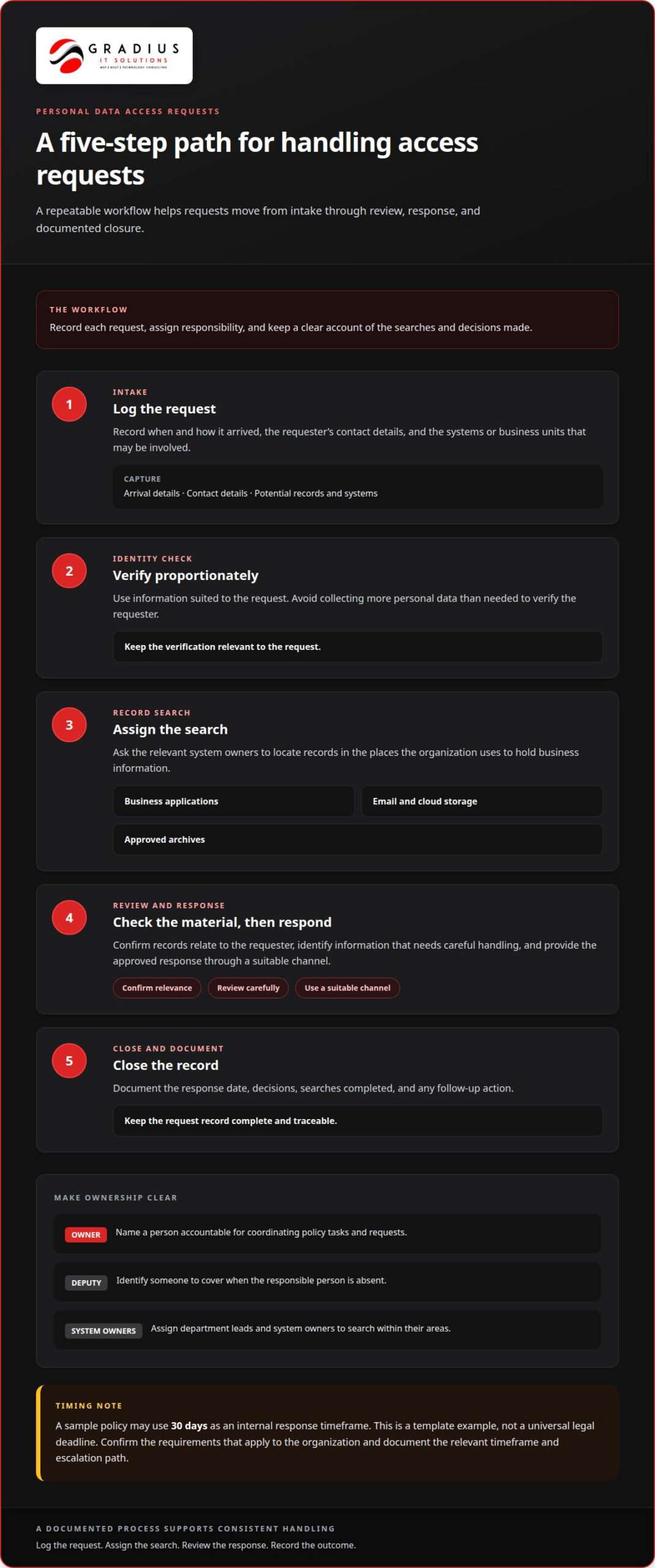
A clear access-request procedure helps prevent requests from getting lost between inboxes, departments, and systems. The policy should identify who receives a request, who verifies the requester, who searches for records, and who approves the response. It should also explain how the organization documents each step and tracks deadlines.
Set an internal response timeframe that staff can follow. A sample policy may use 30 days as a response timeframe, but that is a template example, not a universal legal deadline. The responsible person should confirm which requirements apply to the organization and its data, then document the applicable timeframe and any escalation path.
Use a repeatable workflow:
- Log the request. Record when it arrived, how it arrived, the requester’s contact details, and the systems or business units involved.
- Verify identity proportionately. Use information suited to the request, avoiding unnecessary collection of additional personal data.
- Assign the search. Ask system owners to locate relevant records in business applications, email, cloud storage, and approved archives.
- Review and respond. Check that records relate to the requester, identify information that requires careful handling, and provide the approved response through a suitable channel.
- Close the record. Document the response date, decisions, searches completed, and any follow-up action.
Responsibility needs a named owner, not a generic department. A Data Protection Officer has a formal role under GDPR with specific legal responsibilities. An organization without that role should still identify a designated person accountable for coordinating policy tasks and requests. A deputy should cover absences, while department leads and system owners handle searches within their areas.
Situation: a former customer asks for a copy of personal data held by a company. Action: the request coordinator logs it, verifies identity, and assigns searches to the relevant system owners. The coordinator records each search and routes the gathered material for review. Result: the response has a traceable owner and documented process, rather than relying on informal messages.
Write responsibilities in plain language. Specify who can approve a response, who handles questions about storage systems, and who escalates a suspected breach discovered during a search. Staff training should use realistic examples, such as recognizing a request sent to a sales inbox and forwarding it through the designated channel. Training should also remind employees not to export or share records outside the approved process.
A policy works best when its procedures match actual system access. If a request spans shared drives, email, and cloud applications, assign an owner for each system and record completion in one tracking log. This makes the process easier to repeat and shows how responsibilities support the organization’s stated privacy practices.
Technical and organizational security measures
A policy should turn security expectations into controls people can apply across systems, devices, and paper records. Limit personal data access to authorized roles, assign each user a unique account, and remove access when job duties change. Unique accounts help connect system activity to the person responsible. Use multi-factor authentication for sensitive systems and remote access, and train staff to report suspicious messages or unexpected file access.
Technical safeguards work best in layers. Encrypt personal data in transit and at rest, and avoid sending sensitive information in clear text. Keep a central copy in an approved system instead of storing personal-data files on individual computers. Protect endpoints, filter email threats, monitor system activity, and use secure authentication for remote access. Store servers containing personal data in a restricted area, away from general office space.
Set out employee responsibilities alongside the controls. The policy can require staff to:
- Lock screens when leaving their desks and keep passwords confidential.
- Access only records needed for assigned work, following least-privilege access.
- Use approved channels to share personal data and report suspected exposure promptly.
- Follow documented backup procedures, including the frequency and retention period.
- Store paper records securely and shred printouts when no longer required.
For retention and disposal, define what data the organization keeps, why it needs it, how long it remains, and when deletion occurs. Specify secure deletion for electronic records and secure shredding for paper. Set backup frequency and retention rules too, so deleted information does not remain indefinitely in backup copies.
Situation: An employee downloads customer records to a laptop for convenience. Action: The policy directs staff to use the central system, restricts downloads, and requires reporting unexpected copies. Result: Fewer uncontrolled copies remain outside the organization’s approved storage and access controls.
Make security steps specific to real work. For example, a finance employee handling account records may need access to a defined folder, while a sales employee may need only contact details. Managers approve access based on job duties; system owners apply those permissions and review changes. Onboarding training should explain these rules, while follow-up training can use examples involving phishing emails, misplaced printouts, and accidental sharing.
Build safeguards into new processes, not only after deployment. The European Union describes appropriate measures for data protection by design and by default. For a new customer portal, that can mean limiting collected fields, restricting default access, and protecting stored records before launch. The policy should outline who approves these measures and how teams document them.
Policy review dates and frequency
Set a review schedule in the policy, then record the latest review date. An annual review creates a predictable checkpoint for owners, procedures, and electronic records. Review sooner when a new system, business process, data category, or operating location changes how personal data is handled. A calendar reminder helps the policy owner start before outdated instructions create confusion.
Review the policy against actual operations, not just its previous wording. The owner can compare its procedures with current system access, storage locations, retention practices, and request-handling workflows. Department leads can identify changes affecting individuals or business parties. For example, introducing a customer portal may require updates to the policy’s scope, responsible roles, and guidance for handling information submitted through it.
During each review, document the outcome, including decisions to leave sections unchanged. Record:
- The policy title, version, and review date.
- The owner and the people or departments consulted.
- Sections examined, changes made, and reasons for those changes.
- The approver, approval date, and next scheduled review.
A short revision history makes changes traceable. For example, an entry might note that a review updated approved storage procedures after a system change. Preserve earlier versions according to the organization’s records practices, and make the current approved copy easy for staff to identify. This prevents an old electronic file from being mistaken for the active policy.
Assign approval to the responsible executive or committee identified by the organization. Reviewers can prepare proposed wording, but the designated approver should authorize amendments before publication. The record should show who approved each change and when. If a revision affects employee duties, the policy owner should communicate the update and provide targeted training before the new procedure takes effect.
Situation: A company changes how customer information is stored and accessed. Action: The policy owner checks the affected sections, consults system owners, and proposes revised access and storage procedures. The designated executive approves the amendment, and the owner records its version and review date. Result: Staff receive one current policy that reflects the changed process.
Use the review to test whether the policy still fits its audience. Replace broad directions with specific steps, such as naming the team responsible for a request or explaining how staff report a suspected issue. Confirm that related procedures identify the same roles and approved documents. An annual review, combined with updates triggered by changes, keeps the policy connected to evolving assets and operations.
Review who can access records, where information is stored, and how requests are handled. The template recommends reviewing the company’s Data Protection Policy annually and updating it as necessary. A data protection policy should state how often it is reviewed and record the date of its latest review. Regular reviews should also address new assets and business operations.
The sample revision history lists an initial policy version dated June 12, 2019, and a policy update dated July 14, 2022. These entries illustrate how a dated history can show that the policy has progressed through review. The page recommends that organisations regularly review their data protection policies so that recorded changes remain aligned with evolving assets, operations, and procedures.
Operational data protection topics
A company policy should connect data handling to operational ownership, vendor arrangements, incident reporting, and disposal decisions. For each process, identify the responsible role, the record it maintains, and how staff escalate exceptions. This makes the policy usable when a system changes or an unusual event requires a documented response.
Vendor arrangements need clear operational boundaries. A written agreement should identify the processor’s assigned task, permitted access, and limits on using or disclosing personal information. Internally, name the business owner who tracks the relationship and routes changes for review. For example, if a payroll provider adds a data-processing function, the owner records the change and updates relevant procedures before staff rely on it.
International transfers call for clear records of the destination, data categories, and transfer safeguards. Standard Contractual Clauses or an adequacy decision may support a transfer, depending on the circumstances. According to EUR-Lex, when personal data are collected from another source, controllers must disclose applicable plans to transfer the data to a third country and whether an adequacy decision exists.
Incident reporting should define who receives reports, how they are recorded, and which events require escalation. One operating model has the IT Security department or Incident Response Team produce incident reports daily, then send weekly reports to the IT manager or director. Escalate high-priority incidents immediately. Some templates also track incident counts and resolution percentages monthly, giving leaders a view of recurring operational issues.
Situation: A team identifies repeated alerts involving access to a business system. Action: Staff follow the reporting route, the responsible team documents the event, and high-priority findings reach the IT manager immediately. Operational visibility can also draw on network monitoring practices to help teams understand system events. Result: Leaders receive a documented picture of incidents and follow-up, rather than isolated messages.
Keep operational records useful without copying sensitive data into reports. For each system, record the responsible steward and classification, then update the inventory when the system changes. The inventory should describe data elements without storing actual values. This helps teams identify ownership and assess changes without creating an unnecessary second repository of personal information.
Set a disposal process that names the role authorized to approve destruction and the record confirming completion. For example, when a business unit closes an obsolete file repository, its owner can identify records subject to retention, coordinate approved deletion, and document the action. A defined handoff prevents orphaned systems from being overlooked during operational changes.
Gradius IT Solutions
A written policy is useful only when its procedures match how your organization handles information. If you’re preparing to put new rules into practice or have identified gaps between policy and daily operations, Gradius IT Solutions can help you plan next steps around your technology environment.
Bring the areas you want to address, such as system access, data workflows, or operational responsibilities. A focused conversation can clarify how technology planning and security practices intersect with your organization’s priorities.
Contact Gradius IT Solutions to discuss your next steps.
Put Your Policy Into Practice
A company data protection policy template is a starting point. Its value comes from connecting written rules to the systems, people, and decisions that shape daily data handling. Choose an owner, keep procedures aligned with actual operations, and make updates part of how your organization introduces systems or changes workflows.
Gradius IT Solutions can help put that work into practice across your technology environment. Managed IT Services support day-to-day operations, while Cybersecurity & SOC address protective controls and security monitoring. Through Compliance as a Service, Gradius provides a GRC platform that keeps technology aligned with your framework and documentation audit-ready. Your organization remains responsible for its policy decisions and compliance obligations.
Take the next step by discussing how your policy, systems, and security practices fit together. A focused review can help identify where operational procedures need clearer ownership or stronger technical alignment.
Frequently Asked Questions
What about a POPI or POPIA policy?
A POPI or POPIA policy is designed to address South Africa’s Protection of Personal Information Act. If an organization needs a policy for that framework, it should use wording and procedures tailored to POPIA rather than assume a U.S.-focused template covers every requirement. For example, the document can identify which business units and information-handling activities fall within its intended scope, then connect them to assigned internal owners.
What rules should a data protection policy set for collecting, using, storing, and sharing data?
Give employees practical decision rules for common situations. A form owner can document which fields are mandatory, while a team lead can approve a new use before a record is reused in a different workflow. Set rules for correcting inaccurate records, handling duplicate entries, and logging changes to important data. For sharing, define how staff confirm the recipient and record the business reason, creating a useful trail without repeating sensitive information.
How often should a company review and update its data protection policy?
Set a review schedule in the policy and assign one owner to maintain its version history. After approval, publish the current version where employees can find it, withdraw obsolete copies from shared folders, and record who approved its release. If a revision changes staff duties, document how the update was communicated. These steps help show which policy version governed a decision and prevent teams from following conflicting copies.

Article by
Robert Joyce
Robert Joyce is the Owner and Chief Technology Officer of Gradius IT Solutions, a security-first provider of managed IT, cybersecurity, cloud, compliance, and secure AI solutions. Headquartered in New Jersey with satellite offices in the Midwest and South Florida, Gradius serves businesses across the Tri-State Area, Midwest, South Florida, and nationwide.
Robert brings 30 years of IT experience, including 23 years in hedge funds, global banks, and wealth management firms where uptime, security, and continuity are non-negotiable. He began in trade floor support at Caxton, Shell Trading, and Knight, provided senior trade floor support at RBC and SAC Capital, served as VP of IT at EntrustPermal, and was CTO of Gerstein Fisher. After September 11, he helped rebuild critical technology infrastructure for Merrill Lynch.
His expertise spans Microsoft 365, cloud, cybersecurity, networking, infrastructure, disaster recovery, compliance, and strategic IT leadership.
Robert founded Gradius to bring enterprise-level technology and security to small and midsized businesses at a predictable monthly cost. Gradius delivers managed and co-managed IT, cybersecurity, Microsoft 365 and cloud, compliance programs supported by a GRC platform, secure AI consulting, and vCIO services, with a full help desk, 24/7 NOC and SOC monitoring, and U.S.-based onsite engineers and SOC.
Robert works directly with business owners and executives as their single accountable point of contact. His philosophy: one trusted partner, complete IT accountability.
Disclaimer
## Disclaimer
The information provided in this article is for general informational and educational purposes only and should not be considered professional IT, cybersecurity, legal, regulatory, or compliance advice. While Gradius IT Solutions strives to provide accurate and up to date information, technology, security threats, and regulatory requirements change frequently, and we cannot guarantee that all information will remain current or applicable to your specific situation.
Every organization has unique technology, security, compliance, and business requirements. Before implementing any recommendations discussed in this article, you should evaluate their suitability for your environment or consult with a qualified technology professional.
Gradius IT Solutions makes no warranties, express or implied, regarding the completeness, accuracy, reliability, or results obtained from the use of this information. Any actions you take based on this content are at your own risk. Gradius IT Solutions shall not be liable for any direct, indirect, incidental, or consequential damages arising from the use of, or reliance upon, the information contained in this article.
References to third party products, services, or vendors are provided for informational purposes only and do not constitute an endorsement unless explicitly stated.
If you would like guidance tailored to your organization, contact Gradius IT Solutions to schedule a consultation with one of our technology experts.