

A network can look orderly on paper and still leave critical risks exposed. Conduct a network security risk assessment by discovering assets, reviewing configurations and compliance, scanning for vulnerabilities, testing defenses, and ranking findings by likelihood and business impact. Businesses should assess network security at least annually and after a significant change to their IT infrastructure. Effective network security assessment services turn automated findings into prioritized actions, not just a pile of alerts.
Automated tools can reveal security gaps across complex networks, but scans alone cannot show how a weakness could affect your business or whether it can be exploited in practice. Effective network security assessment services combine asset discovery, compliance checks, automated testing, and penetration testing. The key is to prioritize findings and turn them into clear next steps.
Key Takeaways
- Start by defining what the assessment must protect and which business risks matter most.
- Build an accurate asset inventory so unmanaged devices and overlooked systems don’t escape review.
- Use automated tools to surface configuration gaps and vulnerabilities, then validate important findings with expert testing.
- Review security controls against relevant compliance needs and turn findings into prioritized, actionable remediation steps.
- Choose the assessment approach that matches your network’s scope, including cloud services, remote endpoints, and third-party connections.
How To Conduct A Network Security Risk Assessment?
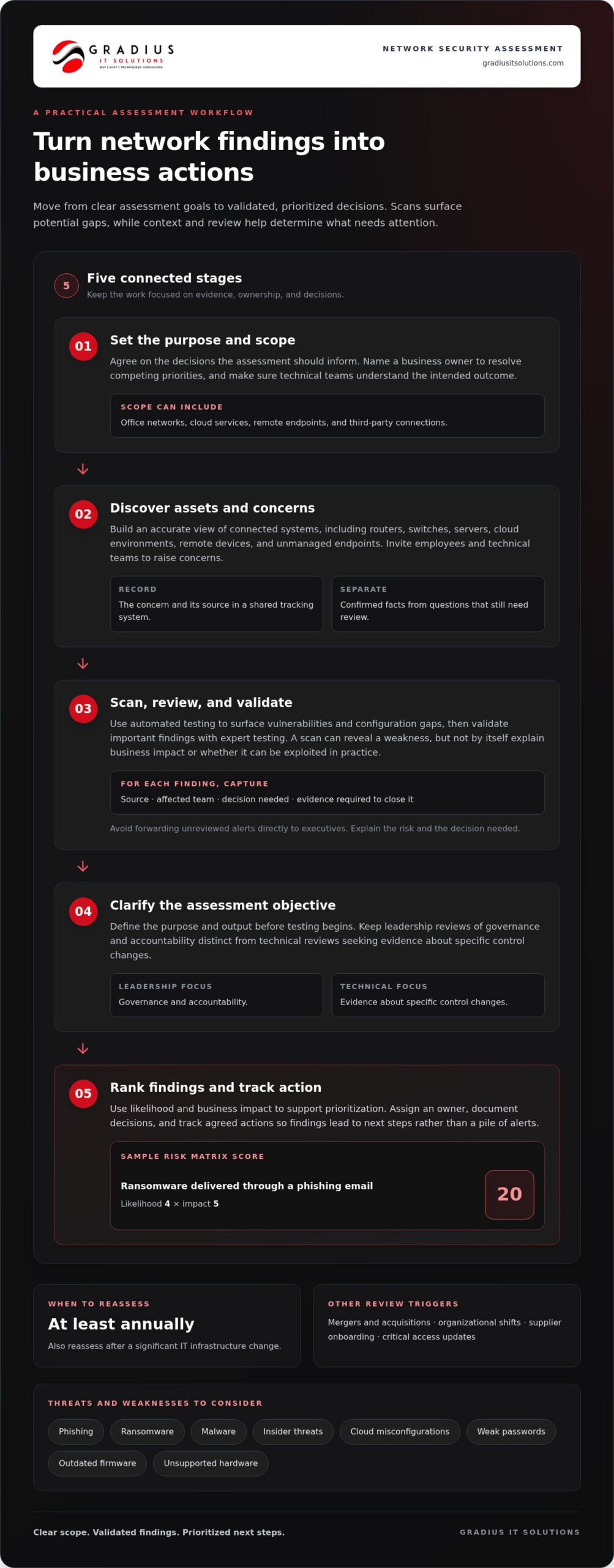
This section is a short orientation, not a standalone guide to IT risk assessment methodology. Treat the work as a business decision process: agree on the questions, involve responsible teams, and decide how findings will support action.
-
Set the Assessment Purpose
Begin by agreeing on the decisions the assessment should inform. For example, leadership may need to decide which system changes to schedule, while operations teams need to understand how proposed changes affect daily work. Name a business owner who can resolve competing priorities and make sure technical staff understand the intended outcome. Connecting security work to broader technology strategy planning helps keep recommendations aligned with business goals.
-
Identify Network Threats and Vulnerabilities
Give employees and technical teams a clear way to raise security concerns during the assessment. A staff member might notice that access lasts longer than a project requires, or an administrator may flag a change that affects a key workflow. Record concerns in a shared tracking system, assign an owner, and distinguish confirmed facts from questions that still need review. This gives decision-makers a reliable basis for setting priorities.
-
Scan for Vulnerabilities and CVEs
Agree how technical observations will be reviewed before they become business actions. For each finding, record its source, the affected team, the decision needed, and the evidence required to close it. Avoid forwarding unreviewed alerts directly to executives: raw technical output can obscure the decision at hand. A defined review process helps specialists explain the risk while business owners consider timing and dependencies.
-
Distinguish Related Security Assessments
Before approving testing, clarify its purpose and the output the organization needs. A leadership review may focus on governance and accountability, while technical teams may need evidence about specific control changes. Keep those objectives distinct during planning and reporting. Assign someone to coordinate questions, document decisions, and track agreed actions. This prevents teams from treating different findings as interchangeable or assuming one review answers every security question.
The NIST methodology is recommended for cybersecurity risk assessments. Their scope can include phishing, ransomware, malware, insider threats, cloud misconfigurations, and weak passwords. Cybersecurity assessments take near 1-2 weeks, after which a detailed report of discovered risks and vulnerabilities is given. Network assessments can also map routers, switches, and servers, identifying outdated firmware or unsupported hardware.
Use a risk matrix to support discussion of priorities: the sample assigns a risk score of 20 to ransomware delivered through a phishing email, based on likelihood 4 and impact 5. Reassess network security after major infrastructure changes, mergers and acquisitions, organizational shifts, supplier onboarding, or critical access updates. These triggers can prompt teams to review whether previous findings and agreed actions still reflect current conditions.
Asset inventory and unmanaged endpoint discovery
Build an inventory of what connects to your network, who owns each asset, and what it can access. Map how devices relate to one another, then prioritize assets that could expose sensitive systems or data.
-
Discover Network Assets and Endpoints
Start with authorized discovery across office networks, cloud environments, remote connections, and employee devices. Compare scan results with purchasing records, identity directories, and staff assignments to spot unmanaged endpoints or shadow IT. A sample assessment might scan subnet 192.168.0.0/24 and discover 120 assets, while successfully scanning only 110. Investigate the remaining devices instead of assuming they are inactive. Unknown phones, personal laptops, and unapproved cloud services can create internal paths to business information.
-
Map Network Topology and Devices
Record how each asset connects, including its network segment, address, device type, owner, and access role. Map the links between endpoints, switches, routers, servers, wireless networks, and cloud services. For example, a diagram might reveal that a conference-room device shares a segment with file storage, prompting a review of access boundaries. Note devices found in scans but missing from configuration records. This map shows traffic paths and helps teams spot unexpected connections before they create an opportunity for a breach.
- Combine discoveries into a single inventory. Give each asset a stable identifier, such as its hostname or serial number, and record when and how it was found. Distinguish business-owned equipment from personal devices and third-party connections. Check for duplicates when a laptop appears under both a device name and a network address. Flag assets without an identified owner for follow-up. These steps make later reviews more reliable and prevent duplicate records from being mistaken for separate devices.
-
Prioritize the Asset Inventory
Rank assets by the data they handle, their business role, external exposure, and access privileges. A server holding sensitive information warrants closer attention than a display with no network access. Record dependencies as well: an overlooked authentication service may support access across several systems. Use this context to decide which owners should review access first and where segmentation or stronger controls could reduce exposure. Prioritization makes the inventory useful for decisions, not just a static catalog.
- Set a repeatable process for keeping records current. Compare discovery results with approved changes, staff onboarding, equipment retirement, and new cloud connections. Track whether an asset is known, assigned, approved, and appropriately connected. Network management services can support ongoing visibility as network infrastructure changes. A current inventory helps teams identify unfamiliar devices sooner and direct security reviews toward assets with meaningful business access.
Automated assessment tools and services
Automated tools can inspect network configurations, endpoints, cloud settings, and exposed services. Use them to find recurring issues, then validate each finding against the business context.
- Define the scan scope and safeguards. List the networks, cloud accounts, endpoints, and systems approved for testing. Identify sensitive production services and schedule scans to avoid peak business periods. Set permissions, scan intensity, and exclusions before running a tool. For example, a fragile production system may need a lighter check than a test environment. Document the scope so the client and technical team know which assets were assessed and which were not.
- Select tools for specific assessment tasks. Use vulnerability scanners to find known software weaknesses, configuration tools to flag insecure settings, and cloud security checks to inspect exposed storage or excessive permissions. One dashboard may combine results, but each finding should retain its source and affected asset. For example, a configuration scan might flag an externally accessible management interface, while an endpoint scan finds missing patches. Match each tool to a specific question rather than treating one product as a complete assessment.
- Configure checks against approved baselines. Compare device and service settings with the organization’s security requirements. Review access controls, firewall rules, outdated software, and encryption settings. For secure connections, check whether systems enforce TLS 1.2 or higher where applicable. Automated policies can detect deviations across similar devices, such as one server allowing weaker settings than its peers. Keep baseline changes documented, so a revised rule does not hide a genuine exposure or create noisy alerts.
- Validate and rank automated findings. Confirm that the asset exists, the detected version or setting is accurate, and the issue matters in context. A scanner may identify a vulnerability without showing whether the system is reachable or handles sensitive information. Consider asset criticality, exposure, exploitability, and business impact before setting priority. Group duplicate alerts, document evidence for false positives, and assign an owner and remediation action to each verified issue.
- Turn results into a repeatable workflow. Produce a report listing affected assets, evidence, severity, ownership, and next steps. Track remediation, then rerun the relevant checks to confirm the finding is closed. Continuous monitoring can detect configuration changes between formal assessments, but alerts still need review and context. For example, a newly exposed service should prompt an investigation, not an automatic conclusion that the system is compromised. Automation improves coverage and consistency; people still make the risk decisions.
What do network security assessment services include?
Network security assessment services combine technical testing, control reviews, and practical remediation guidance. The scope should explain how network weaknesses could affect systems, sensitive information, and business operations.
- Define the scope and business priorities. Identify network boundaries, cloud environments, remote access paths, and business processes in scope. Note which systems support critical work and handle sensitive data. This lets assessors connect technical findings to operational impact instead of presenting isolated alerts. Use the NIST Cybersecurity Framework as a reference for organizing cybersecurity activities, according to the National Institute of Standards and Technology.
- Review configurations and access controls. Examine network access control lists, firewall rules, account permissions, password practices, software versions, and patch status. Check whether users and devices have only the access their tasks require. For example, an assessment might identify an overly broad rule that lets a guest network reach an internal business system. Document the setting, its exposure, and the corrective action instead of listing a configuration issue without context.
- Combine scanning with targeted testing. Vulnerability scans identify known weaknesses and missing updates across approved systems. Penetration testing can then establish whether selected weaknesses create a practical route into the network. Keep testing within the agreed scope and record evidence for each confirmed finding. The methods answer different questions: which weaknesses appear to exist, and whether a tested weakness can be exploited under defined conditions.
- Assess compliance and response readiness. Compare relevant safeguards with the organization’s applicable framework and data obligations. HIPAA is relevant to healthcare data protection, according to the U.S. Department of Health and Human Services. Organizations handling payment card data may also need to consider PCI DSS. Review incident response procedures, escalation roles, backup and recovery arrangements, and employee awareness. A tabletop ransomware scenario can show whether staff know how to report suspicious activity and who coordinates the response.
- Require a useful report and action plan. Ask for an overview of the environment, an asset summary, risk scores, technical findings, and clear recommendations. Findings should identify affected systems, evidence, severity, business impact, and accountable remediation owners. A useful report distinguishes urgent exposure from routine hardening, then records actions and follow-up testing. For example, an exposed service may need an immediate access review, while a lower-impact software update can be scheduled for planned maintenance.
How do network security assessments differ from penetration testing and vulnerability assessments?
These methods answer different security questions. A network security assessment offers a broad view, vulnerability assessments identify weaknesses, and penetration testing examines whether selected weaknesses can be exploited.
- Use a network security assessment to evaluate the whole picture. Review assets, configurations, access controls, network exposure, and security processes together. The goal is to understand how technical weaknesses connect to business risk. For example, an assessment may show that a server vulnerability is more significant because the server holds sensitive data and has broad internal access. Findings should connect evidence to impact and practical remediation, rather than simply listing issues from separate tools.
- Use a vulnerability assessment to find and rank weaknesses. Scanners compare systems and settings with known vulnerabilities, missing patches, and configuration problems. The results help teams identify affected devices and prioritize corrective work. A vulnerability assessment usually identifies potential exposure; it does not necessarily prove an attacker can exploit it. Review scan evidence and system context before treating an alert as a confirmed route into the network.
- Use penetration testing to validate exploitability. Within an agreed scope, authorized testers attempt to exploit selected weaknesses and document the access they can gain. For example, a test may determine whether a misconfigured service allows access beyond its intended network segment. This controlled exercise can demonstrate a practical attack path, but it covers only the systems and conditions tested. It does not replace a wider environment review or identify every known weakness.
- Match the method to the decision you need to make. If leadership needs an overall risk picture, begin with a broad assessment. If the immediate task is finding known software issues, use vulnerability scanning. If you need to know whether a particular weakness can be exploited, scope a penetration test. A healthcare organization, for example, may need a broad review of access to sensitive records, followed by focused testing of a high-risk connection.
- Combine results into one remediation plan. Bring scan findings, test evidence, and control observations together, then assign owners and actions. Label detected weaknesses separately from successfully demonstrated exploits. This prevents teams from treating every scanner alert as a confirmed breach or assuming a clean penetration test proves the entire network is secure. Retest important fixes and update priorities when business systems or access paths change.
Explore penetration testing services
Gradius IT Solutions: Managed IT Services
Gradius IT Solutions can help translate assessment findings into practical security and infrastructure actions. Its Managed IT Services and Cybersecurity & SOC offerings support businesses that need to address vulnerabilities and maintain ongoing oversight. For organizations working within a defined compliance framework, Gradius runs a GRC platform that keeps technology aligned with the client’s framework and documentation audit-ready. Cloud & Microsoft 365 support can also help address security considerations across those environments. Turn to Gradius when your team needs help prioritizing assessment findings, coordinating remediation, or maintaining visibility as systems change.
Contact Gradius IT Solutions or visit the website to discuss your next steps.
Turn assessment findings into lasting security habits
A risk decision is useful when it leads to a clear action. Assign an owner, agree on the next step, and define what evidence will show the work is complete. Revisit decisions as business needs change, so security improvements become part of normal operations rather than a report left untouched.
Choose an open finding and identify who can approve its resolution. If a change affects a business process, involve the people who rely on it before adjusting access or configurations. This keeps the next step practical and helps the team make steady progress.
Frequently Asked Questions
Understanding What’s on Your Network: Why Is It So Important?
Knowing what connects to your network helps you spot changes that could introduce unnecessary access. A temporary project device, for example, might remain connected after the work ends. Understanding which users and systems depend on it helps teams decide whether to remove it, restrict its access, or retain it. Clear visibility also gives responders useful context when investigating unusual activity.
What Are Cybersecurity Assessment Services?
Cybersecurity assessment services examine how an organization protects its technology, information, and operations. The scope may include security practices, access processes, and response planning. For example, a business that relies on remote staff should consider how employees connect to internal resources and report suspicious activity. The assessment should produce practical findings that help leaders choose changes suited to their operations.
What Information Is Collected in a Network Assessment?
A network assessment may collect device identifiers, operating system details, software versions, network addresses, configuration information, and access relationships. These details show how systems connect and which teams depend on them. Before the review begins, decide who can view the evidence, where it will be stored, and how sensitive records will be handled. Planning this in advance helps protect information collected during testing.
What’s Included in Your Network Audit Report?
A useful report gives technical teams enough evidence to investigate findings and decision-makers enough context to act. It can distinguish confirmed observations from items that need further review, identify affected business functions, and assign remediation owners. For example, administrators may need configuration details, while department leaders need to understand how a proposed change could affect their workflows.
What Types of Network Security Assessments Are Available?
Assessment options include vulnerability reviews, penetration tests, configuration checks, compliance reviews, and broader evaluations of security practices. Each serves a different purpose and can focus on a specific environment or business question. A company investigating a remote-access concern may choose focused testing, while an organization reviewing its overall security program may need a broader scope. Choose the approach based on the decision the results need to support.
What Steps Are Involved in a Network Security Assessment?
Start by defining the review’s purpose and scope, then coordinate access and timing with the teams responsible for affected systems. Gather and analyze evidence, discuss findings with the relevant owners, and document agreed actions. After making a change, confirm that it works as intended and record the result. For example, check whether revised permissions preserve necessary access while addressing the original concern.
How Should a Business Choose a Network Security Assessment Provider?
Choose a provider that clearly explains its scope, testing approach, evidence handling, and reporting. Look for relevant technical experience and recommendations tied to business priorities, not just automated findings. Ask how the provider will communicate with system owners and support follow-up. Gradius IT Solutions provides Managed IT Services and Cybersecurity & SOC to help businesses manage ongoing technology and security needs.
What U.S. compliance requirements call for network security assessments?
Relevant requirements include HIPAA for healthcare data and PCI DSS for payment card security. Government cybersecurity assessments can also help entities evaluate compliance with FISMA.

Article by
Robert Joyce
Robert Joyce is the Owner and Chief Technology Officer of Gradius IT Solutions, a security-first provider of managed IT, cybersecurity, cloud, compliance, and secure AI solutions. Headquartered in New Jersey with satellite offices in the Midwest and South Florida, Gradius serves businesses across the Tri-State Area, Midwest, South Florida, and nationwide.
Robert brings 30 years of IT experience, including 23 years in hedge funds, global banks, and wealth management firms where uptime, security, and continuity are non-negotiable. He began in trade floor support at Caxton, Shell Trading, and Knight, provided senior trade floor support at RBC and SAC Capital, served as VP of IT at EntrustPermal, and was CTO of Gerstein Fisher. After September 11, he helped rebuild critical technology infrastructure for Merrill Lynch.
His expertise spans Microsoft 365, cloud, cybersecurity, networking, infrastructure, disaster recovery, compliance, and strategic IT leadership.
Robert founded Gradius to bring enterprise-level technology and security to small and midsized businesses at a predictable monthly cost. Gradius delivers managed and co-managed IT, cybersecurity, Microsoft 365 and cloud, compliance programs supported by a GRC platform, secure AI consulting, and vCIO services, with a full help desk, 24/7 NOC and SOC monitoring, and U.S.-based onsite engineers and SOC.
Robert works directly with business owners and executives as their single accountable point of contact. His philosophy: one trusted partner, complete IT accountability.
Disclaimer
## Disclaimer
The information provided in this article is for general informational and educational purposes only and should not be considered professional IT, cybersecurity, legal, regulatory, or compliance advice. While Gradius IT Solutions strives to provide accurate and up to date information, technology, security threats, and regulatory requirements change frequently, and we cannot guarantee that all information will remain current or applicable to your specific situation.
Every organization has unique technology, security, compliance, and business requirements. Before implementing any recommendations discussed in this article, you should evaluate their suitability for your environment or consult with a qualified technology professional.
Gradius IT Solutions makes no warranties, express or implied, regarding the completeness, accuracy, reliability, or results obtained from the use of this information. Any actions you take based on this content are at your own risk. Gradius IT Solutions shall not be liable for any direct, indirect, incidental, or consequential damages arising from the use of, or reliance upon, the information contained in this article.
References to third party products, services, or vendors are provided for informational purposes only and do not constitute an endorsement unless explicitly stated.
If you would like guidance tailored to your organization, contact Gradius IT Solutions to schedule a consultation with one of our technology experts.