
Table of Contents
- When AI Automation Makes Sense for Small Businesses
- Real Small Business AI Use Cases That Deliver Results
- AI Readiness Checklist for Small Businesses
- Choosing the Right AI Automation Tools for SMBs
- AI Automation Risks for Small Businesses
- The Decision Framework: Do You Need AI Automation?
- Getting Started: A Practical Implementation Path
- Frequently Asked Questions
Last Updated: October 20, 2026
When AI Automation Makes Sense for Small Businesses
Is AI automation necessary for SMBs? The answer to whether is AI automation necessary for SMBs depends on your workflow, team size, and growth goals. Not every small business needs it now, but many leave productivity gains on the table by avoiding it.
AI automation works best on repetitive, high-volume tasks eating up staff time: data entry, email responses, customer follow-ups, report generation.
The real question is whether the time and money spent on manual work could be better spent elsewhere. For most growing SMBs, yes.
Gradius IT Solutions helps organizations identify which workflows benefit from automation and which are better handled by people; bad automation decisions waste money and frustrate teams.
Real Small Business AI Use Cases That Deliver Results
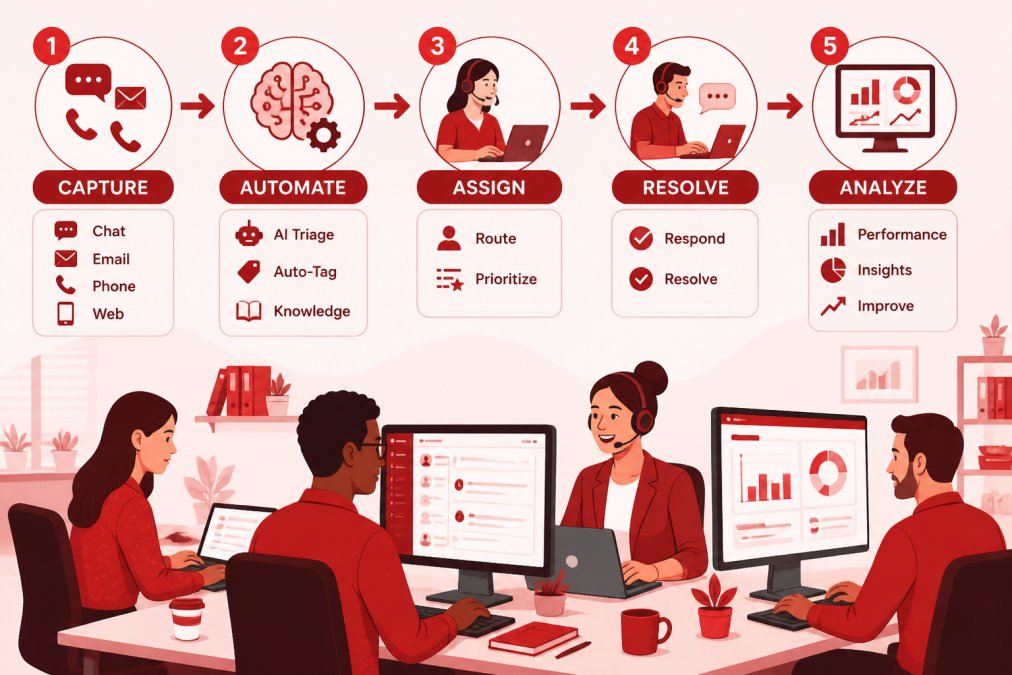
Small business AI use cases fall into clear categories. Each solves a specific pain point that teams face.
Email and Marketing Workflows
Email automation saves time and improves consistency by replacing manual follow-ups with triggers based on customer behavior.
A dental practice might send automated appointment reminders and post-visit care instructions.
Automated workflows also ensure no client falls through the cracks: messages go out consistently, on schedule, without human error.
Setup is straightforward: define the trigger (email opened, form submitted, date reached) and the action (send message, update record, notify team).
Customer Service and Lead Management
Chatbots and AI-powered support tools handle routine questions around the clock, answering FAQs, collecting basic information, and routing complex issues to staff.
A healthcare practice uses a chatbot to answer insurance questions and schedule appointments. An accounting firm uses one to collect tax document lists before client meetings.
The pattern is the same: capture routine information, free staff from repetitive conversations, escalate what matters.
Data Entry and CRM Updates
This is where automation delivers the most obvious time savings. Every customer interaction creates data: contact info, purchase history, support tickets, follow-up notes.
Manual data entry is slow and error-prone.
A construction company uses automation to log job site updates into project management software.
The payoff compounds: better data means better decisions, accurate customer history, visible patterns, and faster service.
AI Readiness Checklist for Small Businesses
Before investing in automation, check whether your business is ready.
Do you have documented processes? Automation works best when workflows are clear and repeatable.
Is the task truly repetitive? Automation handles high-volume, low-variation work.
Do you have the data? Automation needs clean, organized data. If customer information is scattered across systems or spreadsheets, consolidate it first.
Can your team learn new tools? Automation tools have learning curves.
Choosing the Right AI Automation Tools for SMBs
The market has hundreds of automation platforms; the right one depends on your workflow.
Zapier and Make connect apps and trigger actions across them.
Native automation within your existing software often works better than third-party tools. Microsoft 365 has Power Automate.
Specialized tools focus on specific workflows: email marketing automation, CRM lead scoring, support chatbots.
AI agents and chatbots handle customer-facing work: answering questions, collecting information, escalating to humans.
The best tool is the one your team will actually use.
AI Automation Risks for Small Businesses
Automation isn’t risk-free, but its failure modes are predictable and mostly preventable with the same controls you would apply to any system touching customer data. Four matter most for a 5 to 100 user business: data handling, access, model behavior, and operational fragility.
Data Privacy and Compliance
Every automation tool you connect becomes a new place where customer data lives, moves, or is processed. Before you connect anything, answer four questions in writing:
- Where does the data go? Cloud or on-premises, which region, and which subprocessors. A tool that routes data through a third country may create obligations your industry rules do not permit.
- What does the vendor do with it? Read the data processing agreement (DPA) and the AI training clause. Some platforms train models on customer inputs by default; enterprise tiers often let you opt out. If you cannot find the clause, assume the worst and ask.
- Who can access it? Named administrators only, with multi-factor authentication (MFA) enforced. Shared logins are the most common cause of automation-related data exposure in small businesses.
Regulated industries carry extra weight. HIPAA requires a business associate agreement (BAA) before any vendor touches protected health information (PHI), and not every automation platform will sign one. PCI DSS restricts where cardholder data can flow, so an automation that copies payment details into a CRM or inbox is a scope problem, not a convenience. Financial services firms subject to NYDFS or working toward SOC 2 need vendor risk documentation and audit logs the tool may not produce by default.
If a vendor will not sign a BAA, will not disclose subprocessors, or cannot produce access logs, that is a disqualifying answer for healthcare and financial workflows. Do not proceed on a promise.
Access Control and Human Review
AI automation fails in two directions: it does the wrong thing, or it does the right thing for the wrong person. Both are access problems.
- Least privilege. The service account an automation runs under should have access only to the systems and records it needs. A workflow that updates appointment reminders does not need read access to payroll.
- Human-in-the-loop for irreversible actions. Sending a client-facing message, issuing a refund, deleting a record, or filing a document should require a human approval step until the workflow has a track record. Draft-and-approve is slower than full automation, but it catches the errors that damage trust.
- Escalation paths. Chatbots and AI agents must hand off to a person on defined triggers: a complaint, a legal or medical question, a request outside the script, or a frustrated tone. Without an escalation rule, the bot will confidently answer questions it should not.
Model Behavior and Output Quality
Large language model (LLM) based tools generate plausible text, which is not the same as correct text. They can hallucinate facts, misstate policy, or produce a confident answer that is wrong. For customer-facing automation, that risk is real: a chatbot that invents a coverage detail or a delivery date creates a liability your business owns.
Mitigations that work in practice:
- Constrain the tool to approved content (a knowledge base, a policy document, a product catalog) rather than open-ended generation.
- Test with adversarial prompts: ask it about refunds, legal advice, competitors, and topics outside its scope. Note where it fails and add guardrails.
- Review a sample of outputs weekly for the first month, then monthly. Quality drifts as your content and products change.
Implementation Mistakes and Hidden Costs
The biggest mistake is automating a broken process. If your workflow is inefficient, automating it makes the inefficiency faster and harder to see.
Setup effort is real and often underestimated. Configuring the tool, mapping data fields, testing workflows, and training staff typically consumes more time than the subscription saves in the first month.
Before you connect any automation to customer data, confirm four things: a signed DPA (and BAA if PHI is involved), MFA on every admin account, a named human owner for each workflow, and a logging path that lets you reconstruct what the automation did. If any of the four is missing, pause the rollout.
Tools that promise ‘set it and forget it’ are overstating the case. Plan for ongoing monitoring and updates, and budget staff time for both.
The Decision Framework: Do You Need AI Automation?
Most articles answer ‘is AI automation necessary’ with a list of benefits. That is not a decision. The framework below is designed to produce one of three answers: automate now, automate later, or keep it human-led. Work through it in order; stop at the first ‘no’.
Step 1: Quantify the Work
Start with the task, not the tool. Pick one workflow and measure it for two weeks.
- Frequency. How many times per week does the task occur? A task done twice a week is rarely worth automating; one done 200 times a week usually is.
- Time per instance. How long does one instance take, including the context switching around it? A five-minute task done 40 times a week is over three hours of staff time.
- Variation. Does the task follow the same steps every time, or does it branch on judgment? High variation is a signal to keep a human in the loop.
Write the numbers down. ‘We spend about 10 hours a week on intake follow-ups’ is a decision input; ‘we want to be more efficient’ is not.
Step 2: Score the Workflow
Use this table to decide whether a workflow is a candidate. Each row is a gate, not a suggestion.
| Decision Point | Yes → Next Step | No → Decision |
|---|---|---|
| Is the task repetitive and high-volume (roughly weekly or more, similar steps each time)? | Continue | Automation won’t help; leave it manual |
| Can you document the workflow clearly enough that a new hire could follow it? | Continue | Fix and document the process first, then revisit |
| Is the data the task depends on clean and in one system? | Continue | Consolidate data before automating |
| Will automation free staff time for higher-value work, or improve consistency customers notice? | Continue | Reconsider the priority |
| Is the error cost recoverable (a human can catch and correct it)? | Continue | Keep human-led with automation as assist only |
| Does the payback model in Step 3 clear your threshold? | Proceed | Revisit later |
Step 3: Build a Payback Model
A reusable calculation beats a vendor’s ROI claim. Total the annual cost of the workflow on one side and the annual cost of automating it on the other.
Annual cost of the manual workflow
- Hours per week spent on the task × hourly loaded cost of the staff doing it × 52 weeks.
- Add the cost of errors: rework time, credits, or lost business you can reasonably attribute to the task.
Annual cost of the automated workflow
- Subscription fees for the automation platform and any connector tiers.
- Setup labor: configuration, data mapping, testing, and training, expressed as hours × loaded cost. This is usually a one-time cost but belongs in year one.
- Ongoing maintenance: a realistic allowance for monitoring, fixing broken workflows, and reviewing outputs. Small teams often underestimate this.
Payback period = one-time setup cost ÷ (annual manual cost − annual automated cost). If the result is under six months, the workflow is usually worth doing. Between six and twelve months, it depends on how strategic the freed time is.
Run the model on one workflow before you evaluate any platform. Vendors sell features; the model tells you which features matter. A tool that is 20% cheaper but requires twice the setup labor is not cheaper.
Step 4: Decide What to Keep Human-Led
Some workflows should not be fully automated, regardless of the payback math. Common examples in small businesses:
- Anything requiring professional judgment. Clinical advice, legal interpretation, tax positions, and investment recommendations need a licensed human in the loop. Automation can draft and route; it should not decide.
- Irreversible customer-facing actions. Sending a final invoice, terminating an account, or issuing a refund should require approval until the workflow has a long, clean track record.
- Exceptions and escalations. The 10% of cases that do not fit the pattern are where automation fails most visibly. Route them to a person by design, not by accident.
Step 5: Choose the Timing
If the workflow passes Steps 1 through 3 and is not on the human-led list, automate now. If it fails on data cleanliness or process documentation, fix those first and revisit in a quarter; that is ‘automate later’, and it is a legitimate answer. If it fails on volume or error cost, keep it human-led and stop looking for a tool to solve it.
The honest answer to ‘is AI automation necessary’ is that it is necessary for a specific, measurable, well-documented, recoverable workflow, and unnecessary for everything else. If you cannot name the workflow and the hours it consumes, you are not ready to buy a tool yet.
Getting Started: A Practical Implementation Path
If you decide automation makes sense, follow this sequence.
Step 1: Pick one workflow. Start small.
Step 2: Document the current process. Write down every step.
Step 3: Identify the tools you need. What systems are involved?
Step 5: Train your team. Show staff how the automation works.
Step 7: Measure the impact. Track hours saved.
This approach reduces risk.
AI automation is a tool, not a necessity.
If you’re unsure whether automation makes sense for your business, Gradius IT Solutions can help you evaluate your workflows and identify which ones benefit most. We work with small and mid-sized businesses to implement Secure AI & Automation Services safely, with proper data protection and compliance built in.
Frequently Asked Questions
Is AI automation actually necessary for small businesses, or is it just hype?
AI automation is necessary when your team spends hours on repetitive tasks that pull focus from growth activities. If you’re manually entering CRM data, sending similar emails, or processing customer inquiries with the same steps each time, automation can free capacity without replacing staff. It’s not necessary for every workflow, only for those that repeat predictably. The real question isn’t whether AI is trendy, but whether your business has specific, high-volume tasks that automation can handle faster and more consistently than manual work.
What are the best AI automation tools for SMBs?
The right tool depends on your workflow. Email and marketing automation platforms integrate with your existing systems and trigger actions based on customer behavior. CRM systems with built-in automation reduce data entry and flag follow-ups automatically. Customer service chatbots handle routine inquiries 24/7 without adding staff. Document processing tools extract data from invoices or forms in seconds. Start by identifying which repetitive task costs your team the most time, then choose a tool designed for that specific workflow. Integration with your current software matters more than feature count.
What are the main risks of AI automation for small businesses?
The biggest risks are data privacy, compliance violations, and poor implementation. If your business handles regulated data (healthcare, financial, legal), automation must comply with HIPAA, PCI DSS, or other standards, misconfiguration creates liability. Hidden costs also emerge: training staff, integrating systems, and maintaining the automation over time. Common mistakes include automating the wrong process, failing to set up human oversight, and not testing the automation before full deployment. Automation also requires clean data; if your CRM or email list has errors, the automation will amplify them.
How do I know if my small business is ready for AI automation?
You’re ready if you can answer yes to these: Do you have a documented, repeatable process? Is the workflow causing real bottlenecks or costing staff time? Do you have clean, organized data to feed the automation? Can you define success with clear metrics, like response time or error rate? Are you willing to test and adjust the setup before going live? If you’re unsure, start with a low-risk pilot, automate one email sequence or data entry task for a week and measure the time saved. That real-world test beats guessing.