

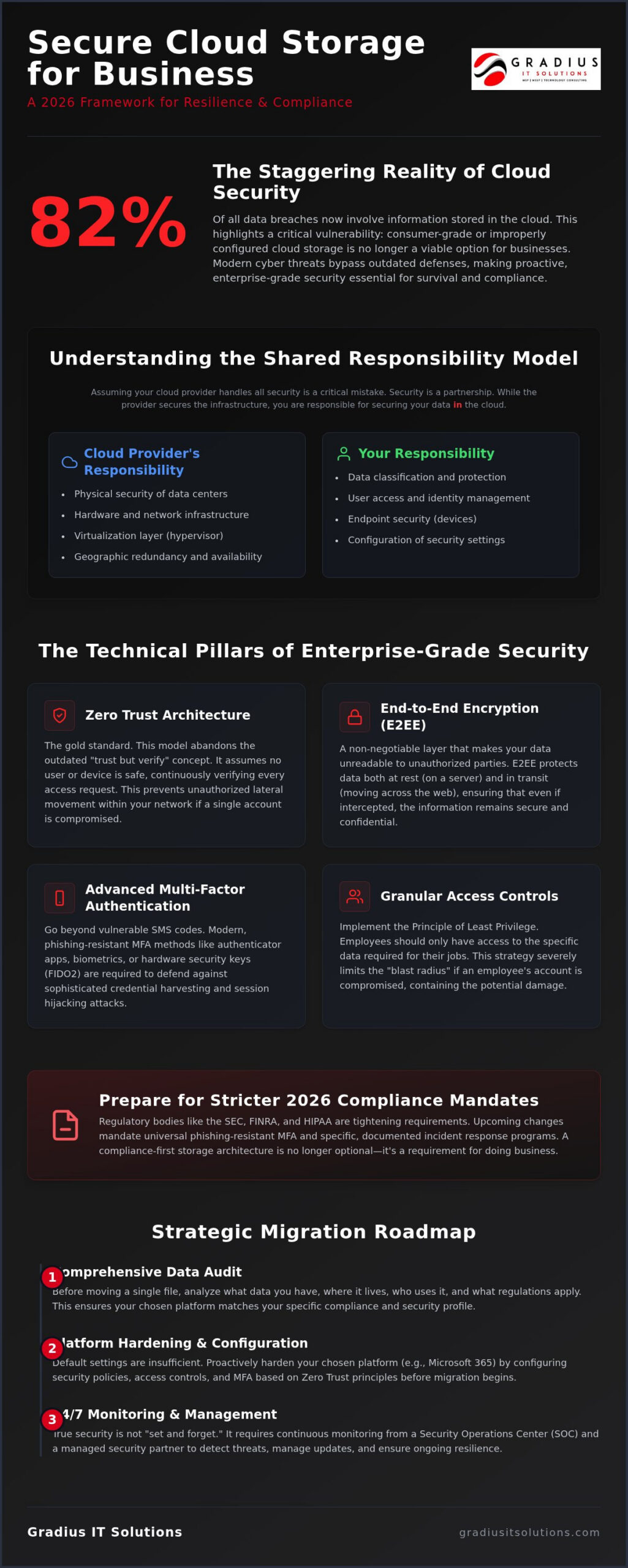
Statistics from Sprinto indicate that 82% of all data breaches now involve information stored in the cloud. That’s a staggering reality for any executive trying to maintain a competitive edge while keeping the digital doors locked. You’ve likely felt the weight of this risk. It’s the nagging worry that a single ransomware attack could freeze your operations or that a surprise SEC audit might reveal gaps in your data retention. Finding the right secure cloud storage for business shouldn’t feel like a high-stakes gamble.
We understand the pressure of balancing growth with the strict demands of HIPAA, SEC, and FINRA. This guide provides a clear roadmap to architecting a resilient, compliance-aware ecosystem that stands up to 2026 cyber threats. We’ll show you how to gain total visibility into your data access while lifting the burden of IT management off your shoulders. You’ll finish this article with the framework needed to migrate with confidence and meet the latest security standards.
Key Takeaways
- Move beyond simple file folders by treating your cloud environment as a dynamic, encrypted ecosystem designed for long-term resilience.
- Discover how to implement secure cloud storage for business using Zero Trust principles and end-to-end encryption to protect data at rest and in transit.
- Prepare for strict 2026 regulatory updates from the SEC and HIPAA that now mandate universal multi-factor authentication and specific incident response programs.
- Follow a strategic migration roadmap that prioritizes a comprehensive data audit to ensure your chosen platform matches your specific regulatory profile.
- Learn why 24/7 SOC monitoring and a managed security partner are necessary to bridge the gap between basic storage and enterprise-grade protection.
Beyond the Folder: Redefining Secure Cloud Storage for Business
Secure cloud storage for business has evolved far beyond the concept of a digital filing cabinet. In the past, companies relied on on-premise servers that were vulnerable to hardware failure, local disasters, and physical theft. Today, a truly secure environment is a dynamic, encrypted ecosystem where data is protected at rest and in transit. This modern architecture provides a level of resilience that legacy systems simply cannot match. It integrates directly into your daily operations, moving from a passive storage bin to an active part of your productivity stack.
To better understand how this technology functions in a modern enterprise, watch this helpful video:
Understanding your role in this ecosystem is vital. Most organizations fall into the trap of assuming the provider handles everything. This is known as the Shared Responsibility Model. While providers like Microsoft secure the physical data centers and underlying infrastructure, you are responsible for the security in the cloud. This includes managing who has access, how they authenticate, and how your data is categorized. If you don’t configure these settings, your data remains exposed regardless of how secure the provider’s data center is.
Why Basic Cloud Storage is No Longer Enough
Consumer-grade accounts or out-of-the-box business setups often leave the door wide open. Modern cybercriminals don’t just hack in. They use sophisticated credential harvesting and session hijacking to walk through the front door using stolen identities. Default settings are rarely enough to stop these advanced 2026 threats. Beyond identity, you must consider data sovereignty. Knowing exactly where your data resides geographically is no longer optional for businesses in regulated sectors. Geographic redundancy ensures that even if one data center goes dark, your business keeps moving without a second of downtime.
The Business Impact of Secure Data Management
Security isn’t just about stopping bad actors. It’s about operational continuity. When your storage is architected correctly, disaster recovery becomes a seamless background process rather than a frantic emergency. This high-level oversight is a core part of strategic Managed IT Services. Optimized storage also drives workforce collaboration. When teams can access files securely from any location without jumping through broken technical hoops, productivity scales. You aren’t just protecting data. You’re empowering your people to work faster and safer.
The Technical Pillars of Enterprise-Grade Cloud Security
Building a resilient infrastructure requires moving past the outdated perimeter mindset. In 2026, the gold standard is Zero Trust Architecture. This approach means your system never assumes a user is safe just because they’re on a known device or a company network. It verifies every single access request based on context, location, and behavior. This model aligns with the NIST Cybersecurity Framework 2.0, which emphasizes governance as a core pillar of risk management. When architecting secure cloud storage for business, you must ensure your provider supports this continuous verification model to prevent unauthorized lateral movement.
Encryption is another non-negotiable layer. End-to-end encryption (E2EE) ensures your data is unreadable to everyone except authorized users, whether it’s sitting on a server or moving across the web. You should pair this with advanced Multi-Factor Authentication (MFA). SMS codes are no longer considered secure due to SIM swapping and interception risks. Modern standards favor phishing-resistant methods like biometrics or hardware security keys that can’t be easily bypassed by credential harvesting.
Granular access controls round out the foundation. By applying the principle of least privilege, you ensure employees only see the specific data they need to perform their jobs. This strategy limits the blast radius if an account is ever compromised. It’s a proactive way to manage risk without slowing down your team’s workflow.
Microsoft 365 Hardening: The Gold Standard for 2026
Microsoft 365 is the primary ecosystem for most firms, but its default settings aren’t enough for high-security needs. Hardening involves using Microsoft Purview to set Data Loss Prevention (DLP) policies. These rules prevent sensitive information like Social Security numbers or patient records from leaving your organization. You also need immutable backups, which are files that cannot be changed or deleted by ransomware. For a full breakdown of these technical steps, you can explore our specialized Cloud and Microsoft 365 services.
AI-Powered Threat Detection in the Cloud
Modern cloud security uses AI to act as a digital sentry. If an employee logs in from a domestic office and then again from an international location five minutes later, the system detects the impossible travel anomaly and locks the account instantly. It also flags bulk file deletions or unusual download patterns that suggest an insider threat. Integrating Secure AI & Automation Services into your storage workflow ensures that threats are contained in milliseconds. If you’re unsure if your current setup is this proactive, a strategic technology consultation can identify the gaps in your defense.
Compliance-First Storage: Meeting SEC, FINRA, and HIPAA Standards
SEC and FINRA regulators are no longer satisfied with paper policies. They want proof of active data integrity. By June 3, 2026, smaller firms must comply with the SEC Regulation S-P amendments. This means your secure cloud storage for business must be part of a documented, tested incident response program. It isn’t just about where the data lives. It’s about how quickly you can detect a breach and notify your customers. Compliance in 2026 is a live demonstration of control, not a periodic audit check.
FINRA Rule 4511 adds another layer of complexity for broker-dealers. Records must be kept in a non-rewritable, non-erasable format, often called WORM (Write Once, Read Many). If your cloud provider doesn’t support WORM-compliant archiving, you’re out of compliance from day one. Additionally, FINRA Rule 4370 mandates a business continuity plan that covers data backup and recovery. Your storage shouldn’t just be a backup; it should be a resilient foundation for recovery that works when everything else fails.
For healthcare providers, the 2026 HIPAA Security Rule updates have turned “addressable” safeguards into “required” ones. Encryption for data at rest and in transit is now mandatory for everyone. Universal MFA is also a requirement for all access points to electronic Protected Health Information (ePHI). Without a signed Business Associate Agreement (BAA), no cloud platform is HIPAA compliant, regardless of its technical features. Audit trails and immutable logging are your primary defense during a regulatory inquiry.
Financial Services: Protecting Wealth Management Data
RIAs and wealth managers face unique scrutiny regarding data retention and client privacy. We specialize in IT and cybersecurity for financial advisors, focusing on WORM compliance and Microsoft 365 hardening. During an audit, having an automated trail of immutable logs saves hundreds of hours of manual reporting. It transforms a stressful investigation into a simple demonstration of your proactive security posture.
Healthcare and Legal: Managing Sensitive PII and PHI
Protecting sensitive PII and PHI requires a layered approach that moves beyond basic file sharing. Our HIPAA compliance strategies for healthcare ensure your storage ecosystem meets the 2026 encryption mandates. Legal firms also benefit from this rigor, as client confidentiality depends on secure, logged file sharing that prevents unauthorized leaks. Utilizing Compliance as a Service (CaaS) bridges the gap between technical storage and your legal obligations.
Strategic Migration: Moving Your Business to the Cloud Safely
Strategic migration is more than a technical transfer. It’s a fundamental rebuild of your data governance. Many firms treat migration like moving boxes into a new warehouse. In reality, it’s more like installing a high-tech security system while you move. To achieve secure cloud storage for business, you must prioritize strategy over speed. Moving too fast without a plan is how misconfigurations happen, and SentinelOne reports that these errors cause 31% of cloud data breaches. Your migration should follow a methodical five-step process.
- Step 1: Data Audit. Map your entire digital footprint. Identify what’s sensitive, what’s redundant, and what’s governed by specific 2026 regulations.
- Step 2: Platform Alignment. Choose a cloud environment that natively supports your regulatory profile, whether that’s SEC, FINRA, or HIPAA.
- Step 3: Identity First. Lock down your identity management and MFA protocols before moving a single byte of data.
- Step 4: Phased Execution. Move in stages. Start with non-critical data to test your configurations and minimize operational downtime.
- Step 5: Verification. Conduct post-migration audits to ensure all permissions are correct and continuous monitoring is active.
Book a strategic technology consultation for your cloud migration
Assessing Your Current Infrastructure
Before you move, you have to find the “Shadow IT” lurking in your office. This includes unmanaged personal cloud accounts employees use because company tools feel too restrictive. These accounts are massive security gaps. You also need to evaluate your Network Infrastructure. If your local bandwidth can’t handle the constant sync of enterprise-grade storage, your productivity will tank. Some data might even need to stay on-premise in a hybrid model to satisfy specific latency requirements or legacy software constraints.
Avoiding Common Migration Pitfalls
The biggest mistake is the “Lift and Shift.” Taking a messy, unorganized local server and dumping it into the cloud just moves your vulnerabilities to a new location. You must reconfigure your security specifically for the cloud environment. Employee training is equally critical. If your team doesn’t understand the new secure workflows, they’ll find workarounds that create fresh risks. For a deeper dive into the execution details, see our Cloud Migration Roadmap. Success depends on the human element as much as the technical one.
Managed Cloud Resilience: Why a Partner Trumps a Provider
Cloud providers like Microsoft or AWS give you the vault. They don’t provide the guards. That’s the critical distinction when choosing secure cloud storage for business. A provider is responsible for the physical hardware and the global network. You are responsible for the data, the identities, and the configurations inside that vault. Without a managed partner, you’re essentially leaving a high-tech safe wide open in a public square. You need more than just a place to put files; you need a managed security posture.
Our U.S.-based 24/7 SOC (Security Operations Center) provides the constant oversight a standard provider won’t. We keep real-time eyes on your cloud environment to catch anomalies before they escalate. This isn’t just about recording what happened after a breach. It’s about a “Prevent-Instead-React” philosophy. We use proactive patch management and vulnerability scanning to find the cracks in your cloud applications. If a setting is misconfigured or a new exploit emerges, we’ve already closed the gap before a hacker can find it.
The Role of a vCISO in Cloud Strategy
Strategic storage requires more than just technical setup. It needs executive-level vision. Using vCIO and Technology Consulting helps you align your storage architecture with your actual business goals. We help you develop a Written Information Security Policy (WISP) that dictates exactly how your team interacts with cloud assets. This isn’t a “set it and forget it” process. We conduct regular disaster recovery testing with documented restore results. You’ll know exactly how long it takes to get back to work if the worst happens.
24/7 Support: Ensuring Always-On Accessibility
When things go wrong, you don’t have time for vendor finger-pointing. An Always-On Help Desk acts as your single point of accountability. We manage the relationships with cloud vendors so you don’t have to. If there’s an outage or a sync error, we handle the troubleshooting while your team stays focused on their work. Resilience means your data is always there when you need it, regardless of the technical hurdles happening in the background.
Secure storage is the foundation of your business continuity. It’s the quiet engine that keeps your operations running and your clients protected. Investing in secure cloud storage for business isn’t just a technical upgrade. It’s a commitment to your company’s long-term survival in an increasingly hostile digital world. By moving from a passive provider to a proactive partner, you turn your biggest vulnerability into your strongest asset.
Building a Resilient Foundation for Growth
Secure cloud storage for business isn’t a static product you buy off a shelf. It’s a continuous, managed commitment to resilience. We’ve explored how Zero Trust principles and end-to-end encryption form the technical foundation for modern data protection. You also understand that 2026 regulatory updates from the SEC and HIPAA have raised the bar for every organization. Compliance is no longer a simple yearly checklist. It’s a live, daily demonstration of your control over sensitive data and corporate assets.
True protection requires shifting from a passive mindset to a proactive “Prevent-Instead-React” model. Our U.S.-based 24/7 SOC and compliance-aware management bridge the gap between basic storage and enterprise-grade security. By choosing a single accountable partner, you lift the burden of technical complexity off your shoulders and gain the confidence that your assets are guarded around the clock. You don’t have to navigate these evolving cyber threats alone. With a hardened Microsoft 365 ecosystem and strategic oversight, you can stop worrying about ransomware and focus entirely on scaling your business.
Taking this step ensures your technology stack remains a competitive asset rather than a hidden liability. We’re ready to stand in your corner and protect your success as you move into the future.
Frequently Asked Questions
Is cloud storage more secure than an on-premise server for business?
Yes, in most cases, because major providers invest billions in physical security and redundancy that small businesses can’t match. However, the security in the cloud depends on your configuration. While a local server is vulnerable to physical theft or fire, a cloud environment offers geographic redundancy. You must still manage access controls and encryption to ensure your specific setup remains hardened against modern 2026 threats.
How does secure cloud storage help with SEC and FINRA compliance?
It provides the technical framework for WORM (Write Once, Read Many) storage and immutable logging required by FINRA Rule 4511. Secure cloud storage for business allows for automated audit trails that prove data integrity during regulatory exams. By using a compliance-aware setup, you can meet the SEC Regulation S-P amendments’ requirements for documented incident response. This turns a manual, error-prone reporting process into a streamlined digital defense.
What is the difference between cloud backup and secure cloud storage?
Storage is your active workspace for daily collaboration, while backup is a separate, point-in-time copy of that data used for recovery. Storage allows teams to edit and share files in real time. Backups are typically immutable and stored in a different location to protect against accidental deletion or ransomware. You need both to achieve true data resilience. Storage keeps you productive, but backup ensures you can recover if the primary environment is compromised.
Do I need a third-party backup for Microsoft 365 or Google Workspace?
Yes, because SaaS providers operate under a shared responsibility model that doesn’t guarantee data recovery from user error or malicious deletion. If an employee accidentally wipes a critical folder or a hacker gains administrative access, the provider’s native tools might not be enough to restore your files. A third-party backup creates an independent, air-gapped copy of your emails, files, and settings. This ensures your business keeps running even if the primary cloud platform fails.
What security features should I look for in a business cloud storage provider?
Prioritize end-to-end encryption, Zero Trust access architecture, and phishing-resistant multi-factor authentication. Look for providers that offer granular permissions and detailed activity logging to monitor who is accessing sensitive files. For regulated industries, the ability to sign a Business Associate Agreement (BAA) for HIPAA or support WORM storage for FINRA is non-negotiable. These features transform a simple file-hosting service into a professional secure cloud storage for business environment.
How can I prevent employees from accidentally leaking data from the cloud?
Prioritize end-to-end encryption, Zero Trust access architecture, and phishing-resistant multi-factor authentication. Look for providers that offer granular permissions and detailed activity logging to monitor who is accessing sensitive files. For regulated industries, the ability to sign a Business Associate Agreement (BAA) for HIPAA or support WORM storage for FINRA is non-negotiable. These features transform a simple file-hosting service into a professional secure cloud storage for business environment.
How can I prevent employees from accidentally leaking data from the cloud?
Your data remains safe and encrypted in the provider’s data center, but your team will lose real-time access until the connection is restored. Many modern cloud applications offer offline sync features that allow you to work on local copies and upload changes once you’re back online. To mitigate this risk, we recommend redundant internet connections or 5G failover systems. This ensures your cloud-based workflows remain accessible even during a local ISP outage.
Can secure cloud storage protect my business from ransomware?
It provides critical layers of defense through versioning and immutable snapshots, but it isn’t a silver bullet on its own. If ransomware encrypts your live cloud files, versioning allows you to roll back to a clean state from before the attack. Immutable backups go a step further by preventing the malware from deleting or changing your recovery points. When paired with 24/7 SOC monitoring, these tools stop attacks before they can spread through your network.

Article by
Robert Joyce
Robert Joyce is the Owner and Chief Technology Officer of Gradius IT Solutions, a security-first provider of managed IT, cybersecurity, cloud, compliance, and secure AI solutions. Headquartered in New Jersey with satellite offices in the Midwest and South Florida, Gradius serves businesses across the Tri-State Area, Midwest, South Florida, and nationwide.
Robert brings 30 years of IT experience, including 23 years in hedge funds, global banks, and wealth management firms where uptime, security, and continuity are non-negotiable. He began in trade floor support at Caxton, Shell Trading, and Knight, provided senior trade floor support at RBC and SAC Capital, served as VP of IT at EntrustPermal, and was CTO of Gerstein Fisher. After September 11, he helped rebuild critical technology infrastructure for Merrill Lynch.
His expertise spans Microsoft 365, cloud, cybersecurity, networking, infrastructure, disaster recovery, compliance, and strategic IT leadership.
Robert founded Gradius to bring enterprise-level technology and security to small and midsized businesses at a predictable monthly cost. Gradius delivers managed and co-managed IT, cybersecurity, Microsoft 365 and cloud, compliance programs supported by a GRC platform, secure AI consulting, and vCIO services, with a full help desk, 24/7 NOC and SOC monitoring, and U.S.-based onsite engineers and SOC.
Robert works directly with business owners and executives as their single accountable point of contact. His philosophy: one trusted partner, complete IT accountability.
Disclaimer
## Disclaimer
The information provided in this article is for general informational and educational purposes only and should not be considered professional IT, cybersecurity, legal, regulatory, or compliance advice. While Gradius IT Solutions strives to provide accurate and up to date information, technology, security threats, and regulatory requirements change frequently, and we cannot guarantee that all information will remain current or applicable to your specific situation.
Every organization has unique technology, security, compliance, and business requirements. Before implementing any recommendations discussed in this article, you should evaluate their suitability for your environment or consult with a qualified technology professional.
Gradius IT Solutions makes no warranties, express or implied, regarding the completeness, accuracy, reliability, or results obtained from the use of this information. Any actions you take based on this content are at your own risk. Gradius IT Solutions shall not be liable for any direct, indirect, incidental, or consequential damages arising from the use of, or reliance upon, the information contained in this article.
References to third party products, services, or vendors are provided for informational purposes only and do not constitute an endorsement unless explicitly stated.
If you would like guidance tailored to your organization, contact Gradius IT Solutions to schedule a consultation with one of our technology experts.