

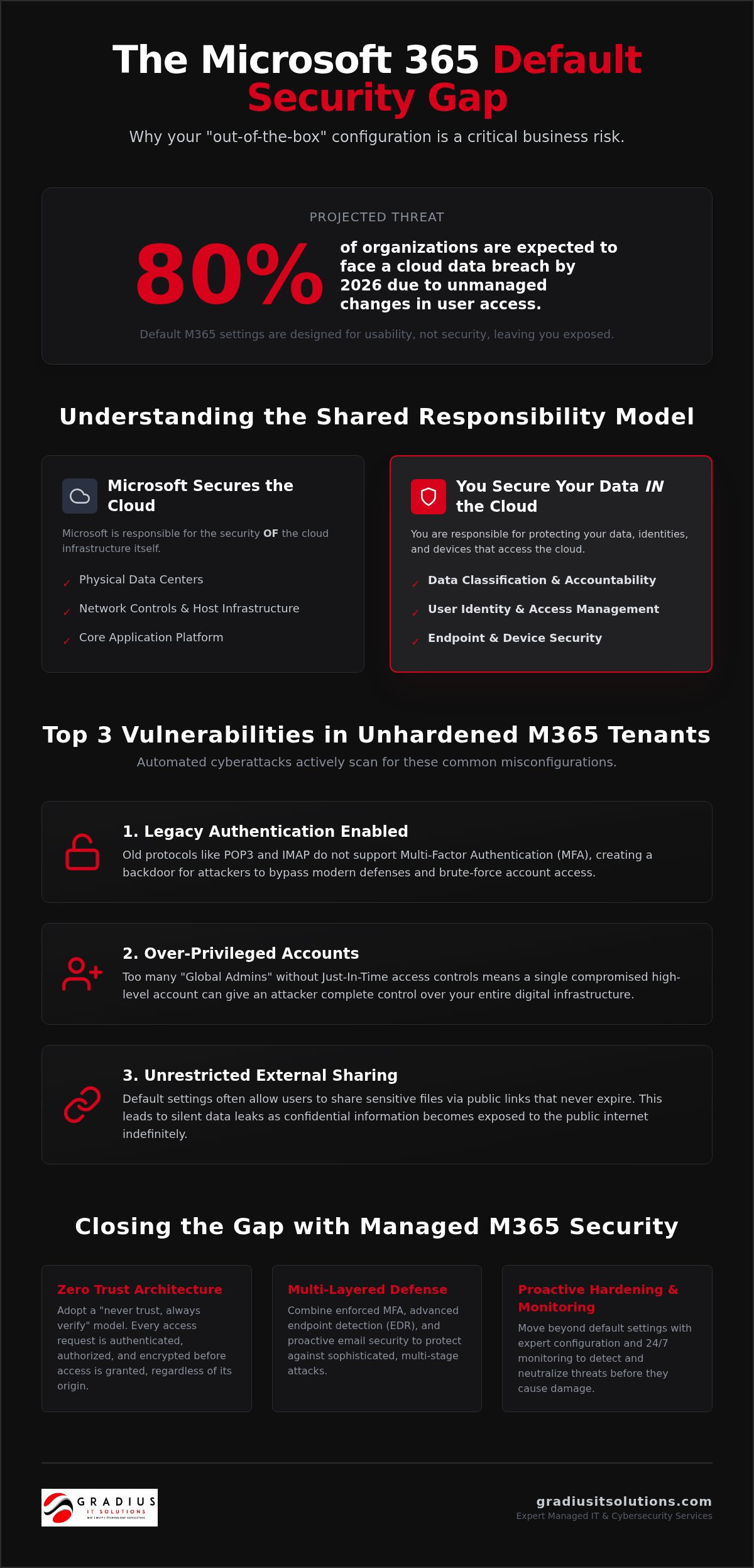
Did you know that 80% of organizations are expected to face a cloud data breach in 2026 due to identity drifts, or unmanaged changes in user access? It’s a high-stakes environment. Default settings often leave the back door wide open. You’ve likely felt the mounting pressure from cyber insurance providers to prove your controls are solid, yet the maze of managed m365 security options feels like a full-time job. We understand the frustration. You want ironclad protection, not a second career in technical management.
This guide teaches you how to bridge the gap between basic configurations and a truly hardened environment. We’ll break down the proactive hardening process, show you how to satisfy compliance demands, and explain how 24/7 monitoring creates a resilient business without adding friction for your users. It’s time to move beyond the old “castle and moat” mentality and build a tenant that’s actually ready for the future. Let’s get your security under control so you can focus on growth.
Key Takeaways
- Understand the Shared Responsibility Model. Microsoft secures the platform, but the configuration and data protection remain your responsibility.
- Strengthen your perimeter with identity-first protection. Learn how managed m365 security applies Zero Trust principles to stop unauthorized access attempts.
- Decode your Microsoft Secure Score. Find out why automated metrics require expert manual review to ensure your business is actually protected.
- Implement a multi-layered defense strategy. Combine enforced MFA with advanced endpoint detection to catch sophisticated threats early.
- Simplify compliance and insurance audits. Hardening your environment makes it easier to meet SEC or HIPAA standards while potentially lowering insurance costs.
The Microsoft 365 Default Gap: Why Out-of-the-Box Isn’t Enough
Most business owners believe that purchasing a license is the same thing as being secure. It’s a dangerous assumption. Microsoft builds the Microsoft 365 suite to be accessible and easy to use. To achieve this, settings are tuned for maximum usability rather than maximum protection. Security, by its nature, adds friction. To keep users from complaining, many critical defenses are turned off by default. This creates the “Default Gap.” It’s the space between what you think you have and the actual protection your business requires to survive in 2026.
Cybercriminals don’t work hard; they work smart. They use automated scripts to scan for standard, unhardened tenants. If you haven’t optimized your settings, you’re using the same “lock” as millions of other businesses. This makes you an easy target. A comprehensive managed m365 security strategy closes this gap by prioritizing protection over convenience. It transforms a generic environment into a digital fortress tailored to your specific risk profile.
The Shared Responsibility Model: Your Role in the Cloud
Microsoft is transparent about how cloud security works. They manage the physical infrastructure: the servers, the cooling, and the data center perimeter. You manage everything inside. This includes your data, your user identities, and your device configurations. If a staff member’s account is compromised because multi-factor authentication (MFA) wasn’t enforced, Microsoft isn’t responsible. A “set it and forget it” approach is a recipe for a data breach. High-performance managed m365 security fills the gaps Microsoft leaves behind, ensuring that your specific “slice” of the cloud is monitored and defended 24/7.
Top 3 Vulnerabilities Found in Standard M365 Tenants
- Legacy Authentication: Old protocols like POP3 or IMAP don’t support MFA. Hackers use these backdoors to bypass your modern security layers entirely.
- Over-Privileged Accounts: Many businesses have too many “Global Admins.” Without Just-In-Time access, a single compromised admin account gives a hacker the keys to your entire digital kingdom.
- External Sharing Leaks: Default settings often allow users to share files with “Anyone with the link.” These links often stay active forever, leaving sensitive data exposed to the public internet.
The impact of ignoring these gaps is severe. Recent data shows that 80% of organizations are expected to face a cloud breach in 2026 due to identity drifts. Beyond the immediate downtime and reputation loss, the regulatory landscape has shifted. New standards like DORA and updated HIPAA requirements now make AES-256 encryption mandatory for data at rest. Failing to harden your tenant doesn’t just invite hackers; it invites massive regulatory fines that can cripple a small to mid-sized firm. Proactive hardening isn’t an option anymore. It’s a business necessity.
Core Pillars of Managed M365 Security: From Identity to Data
Modern protection requires a shift in mindset. We no longer assume a user is safe just because they are on your network. A robust managed m365 security strategy is built on the Zero Trust framework. This philosophy is simple: never trust, always verify. Every access request is authenticated, authorized, and encrypted before access is granted. This approach is essential because identity has replaced the traditional office wall as the new corporate perimeter for hybrid teams.
To implement this effectively, we look to established standards like CISA’s SCuBA Project. These baselines provide a roadmap for securing your data and identities against sophisticated 2026 threats. It’s not just about stopping hackers. It’s about ensuring your data remains classified and protected through tools like Microsoft Purview. Simple spam filters are no longer enough. Your email security must evolve to detect prompt injection and lateral movement within your tenant. If you’re concerned about your current posture, our cybersecurity services can help you identify these hidden gaps.
Identity Protection and Zero Trust Principles
Identity is the most vulnerable link in your chain. For hybrid teams across New York, New Jersey, and Connecticut, the risk of “identity drift” is constant. We manage this through Conditional Access policies. Think of these as “if-then” logic gates. If a user tries to access sensitive financial data from an unrecognized device in another state, then they are blocked or prompted for additional verification. This prevents compromised credentials from becoming a full-scale breach.
As of September 2026, passkeys have become the default authentication method in Microsoft Entra. This shift is critical because traditional SMS and voice MFA are scheduled for retirement in early 2027. Phishing-resistant MFA is now the baseline for business resilience. If you aren’t already moving toward passwordless environments, you’re falling behind the security curve. Implementing these advanced identity controls ensures that only the right people have access to your critical resources, regardless of where they are working.
Hardening Your Tenant for Secure AI Integration
The rise of Microsoft 365 Copilot has changed the security landscape. AI is a powerful tool, but it can also be a liability if your data permissions are loose. If an employee has access to sensitive HR files they shouldn’t see, Copilot will find that data and summarize it for them. This makes internal data governance more important than ever. You must use Purview to classify sensitive information and prevent it from being “over-shared” with AI models.
Preparing for AI requires a clean house. We help you audit your permissions to ensure that “least privilege” access is strictly enforced before you flip the switch on automation. This proactive hardening ensures that your journey into Secure AI Automation is both productive and safe. By locking down your data now, you prevent the accidental exposure of proprietary information later. It’s about building a foundation that supports innovation without compromising your integrity.
How to Audit Your M365 Security Posture (The “Secure Score” Framework)
Your Microsoft Secure Score is a great starting point, but don’t treat it like a final grade. You can find this metric within the Microsoft 365 Defender portal. It provides a numerical representation of your security posture based on your current configurations. While a high percentage looks excellent in a board meeting, it can be dangerously misleading. A high score doesn’t mean you are unhackable. It simply means you’ve checked the boxes Microsoft suggested. Effective managed m365 security requires looking past the dashboard to find the vulnerabilities that automated scans often overlook.
Hackers don’t follow a checklist. They look for the one custom configuration error or the one “exception” made for a high-level executive. Relying solely on an automated score is like trusting a home security system that tells you the doors are locked but ignores the fact that the windows are made of paper. Real-world threat intelligence shows that most breaches happen through pathways that technically “pass” a standard audit. Continuous auditing is the only way to stay ahead of identity drift and emerging threats. Annual check-ups are outdated before the ink even dries on the report.
Interpreting Your Microsoft Secure Score
The score is divided into four critical categories: Identity, Data, Device, and Apps. Identity usually carries the most weight because it’s the primary target for attackers. You might see “Quick Wins” suggested, such as enforcing MFA for all users. These are essential. However, long-term strategic hardening involves deeper dives into your data governance and app permissions. Secure Score is a relative metric, not an absolute guarantee of safety. It measures your alignment with Microsoft’s best practices, but it cannot account for the unique risks specific to your industry or your specific workflow.
Beyond the Score: Manual Configuration and SOC Oversight
Automated tools are blind to business-logic errors. For example, a tool might see that a mailbox has “forwarding enabled” and mark it as a feature, while a human expert recognizes it as a data exfiltration attempt. This is where the synergy between technology and human expertise becomes vital. We are seeing a shift toward AI-enabled security agents that help identify these anomalies faster than ever. However, even the best AI needs professional oversight to validate its findings and prevent false positives from disrupting your team.
True resilience comes from combining these automated insights with proactive, 24/7 monitoring. This is the core of a high-performance managed m365 security plan. Our Managed Security Operations Center (SOC) acts as your proactive guardian. We don’t just look at the score; we watch the behavior. If a user suddenly logs in from a new location and starts downloading an unusual volume of files, we stop the threat in real time. This level of oversight provides the peace of mind that a static dashboard simply cannot offer.
Implementing a Multi-Layered M365 Security Strategy
Building a resilient environment requires more than a single defensive line. It’s about depth. A comprehensive managed m365 security strategy stacks independent layers of protection so that if one fails, others stand firm. This starts with identity but extends rapidly into endpoint protection and data governance. You can’t just secure the user. You must secure the device they use and the data they touch.
First, we eliminate the low-hanging fruit. This means disabling legacy authentication protocols like POP3 and IMAP. These outdated methods are a hacker’s best friend because they don’t support modern MFA. Next, we deploy Endpoint Detection and Response (EDR) that integrates directly with your Microsoft 365 services. This creates a unified view of threats. It allows us to see if a suspicious email led to a suspicious process on a laptop. Finally, we implement Data Loss Prevention (DLP) policies. These act as an automated guardrail, preventing sensitive information like credit card numbers or HIPAA-protected data from leaving your tenant via email or external links. For a deeper look at protecting the data itself once it leaves your tenant, our guide to secure cloud storage for business covers the architecture needed to keep that data resilient and compliant.
Strengthen your multi-layered defense now
Step-by-Step: Conditional Access and MFA Deployment
Conditional Access is the brain of your security strategy. It evaluates every login attempt against a set of rules before granting access. We follow a methodical rollout to ensure security doesn’t break your workflow. This prevents users from getting locked out while keeping hackers at bay.
- Step 1: Identify high-value accounts. We start with Global Admins, HR, and Finance. These are the highest-priority targets for Business Email Compromise (BEC).
- Step 2: Define “Known Locations” and compliant devices. We whitelist your physical offices in NJ, NY, or CT. We also ensure that only company-managed devices can access sensitive folders.
- Step 3: Roll out MFA with employee awareness training. Technology is only half the battle. We educate your team on how to use phishing-resistant MFA to reduce friction and prevent “MFA fatigue” attacks.
Securing the Human Element: Phishing Simulations
Technology alone cannot stop every threat. Human error remains a factor in 90% of cloud breaches. This is why phishing simulations are a core component of a managed m365 security plan. We run these tests to identify who in your organization is most likely to click a malicious link. The goal isn’t to punish employees. It’s to find the training gaps. Effective simulations use real-world scenarios that mirror the tactics hackers are using right now. By building a culture of awareness, you turn your staff from a vulnerability into your strongest line of defense.
Monitoring is the final layer. We connect your M365 logs to our 24/7 SIEM/SOC. This ensures that even if a threat bypasses your filters, a human expert is there to catch it. It’s about moving from a “hope for the best” model to a “prevent instead of react” philosophy. This structured approach ensures your business remains resilient against the evolving threats of 2026.
The Strategic Advantage of Managed M365 Security Partners
Choosing a partner for your managed m365 security isn’t just a technical decision; it’s a strategic move to insulate your business from volatility. In an era where a single misconfiguration can lead to a six-figure data breach, the “do-it-yourself” model is a liability. You need a single, accountable partner who understands the intersection of IT performance, cybersecurity, and regulatory compliance. Gradius fills that role. We move beyond basic support to become an empowering advocate for your success, lifting the burden of technical complexity so you can focus on scaling your organization.
A proactive security posture does more than just block threats. It improves your bottom line. By reducing business risk, you ensure that productivity never stalls due to emergency downtime. When your environment is hardened, your team works with confidence, knowing that the tools they rely on are defended by a “Prevent-Instead-React” philosophy. This shift from reactive firefighting to strategic oversight is the hallmark of a high-performance organization. It’s about building a foundation of trust that your clients and stakeholders can rely on every single day. Pairing this security-first mindset with microsoft 365 integration services ensures your technology stack is not only protected but fully aligned with your business goals.
Aligning M365 with Compliance and Cyber Insurance
The gap between standard security and regulatory requirements is growing. Whether you’re navigating SEC, FINRA, or HIPAA standards, your Microsoft 365 tenant must be configured to produce defensible evidence of protection. This is where Compliance as a Service becomes a force multiplier. We help you turn your M365 logs into an asset during audits and insurance renewals. Cyber insurance providers are no longer accepting “yes” or “no” answers on questionnaires; they want to see active monitoring and enforced controls.
By aligning your settings with these rigorous standards, you don’t just pass the audit. You often put your business in a better position to negotiate lower insurance premiums. Robust security is a signal to underwriters that you’re a low-risk client. We ensure your tenant meets these high-bar requirements without creating unnecessary friction for your legitimate users. It’s about being compliant by design, not by accident.
The Gradius Difference: Prevent-Instead-React
Most IT firms wait for your phone to ring. We don’t. Our U.S.-based SOC provides the “IT That Never Sleeps” approach, identifying anomalous behavior before it turns into a crisis. This 24/7 defense is powered by human expertise and high-level strategy, ensuring that your business remains resilient against the sophisticated threats of 2026. We offer a flat-fee, predictable partnership that aligns our goals with yours. When you’re secure and productive, we’ve done our job.
Secure Your Digital Future with Confidence
Business resilience in 2026 requires moving beyond basic configurations. You’ve seen how the “Default Gap” leaves your organization vulnerable to identity drift and sophisticated breaches. Closing this gap isn’t just about technical settings. It’s about building a proactive defense that protects your data, satisfies your insurance providers, and secures your future growth.
Implementing managed m365 security transforms your environment into a hardened fortress. You gain the peace of mind that comes from a U.S.-based 24/7 SOC and a compliance-aware approach tailored for regulated industries. We take the burden of complexity off your shoulders, allowing you to focus on what you do best. Our proven process ensures you’re ready for the next cyber-insurance audit and the next generation of threats.
Your technology should be an asset, not a source of stress. Let’s build a resilient foundation together.
Frequently Asked Questions
Is Microsoft 365 security included in my standard subscription?
Basic subscriptions include infrastructure protection, but they don’t cover your specific data or identity configurations. You are responsible for enabling and managing advanced features like multi-factor authentication and data loss prevention. Without professional hardening, your tenant remains at default settings that are often too loose for modern business needs.
Can managed M365 security help me meet HIPAA or FINRA compliance?
Yes, managed m365 security is a cornerstone for meeting HIPAA, FINRA, and SEC requirements. These regulations demand strict access controls and detailed audit trails that default settings simply don’t provide. A managed approach ensures your environment is configured to encrypt sensitive data and log every access attempt, making your annual audits much smoother.
How much does it cost to secure a Microsoft 365 environment?
The cost of securing your environment depends on your license tier and the level of 24/7 monitoring your industry requires. While we don’t provide flat rates here, the investment is always a fraction of the cost of a data breach. Most organizations see this as a predictable operational expense that replaces the high risk of emergency remediation and regulatory fines.
What is the difference between MFA and Conditional Access?
Multi-factor authentication (MFA) is the tool that verifies your identity, while Conditional Access is the set of rules that decides when to use it. Think of MFA as the key and Conditional Access as the smart lock that only works if you’re standing on your own porch. This logic-based approach ensures that a stolen password alone isn’t enough to breach your system.
Do I still need a separate backup if I have M365 security hardening?
You absolutely still need a separate, third-party backup solution. Hardening prevents unauthorized access, but it doesn’t protect you from accidental deletion or internal data corruption. A dedicated secure cloud storage for business strategy ensures that even if data is lost, you can restore it quickly without relying on Microsoft’s limited and temporary retention policies.
Can managed M365 security stop all phishing attacks?
No technology can stop 100% of phishing attacks. While managed m365 security filters out the vast majority of threats, sophisticated social engineering can still trick even the most careful users. This is why we combine advanced technical filters with continuous employee awareness training to create a human firewall that catches what the software misses.
How does M365 security impact my cyber insurance application?
Security hardening is now a mandatory requirement for most cyber insurance applications. Carriers frequently deny coverage to businesses that can’t prove they have enforced MFA and 24/7 endpoint monitoring in place. Our managed approach provides the documented evidence and technical controls these providers demand, often helping you secure better coverage terms.
What happens if my M365 account is compromised while under managed security?
If a compromise occurs, our 24/7 SOC identifies the anomaly and isolates the account in real time. Instead of a silent attacker roaming your network for weeks, the incident is detected and neutralized immediately. We then provide a full forensic report that shows exactly what happened, satisfying both your leadership and any regulatory reporting requirements.

Article by
Robert Joyce
**Robert Joyce** is the Founder, CEO, and Chief Technology Officer of Gradius IT Solutions, a security first provider of Managed IT Services, Cybersecurity, Cloud, Compliance, and Secure AI solutions serving businesses throughout New Jersey, New York, Connecticut, and across the United States.
With more than 28 years of IT experience, including 23 years supporting hedge funds, global banks, and wealth management firms, Robert has built a career designing and managing secure, resilient, and highly available technology environments where uptime, cybersecurity, and business continuity are essential.
His expertise includes Microsoft 365, cloud computing, cybersecurity, networking, infrastructure, disaster recovery, compliance, virtualization, and strategic IT leadership. Following the events of September 11, Robert helped rebuild critical technology infrastructure for Merrill Lynch, an experience that reinforced the importance of resilience, planning, and operational excellence.
Robert founded Gradius IT Solutions to bring enterprise level technology and security services to small and midsized businesses at a predictable monthly cost. Today, the company delivers fully managed and co managed IT services, cybersecurity, Microsoft 365, cloud solutions, compliance consulting, Secure AI consulting, technology projects, and vCIO services. Through a U.S. based 24/7 Help Desk and a nationwide network of trusted technology partners, Gradius supports organizations across the country with responsive, security focused technology solutions.
Robert partners with business owners and executive leaders to align technology with business goals, reduce risk, strengthen cybersecurity, improve productivity, and create long term IT strategies that support growth. His mission is simple: provide every client with enterprise class technology, exceptional service, and a trusted advisor they can rely on as their business evolves.
Disclaimer
## Disclaimer
The information provided in this article is for general informational and educational purposes only and should not be considered professional IT, cybersecurity, legal, regulatory, or compliance advice. While Gradius IT Solutions strives to provide accurate and up to date information, technology, security threats, and regulatory requirements change frequently, and we cannot guarantee that all information will remain current or applicable to your specific situation.
Every organization has unique technology, security, compliance, and business requirements. Before implementing any recommendations discussed in this article, you should evaluate their suitability for your environment or consult with a qualified technology professional.
Gradius IT Solutions makes no warranties, express or implied, regarding the completeness, accuracy, reliability, or results obtained from the use of this information. Any actions you take based on this content are at your own risk. Gradius IT Solutions shall not be liable for any direct, indirect, incidental, or consequential damages arising from the use of, or reliance upon, the information contained in this article.
References to third party products, services, or vendors are provided for informational purposes only and do not constitute an endorsement unless explicitly stated.
If you would like guidance tailored to your organization, contact Gradius IT Solutions to schedule a consultation with one of our technology experts.