
Last Updated: November 19, 2026
Quick Summary
Implement AI workflows in small business by starting with one narrow, documented process such as lead follow-up, support FAQs, invoicing, scheduling, or weekly reporting. Score candidates on volume, repetition, risk, and reversibility, then keep a human approval step before anything reaches clients or money.
- An AI workflow needs a trigger, an action, and a named owner.
- Score candidates 1 to 5 on volume, repetition, risk, and reversibility; aim for 14 or higher.
- Keep client-facing work draft-only with human approval for the first 30 days.
- Record time per run, runs per week, error rate, and client response time before launch.
- A single workflow running cleanly for 90 days beats five unmonitored ones.
Table of Contents
- Why AI Workflows Beat Hiring Your Way Out of Admin Work
- AI Workflow Automation Examples for Small Businesses
- How to Use AI for Your Business Without Breaking What Already Works
- AI Automation Tools: What to Compare Before You Buy
- Zapier AI Tutorial for Beginners: Wiring One Workflow End to End
- Planning Your First Secure AI Workflow with Gradius IT Solutions
- Frequently Asked Questions
Why AI Workflows Beat Hiring Your Way Out of Admin Work
Adding a person to absorb repetitive tasks costs more than most owners expect, and the work still piles up when that person takes a day off. AI workflows give small businesses a different option: software that handles routine handoffs in the background while your team stays focused on clients. Below, we break down five practical ways to implement AI workflows in small business, plus how to set them up without breaking what already works.
What Counts as an AI Workflow (and What Does Not)
An AI workflow is a defined sequence of steps where software moves data between your existing tools, makes a limited decision, and hands the result to a person or the next system. It has a trigger, an action, and an owner.
A chatbot that answers every question on its own is not a workflow, and neither is a single AI prompt you paste into a browser. For the basics, our practical guide to AI automation in business covers the vocabulary before you start.
AI Workflow Automation Examples for Small Businesses
Below are five starting points we recommend most often. Each one is narrow, measurable, and easy to reverse if it goes wrong.
Lead Capture, Qualification, and Follow-Up
A form submission arrives. The workflow scores the lead against your criteria, logs it in your CRM, and drafts a follow-up email for a person to approve. No lead sits unanswered overnight.
Risk and governance: Keep the scoring rules visible to your team. Do not let the AI send pricing or contractual language without approval.
Customer Support and FAQ Handling
A chatbot or voice assistant can answer routine questions and route the rest to a human queue. The value is in deflection, not replacement.
Risk and governance: Never let the assistant invent policy. Restrict it to an approved answer library, and log every conversation.
Invoice Processing and Payment Reminders
Invoices get read, matched to the right client, entered into accounting, and queued for a polite reminder when due. This cuts manual data entry and shortens cash flow cycles.
Risk and governance: Require human sign-off on any payment amount change. Keep an audit trail of every automated reminder.
Scheduling, Data Entry, and Weekly Reporting
Appointment scheduling, record updates, and a Monday reporting summary are the three tasks owners most often want off their plate. All three are highly repeatable, which makes them good automation candidates.
Risk and governance: Check that the reporting pulls from your system of record, not a stale export.
| Workflow | Typical Setup Time | Who Owns It | Main Risk |
|---|---|---|---|
| Lead capture and follow-up | 1-2 weeks | Sales lead | Wrong lead scoring |
| Support and FAQ handling | 2-3 weeks | Operations | Invented answers |
| Invoicing and reminders | 1-2 weeks | Finance | Duplicate sends |
| Scheduling and data entry | 1 week | Office manager | Bad source data |
| Weekly reporting | 1 week | Team lead | Stale exports |
Typical Setup Time
How to Use AI for Your Business Without Breaking What Already Works
A common mistake is automating a process nobody has documented. If your team cannot explain the steps on paper, the AI will inherit the mess. Before you open any automation tool, write the current process as a numbered list, trigger, steps, decision points, handoffs, and the person who signs off.
Start with one workflow. Map it. Then automate the boring middle, not the judgment calls.
A Selection Framework for Your First Workflow
Most small businesses have five to ten tasks that look automatable. Picking the wrong one first is the most common reason a pilot stalls: the workflow is either too risky to trust or too trivial to notice. Score candidates before you build anything.
Score each candidate workflow from 1 to 5 on four criteria:
- Volume: How often does it run each week? (1 = a few times a month, 5 = many times a day)
- Repetition: How identical are the steps each time? (1 = every case is different, 5 = the same fields and the same order every time)
- Risk: What happens if the AI gets it wrong? (1 = a client sees a bad email, 5 = a payment or record is wrong)
Add the four scores. A useful first workflow usually lands at 14 or higher, with no single score below 3. If a candidate scores high on volume and repetition but low on reversibility, for example, anything that writes directly into your accounting system, either add an approval step that raises its reversibility score, or defer it to a later phase.
A worked example helps. A professional services firm might score three candidates like this:
| Candidate workflow | Volume | Repetition | Risk | Reversibility | Total |
|---|---|---|---|---|---|
| Draft replies to inbound web leads | 4 | 5 | 4 | 5 | 18 |
| Auto-post invoices to accounting | 3 | 5 | 2 | 2 | 12 |
| Weekly KPI summary email | 2 | 4 | 5 | 5 | 16 |
The lead-drafting workflow wins because it is high-volume, highly repeatable, low-risk (a person still approves the send), and easy to turn off.
Watch out: teams often pick the workflow that annoys the loudest person rather than the one that scores highest.
If you want help matching tools to specific processes and planning a measurable pilot, our business process automation consulting walks through it.
Human Review, Privacy, and Error Controls
Every AI workflow needs a human checkpoint before anything leaves your building. Set review rules for outbound email, client records, and anything involving money.
A workable pattern for most small firms is three tiers:
- Draft-only: The workflow produces a draft and a person must approve every send. Use this for anything client-facing in the first 30 days.
- Sampled review: The workflow sends automatically, but a person reviews a fixed sample each week, for example, every tenth message or every message flagged by a keyword. Use this once the draft-only stage has run clean for a month.
- Exception-only: The workflow sends automatically and escalates only when a rule fires (a new domain, an unusual amount, a missing field). Use this only for low-risk, high-volume tasks with a clear escalation path.
Data permissions matter just as much. A written company data protection policy template gives your team rules for access, retention, and reviews they can apply.
Error controls are the third leg.
Watch out: an approval step that nobody actually reads is worse than no approval step, because it creates the appearance of control.
AI Automation Tools: What to Compare Before You Buy
Most AI automation tools fall into three groups: workflow platforms that connect your apps, AI assistants built into tools you already own, and model APIs for custom work. The right pick depends on your team’s technical depth, not the longest feature list.
- Workflow platforms (connector-based tools that link your CRM, email, forms, and accounting apps) are the fastest path for a small business with no developer. You trade some flexibility for speed and a visual builder your operations manager can maintain.
- Built-in AI assistants inside tools you already pay for, for example, the AI features in Microsoft 365 or your CRM, reduce the number of vendors and keep data inside an environment you already govern. The trade-off is that they only automate what that vendor supports.
- Model APIs and custom builds give you the most control and the most integration depth, but they require an owner with technical skill and a maintenance plan. For most 5-to-50-user firms, this is a second-phase option, not a first.
Key Considerations Checklist for Evaluating Tools
- Does it connect to your CRM, email, and accounting tools?
- Can you set human approval steps?
- Does it log every action for audit?
That last point is the one most buyers skip. A workflow without a named owner becomes a silent failure within a quarter, the connector breaks, the prompt drifts, or the person who built it leaves. Before you sign, decide who reviews the workflow weekly, who updates the prompts when your process changes, and who gets alerted when a run fails.
Measuring Whether the Workflow Actually Worked
A pilot without a baseline is a demo, not a test. Those baseline numbers make it easier to choose the next workflow to automate and Think Big & Win Today by building from one measured improvement to the next.
A simple payback view is enough for most owners: multiply the minutes saved per run by the runs per week to get weekly minutes saved, convert that to hours, and compare against the subscription cost and setup time.
Watch out: do not measure success by the number of workflows you launched. A single workflow that runs cleanly for 90 days is worth more than five that nobody monitors.
Zapier AI Tutorial for Beginners: Wiring One Workflow End to End
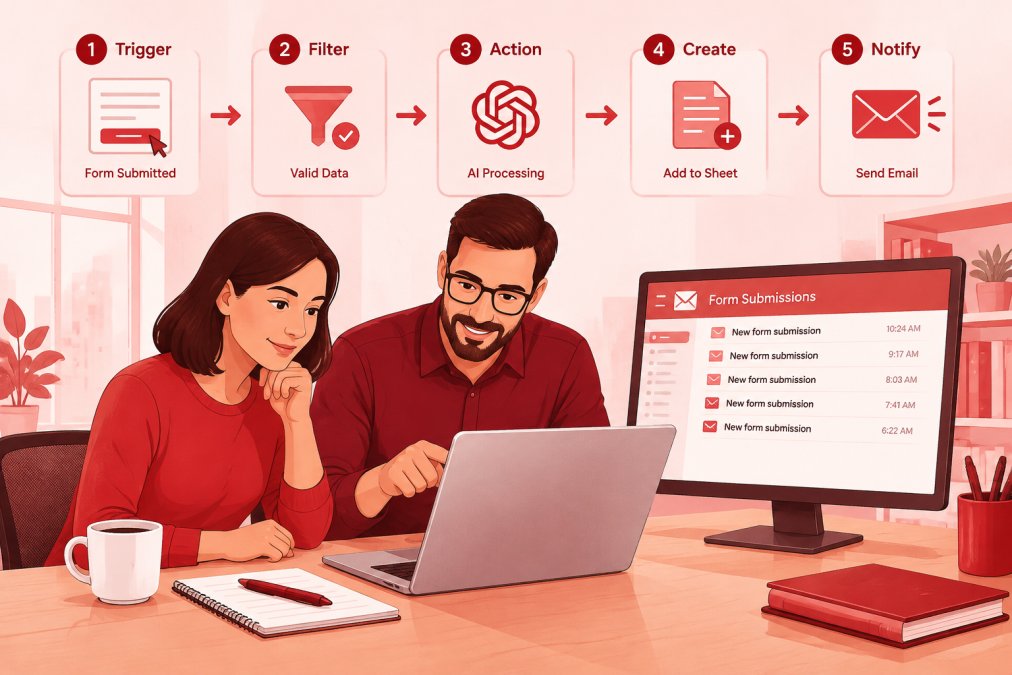
Here is how we would wire a first workflow in a beginner-friendly platform like Zapier, using a lead follow-up as the example.
- Pick the trigger. A new form submission in your website tool.
- Add a filter. Only continue if the email domain is not a free provider.
- Add an AI step. Draft a reply using your approved template and the form details.
- Add a review step. Send the draft to a shared inbox for approval.
- Add the action. Send the approved email and log the lead in your CRM.
- Test with one real submission. Confirm the draft reads correctly.
- Turn it on and watch the first week. Check every send.
Expected result: every lead gets a drafted reply within minutes, with a person still approving the send.
Common Mistakes in the First 30 Days
- Automating before documenting the process.
- Skipping the approval step “just for now.”
- Giving the workflow more data access than it needs.
If you want realistic expectations on rollout time, read how long AI automation integration really takes before you promise a timeline to your team.
Planning Your First Secure AI Workflow with Gradius IT Solutions
The hard part is not picking a tool. It is doing this without exposing client data or creating a workflow nobody owns six months later.
That is where Gradius IT Solutions can help. Our Secure AI & Automation Services can review which data each workflow should touch and help set up approval and logging controls.
Start with one workflow. Get it right. Then scale.
Most small businesses do not need a bigger team to clear administrative bottlenecks.
Frequently Asked Questions
Which AI workflow should a small business set up first?
Start with the task that is high volume, rule-based, and low risk if a mistake slips through. Lead follow-up and appointment reminders usually fit: they run on a predictable trigger, the output is easy to check, and a missed step is recoverable. Avoid starting with anything that touches payroll, clinical records, or client money until you have review controls in place. Score candidate workflows on volume, error cost, and how many systems they touch, then pick the highest scorer that needs only one integration.
What should a business check before connecting AI to its data?
Confirm four things before any AI automation tools touch live data. First, what data the workflow reads and where it is stored, including whether the vendor trains models on your content. Second, who owns each step and who approves exceptions. Third, which accounts the automation uses, and whether those accounts have multi-factor authentication and least-privilege permissions. Fourth, how you log activity and roll back a bad run. For regulated data such as HIPAA or client financial records, get the data handling terms reviewed before the first test run, not after.
How do I measure whether an AI workflow is actually working?
Pick two or three numbers before you launch and compare after 60 to 90 days. Useful measures include hours spent per week on the task, response time to leads or tickets, error or rework rate, and conversion rate on the process the workflow supports. Keep a simple log of exceptions a human had to fix; a rising exception count means the workflow is drifting. If the numbers do not move, the problem is usually the process design rather than the tool, so revisit the trigger conditions before adding more automation.
Can a small business run AI workflows without an IT department?
Yes, for narrow workflows built on existing tools your team already uses, such as Microsoft 365, a CRM, and an automation platform. The risk rises when a workflow touches identity, email security, or regulated data, because a misconfigured connection can expose more than the one mailbox or folder you intended. Many small firms run the simple workflows in-house and have a managed IT provider review permissions, logging, and backup coverage before anything connects to client records.
