
Last Updated: November 24, 2026
Quick Summary
AI automation gives operations managers ten benefits: fewer repetitive tasks, higher workforce productivity, lower operating costs, faster data-driven decisions, better demand forecasting, tighter inventory control, clearer supply chain visibility, less equipment downtime, fewer human errors, and room to scale. Start with one high-volume, low-risk workflow, measure it against a baseline, then expand only what works.
- Map and fix a broken process before automating it, or you automate the waste.
- Track average handling time and the share of tasks completed without manual touch.
- Clean your item master data before trusting automated reorder points and safety stock.
- Assign an owner and response window to each supply chain alert category.
- Keep a human review step for exceptions and log every automated decision.
Table of Contents
- What are the 10 benefits of AI automation for operations managers?
- 1. Automating repetitive and routine tasks
- 2. Improving operational efficiency and workforce productivity
- 3. Reducing operating costs and cost savings
- 4. Supporting faster, data-driven decisions
- 5. Demand forecasting and planning
- 6. Inventory management and optimization
- 7. Supply chain visibility and optimization
- 8. Predictive maintenance and equipment uptime
- 9. Reducing human error and improving accuracy
- 10. Scalability and business growth
- Manual vs. AI-automated workflows: a side-by-side comparison
- AI automation examples in business operations
- Best AI tools for operations management
- AI automation implementation best practices
- Measuring ROI: KPIs and calculation methods for AI automation
- Security considerations: AI governance, data privacy, and human oversight
- Mapping your first AI automation rollout with Gradius
- Frequently Asked Questions
What are the 10 benefits of AI automation for operations managers?
AI automation gives operations managers ten concrete advantages: fewer repetitive tasks, higher workforce productivity, lower operating costs, faster data-driven decisions, better demand forecasting, tighter inventory control, clearer supply chain visibility, less equipment downtime, fewer human errors, and room to scale. This guide explains each one, then shows how to measure results and keep the automation secure.
AI automation is the use of artificial intelligence to run routine operational work and support decisions with far less manual effort. It handles the repetitive steps and hands the judgment calls back to your team.
Below, we break down each benefit with the workflows it touches, the KPIs to track, and the limits to respect.
1. Automating repetitive and routine tasks
The biggest early win is task automation. Data entry, invoice routing, status updates, and report building all follow predictable rules, so software can run them.
A common mistake is automating a broken process. Map the workflow first, remove the wasted steps, then automate what remains.
This is where business process automation fits.
If you want to plan this properly, our business process automation consulting walks through matching tools to real workflows and running secure, measurable pilots.
2. Improving operational efficiency and workforce productivity
Operational efficiency improves when work moves without waiting. AI automation keeps handoffs moving, so tasks do not sit in someone’s inbox overnight.
Workforce productivity follows. When staff stop copying data between systems, they spend more time on exceptions, customer issues, and improvement work.
Track this with two numbers: average handling time per task, and the share of tasks completed without manual touch. Both should move in the right direction within a quarter.
3. Reducing operating costs and cost savings
Cost savings rarely come from cutting headcount. They come from removing wasted hours and rework.
Automation reduces labor spent on low-value steps and the cost of fixing errors, and it cuts overtime spikes during busy periods.
A practical approach is to price the hours a task consumes, then compare that to the effort of automating it.
4. Supporting faster, data-driven decisions
Data-driven decisions need current numbers, not last month’s spreadsheet. AI automation pulls live data from your systems and surfaces it in one place.
Real-time insights let an operations manager see a backlog forming before it becomes a service failure, shifting from reacting to anticipating.
The caveat: automation is only as good as the data feeding it. Clean, consistent records are the price of admission.
5. Demand forecasting and planning
Demand forecasting is where predictive analytics earns its keep. Models read historical patterns, seasonality, and current orders to project what is coming.
Better forecasts mean better staffing, purchasing, and capacity planning. You schedule people and materials against expected demand instead of guessing.
Start with one product line or service category. Compare the forecast to what actually happened, then widen the scope once the model proves itself.
6. Inventory management and optimization
Inventory ties up cash and space, and it fails in two directions. Too much stock means holding costs, obsolescence risk, and shrink. Too little means stockouts, missed service levels, and expedited freight.
Forecasting models read historical demand, seasonality, lead times, and open orders, then recommend reorder points and safety stock per item.
A common pattern is to start with ABC classification, where A items are high-value, high-velocity SKUs, B items are mid-range, and C items are low-value and slow.
Measure inventory work with a small set of KPIs, calculated the same way before and after automation:
| KPI | What it shows | How to calculate |
|---|---|---|
| Inventory turnover | How fast stock moves | Cost of goods sold ÷ average inventory value |
| Days of inventory outstanding | Cash tied up in stock | (Average inventory ÷ cost of goods sold) × 365 |
| Stockout rate | Service level risk | Stockout events ÷ total order lines |
| Forecast accuracy | Model quality | 1 − (absolute forecast error ÷ actual demand) |
| Carrying cost | Holding expense | Storage, insurance, shrink, and capital cost per item |
The human role stays important. The same balance of automated recommendations and human judgment applies to AI in customer service, where teams can streamline routine responses while keeping people responsible for sensitive decisions.
Watch out: an inventory model trained on bad master data will confidently recommend the wrong reorder point.
7. Supply chain visibility and optimization
Supply chain visibility means knowing where goods, dependencies, and commitments stand right now, across suppliers, carriers, and internal systems, without waiting for a status report.
Supply chain optimization builds on that view.
Assign an owner to each alert category. Late inbound shipments, quality holds, and capacity constraints each get a named person and a response window.
Track supply chain performance with a few consistent KPIs:
| KPI | What it shows | How to calculate |
|---|---|---|
| On-time in-full rate | Supplier reliability | Orders delivered on time and complete ÷ total orders |
| Lead time variance | Planning risk | Actual lead time − promised lead time, averaged |
| Order cycle time | End-to-end speed | Average time from order to delivery |
| Exception resolution time | Responsiveness | Average time from alert to resolution |
| Expedite frequency | Cost of poor visibility | Expedited shipments ÷ total shipments |
Watch out: visibility data is only as good as the supplier feeds behind it.
8. Predictive maintenance and equipment uptime
Predictive maintenance uses sensor and usage data to flag equipment before it fails (Manufacturing Machinery Maintenance | NIST). That protects equipment uptime and reduces unplanned downtime.
Downtime reduction matters most where a single machine or system stops the whole operation.
The limit is data quality. Predictive models need a history of readings to learn from, so start with your most critical assets.
9. Reducing human error and improving accuracy
Human error is predictable. It shows up in manual entry, copy-paste work, and rushed handoffs at month end.
Task automation removes the steps where mistakes happen. Validation rules catch bad data at the door, and accuracy improves without extra review layers.
Keep one check in place: a sampling review of automated outputs. It catches rule gaps before they reach a customer or a filing.
10. Scalability and business growth
Scalability is the quiet benefit. Automated workflows absorb higher volumes without a matching rise in headcount.
When order volume doubles, the same team handles it because routine work scales on its own, freeing budget for growth instead of back-office hiring.
Changing market demand is easier to meet too. You adjust capacity in the workflow, not by hiring and training in a hurry.
Manual vs. AI-automated workflows: a side-by-side comparison
Manual workflows depend on people remembering steps. Automated workflows depend on rules that run the same way every time.
| Factor | Manual workflow | AI-automated workflow |
|---|---|---|
| Speed | Depends on staff availability | Runs continuously |
| Error rate | Rises with volume and fatigue | Consistent, rule-based |
| Visibility | Scattered across inboxes | Single live view |
| Scaling | Needs more headcount | Handles higher volume |
| Reporting | Built by hand, often late | Generated automatically |
| Best use | Judgment-heavy exceptions | High-volume routine steps |
The strongest setup uses both. Automate the routine, and reserve people for the exceptions.
AI automation examples in business operations
Here are practical AI automation examples in business operations you can recognize in your own environment:
- Invoice processing that reads, codes, and routes documents for approval
- Ticket triage that sorts support requests by type and urgency
- Reorder alerts that trigger purchasing when stock hits a set level
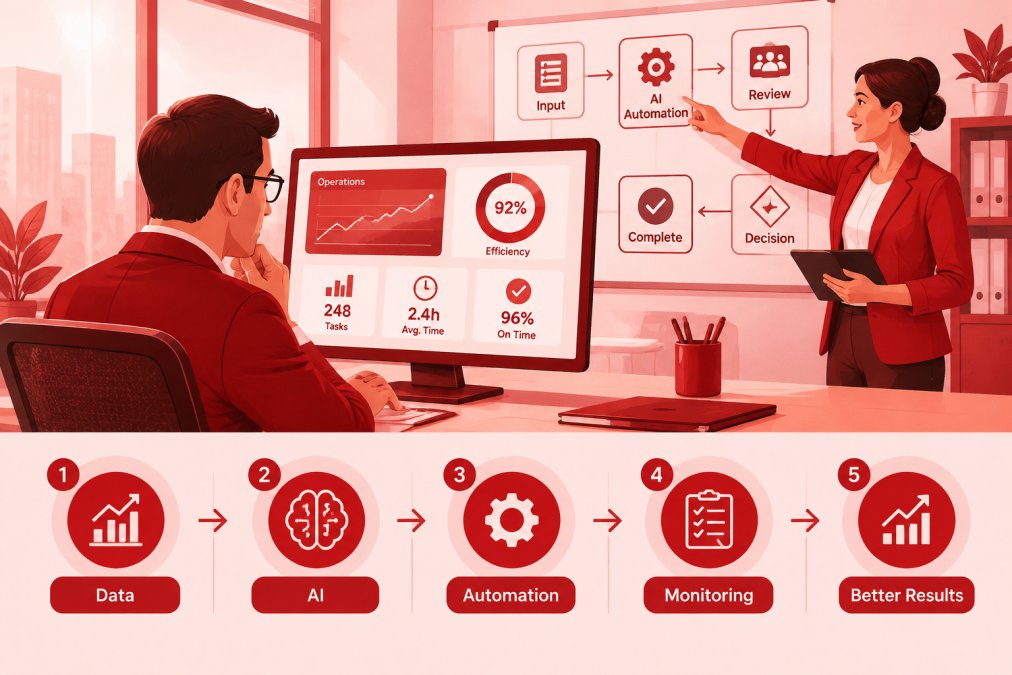
Each example removes a manual step and leaves a clear record behind, which is what makes the next improvement possible.
Best AI tools for operations management
The best AI tools for operations management fall into a few clear categories. Match the category to the workflow before you look at any product.
- Workflow platforms: connect apps and run rule-based steps across systems
- Forecasting and analytics tools: project demand and surface trends
- Inventory and supply chain suites: manage stock levels and supplier data
A common mistake is buying a tool before defining the process. Pick the workflow, agree on the success measure, then choose the tool that fits it.
AI automation implementation best practices
AI automation implementation best practices start with scope. Pick one high-volume, low-risk workflow and prove it works before expanding.
Follow these steps:
- Map the current process and remove wasted steps first
- Define one success measure for the pilot
- Keep a human review step for exceptions
- Document who owns each automated decision
- Review results monthly and expand only what works
For a practical starting set, our guide to AI workflows for small business lays out five concrete ways to begin.
Measuring ROI: KPIs and calculation methods for AI automation
Measure automation the way you measure any operational change: before and after, on the same metric.
| KPI | What it shows | How to calculate |
|---|---|---|
| Hours saved per week | Labor efficiency | Manual time per task × tasks automated |
| Error rate | Accuracy | Errors ÷ total transactions |
| Cycle time | Process efficiency | Average start-to-finish time per task |
| Cost per transaction | Operating costs | Total process cost ÷ volume |
| Uptime | Equipment reliability | Available time ÷ scheduled time |
The simplest ROI method is to add the labor hours saved and the rework avoided, then compare that to the tool and setup cost. Review the numbers quarterly, not once.
To see how outcomes like these look in practice, browse our client case studies.
Security considerations: AI governance, data privacy, and human oversight
Security has to be designed in from the start. Automation tools can touch sensitive records, so access control and data privacy matter from the start.
Set clear AI governance before the pilot:
- Limit each tool to the data it actually needs
- Require approval before any automated action touches money or customer records
- Log every automated decision so it can be reviewed
The [NIST AI Risk Management Framework | nist.gov] offers a structured way to think about these risks (AI Risk Management Framework | NIST).
Human oversight is the backstop. Automation should escalate anything outside its rules rather than guess.
Mapping your first AI automation rollout with Gradius
A first rollout succeeds when it is scoped, secure, and measured. That is the part most teams underestimate.
Gradius IT Solutions offers co-managed IT services and secure AI and automation services that can help map automation to real workflows and keep governance and data permissions in place.
Strategic planning support is available through vCIO consulting services.
Start with one workflow. Measure it. Then scale what works.
The hardest part of AI automation is not picking a tool. It is scoping the first workflow, securing the data, and proving the result.
Frequently Asked Questions
How is AI used in operations management?
AI automation handles the repeatable work that fills an operations manager’s day: routing tickets, reconciling inventory counts, flagging supplier delays, and drafting routine reports. It also surfaces patterns in data, such as a machine trending toward failure or a demand spike forming, so managers can act before problems spread. The manager keeps judgment calls, exceptions, and vendor negotiations. In practice, teams start with one high-volume workflow, measure the baseline, and expand once the results hold.
What are the risks of using AI in operations management?
The main risks are bad data in, bad decisions out; automation running without human review on exceptions; and sensitive operational data flowing into tools that were never approved for it. Model drift can also quietly degrade accuracy over time. Mitigate by defining which decisions require human sign-off, restricting data permissions to what each workflow actually needs, logging every automated action, and reviewing outputs on a set schedule. Governance is not paperwork here; it is how you keep automation from creating new operational failures.
How should a business get started with AI automation?
Pick one process that is high volume, rule-based, and painful to staff, such as invoice intake or shift scheduling. Document the current steps and record a baseline for time, error rate, and cost. Run a limited pilot with clear success criteria, keep a human reviewer in the loop, and compare results against the baseline before expanding. AI automation implementation best practices matter more than tool choice at this stage: small scope, measured outcomes, and a named owner for each workflow.
What is the difference between AI and automation in business?
Automation follows fixed rules: when an invoice arrives, extract the total and route it for approval. AI adds judgment on top, such as reading a messy PDF, classifying an unusual request, or predicting which orders are likely to be late. Most useful business workflows combine both. The rule-based layer handles the predictable path, and the AI layer handles variation and exceptions, escalating anything it cannot resolve to a person. Confusing the two leads teams to expect judgment from a script or rules from a model.
