

An in-house help desk isn’t automatically the simplest way to keep employees productive or control IT workload. The benefits of outsourced IT helpdesk support can include access to broader expertise, clearer service reporting, less time spent by employees managing routine issues, and potential savings compared with staffing support internally. The right arrangement gives your team a dependable route to help without making internal IT capacity the bottleneck.
It’s reasonable to expect support that resolves problems promptly, understands your business, and makes performance visible. Outsourced support can handle day-to-day requests and troubleshooting, while reporting can reveal recurring issues and opportunities to improve. This article explains what outsourced IT support can include, how it can support cybersecurity and employee focus, and which staffing and service factors shape its value. You’ll also learn when outsourcing makes sense and when an in-house or hybrid approach may be a better fit.
Key Takeaways
- Outsourced help desk support can handle routine employee requests and complement an internal IT team, freeing its time for larger priorities.
- Access to specialized IT and cybersecurity expertise can help address issues that require more than basic troubleshooting.
- Use reporting on response times, resolution, recurring issues, and ticket volume to identify service gaps and improvement opportunities.
- Routing support requests to a dedicated help desk can reduce the time employees spend troubleshooting technology instead of doing their core work.
- Compare the full demands of internal staffing with the support scope you need to assess whether outsourcing fits your business.
1. What Is Outsourced IT Support?
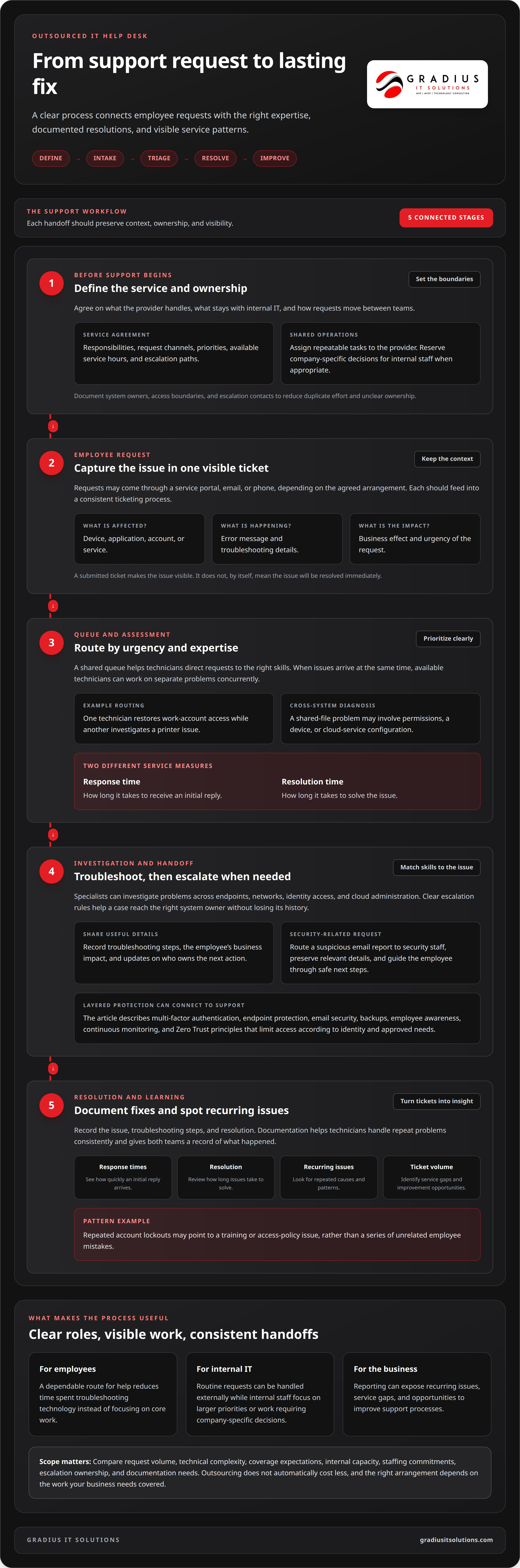
Outsourced IT support means an external provider handles some or all employee technology requests. Instead of hiring full-time staff for every support need, a business assigns defined tasks to a specialist team. Those tasks might include password resets, application troubleshooting, device setup, and escalating network problems. Before support begins, the provider and business should agree on responsibilities, request channels, priorities, and escalation paths.
Response times can improve when requests enter a shared queue and technicians route them by urgency and expertise. If several employees report different problems, available technicians can work on them concurrently. One technician might restore access to a work account while another investigates a printer issue. Service availability refers to the hours when the help desk accepts and responds to requests, as defined in the service agreement. Response time measures the wait for an initial reply; resolution time measures how long it takes to solve the issue.
Depending on the agreed arrangement, providers may offer support through a service portal, email, or phone. Each channel should feed into a consistent ticketing process so a request remains visible if it moves between technicians. The service agreement should explain which channels employees can use, when support is available, and how urgent issues are escalated. Clear definitions prevent employees from assuming that submitting a ticket means the issue will be resolved immediately.
Outsourcing can complement internal IT staff rather than replace them. An internal technician may focus on a system upgrade or business application while an external team handles routine support requests. A useful division assigns repeatable tasks to the provider and reserves internal staff for work requiring company-specific decisions. Shared documentation, access controls, and escalation contacts help both teams avoid duplicate effort and unclear ownership.
Consistent support depends on repeatable processes. A provider can record the issue, document troubleshooting steps and the resolution, then identify patterns across tickets. Repeated account lockouts, for example, may point to a training or access-policy issue rather than separate employee mistakes. Standard intake questions and escalation rules make handoffs clearer, while documented fixes help technicians handle recurring problems consistently.
Support can scale as staffing, locations, or ticket volume changes. A growing company might need help onboarding employees, while a smaller internal team may need coverage for routine requests during a major project. Outsourcing can add support capacity for those needs without requiring the business to hire every specialist directly. The right scope depends on request volume, technical complexity, coverage expectations, and how much work internal staff can absorb.
Hiring expenses extend beyond salary: recruitment, onboarding, training, benefits, and time spent managing coverage all affect the decision. Outsourcing shifts some staffing and training responsibilities to the provider, but it doesn’t automatically cost less. Compare the provider’s scope with the workload and employment commitments an internal desk would require. Include escalation ownership, documentation, and the business impact of unresolved requests in that comparison.
2. Access to specialized IT and cybersecurity expertise
A single internal technician can know a company’s systems deeply, but one role can’t cover every technical challenge. Outsourced support can draw on people with different specialties, such as endpoint troubleshooting, network connectivity, identity access, and cloud administration. A recurring sign-in problem, for example, may need account-policy analysis, while a slow application may call for network investigation. Routing each case to suitable skills can improve diagnosis and move the issue toward resolution.
That breadth matters when issues cross system boundaries. An employee unable to open a shared file might face a permissions problem, a device issue, or a cloud-service configuration error. A support team can investigate these connected causes instead of treating each symptom as unrelated. Businesses should define escalation rules, document system owners, and give support staff the access required for their assigned work. Clear boundaries protect sensitive systems while helping specialists investigate efficiently.
Specialist cybersecurity knowledge can strengthen prevention as well as response. A layered approach may combine multi-factor authentication, endpoint protection, email security, backups, employee awareness, and continuous monitoring. Zero Trust principles also limit access according to a user’s identity and approved needs. For example, a support process can route a suspicious email report to security staff, preserve relevant details, and guide the employee through safe next steps. Layered cybersecurity services can connect these protections to the support process.
Support expertise also shapes the employee experience. A clear intake process should capture the affected device or application, the error message, and the business impact. That detail helps technicians avoid repeated questions and choose a practical next step. If a staff member can’t access a business application before a scheduled client meeting, the team can assess urgency, communicate progress, and escalate when deeper system knowledge is needed. Useful updates keep employees informed and clarify who owns the issue.
Dedicated expertise is especially useful during changes that affect several teams. A new cloud workflow, revised access permissions, or employee onboarding can generate requests beyond basic troubleshooting. Specialists can coordinate with internal staff, follow documented approval paths, and record changes for future support. For secure AI adoption, technical support can also help apply approved access controls and data-handling practices. The business still sets its policies and authorizes sensitive access; specialists perform support tasks within those boundaries.
To make expertise practical, define which issues the provider handles, who approves access changes, and when internal staff take ownership. Map common requests to escalation paths, then review unresolved or recurring challenges with the support team. This turns a broad pool of technical knowledge into a controlled service model. The goal isn’t expertise for its own sake, but a clearer path from employee problem to informed action.
3. Reporting, performance metrics, and predictive insights
Useful reporting turns ticket records into a picture of how support affects daily operations. A monthly review might show which requests recur, how quickly employees receive replies, and which issues take longest to resolve. Response time measures the wait for an initial reply; resolution time tracks how long it takes to solve the problem. Separating the measures helps identify a quick acknowledgment that still leaves an employee blocked. One benefit of outsourced IT help desk reporting is making these patterns visible for review.
Before support begins, the provider and business should agree on a small set of measurable service goals. Common measures include response time, resolution time, ticket volume, user satisfaction, and first-contact resolution. Define each measure precisely. For example, decide whether the clock starts when a request arrives or after the required details are supplied. Clear definitions prevent teams from reporting the same service result in incompatible ways.
Transition planning gives those measures a reliable starting point. The support team should document current request channels, priority definitions, escalation contacts, common software, and known recurring issues. It can then map each request type to an owner and record how unresolved tickets transfer to internal IT. This baseline helps performance reviews distinguish a genuine service trend from a change in ticket categories or reporting practices.
Ongoing reviews work best when they connect metrics to specific examples. If reports show repeated access problems in one department, the provider can examine ticket notes, recent account changes, and the employee onboarding process. If resolution times rise for a particular application, the teams can investigate whether the cause involves configuration, connectivity, or a wider outage. Each review should assign an owner and follow-up action, rather than simply present charts.
Quality monitoring checks whether support stays consistent across technicians and channels. A provider can review a sample of closed tickets for complete notes, accurate categorization, appropriate escalation, and clear employee updates. Technicians handling the same account-access issue, for example, should follow the same approval path and record the outcome in a useful way. These checks can reveal training needs and documentation gaps before they become recurring service weaknesses.
Reporting can reveal patterns without pretending to forecast every incident. A gradual increase in tickets about slow connections, failed logins, or one software platform may signal a trend worth investigating. The provider can compare ticket timing, affected teams, and related changes, then recommend a focused review. These are practical benefits of outsourced IT help desk services: ticket history can flag operational friction before it grows.
Keep the review practical: share a concise report, discuss meaningful changes, agree on corrective actions, and revisit them at the next meeting. If satisfaction scores fall while ticket volume rises, examine whether employees are waiting longer, repeating information, or receiving unclear updates. A recurring issue should lead to a documented improvement task, such as revising an intake question or clarifying an escalation route. That cycle makes service quality visible and gives both teams a concrete way to improve.
4. Freeing employees to focus on core business needs
Every technology interruption takes attention away from an employee’s main work. When a sales representative loses access to a shared file, troubleshooting alone can delay customer follow-up. Routing the issue to a support team gives the employee a clear next step and helps them return to sales work. The practical value is that fewer support tasks land on people whose main roles are elsewhere.
Internal staff also lose focus when they become the default help desk for routine questions. A department manager might spend time explaining account access or resolving a software problem instead of reviewing a project. Outsourced support can take ownership of those requests, while managers handle business decisions and internal IT staff focus on systems or initiatives requiring company-specific knowledge. Clear request channels help employees know where to turn.
Core business functions differ by organization. A clinic needs staff focused on patient administration, while a professional services firm needs its team focused on client work. In either case, a recurring login failure or printer issue can interrupt a deadline-sensitive task. A defined support process gives employees a consistent way to report the issue, explain its business impact, and receive updates as it moves toward resolution.
Outsourcing can help a business scale support as teams, locations, or technology needs change. During a hiring period, for example, new employees may need accounts, devices, and access to approved applications. A provider can handle assigned setup requests through documented procedures, while internal leaders authorize access and confirm role requirements. This adds capacity without requiring the company to recruit a full internal support team for every increase in demand.
How does outsourcing help businesses scale and control costs? It lets organizations assign a defined workload externally, then adjust the scope as employee numbers, request volume, and technical needs change. The business can weigh the service against hiring, training, coverage, and management responsibilities for internal staff, rather than treating salary alone as the full staffing commitment.
Employee satisfaction depends partly on whether support feels easy to access and understandable. If a new team member can’t sign in to Microsoft 365, a clear intake process and progress update reduce uncertainty while the issue is handled. Useful communication should explain the next step in plain language, set expectations for follow-up, and make ownership clear. That process helps employees keep attention on their work instead of chasing updates.
To protect focus, define which requests go to the provider, which require internal approval, and which stay with internal IT. The provider might troubleshoot a standard application issue, for example, while a manager approves access to a restricted folder. Review ticket patterns and employee feedback together. If one task repeatedly interrupts a team, refine the process or address the underlying technology issue instead of accepting the disruption as normal.
5. Cost savings compared with an in-house help desk
Outsourcing can reduce the staffing burden, but savings depend on the work assigned and the support model. Compare the provider’s agreement with the full demands of internal coverage, including recruiting, onboarding, training, benefits, supervision, and employee time spent handling tickets. A salary comparison alone misses these operational commitments.
Start with the workload. List recurring requests, required technical skills, escalation needs, and periods of higher demand. A growing organization, for example, may need more employee onboarding support without needing another full-time technician year-round. An outsourced arrangement can assign capacity to defined support tasks, while internal staff retain responsibility for business-specific decisions and complex projects.
Which benefits matter most? Outsourcing can provide access to broader expertise, consistent request handling, reporting, and support capacity that adjusts to business needs. It can also free employees from troubleshooting outside their roles, giving them more time for core work. The practical value depends on whether the agreement covers the tasks that currently consume the most internal time.
Compare the full scope, not just the contract label. An agreement should define covered requests, service hours, escalation paths, response targets, reporting, and responsibilities for software or device changes. A narrowly defined support package may leave internal staff handling the same complex or recurring issues. A broad package may duplicate work already covered by an internal team. Clear boundaries improve efficiency and clarify who owns each task.
Proactive work can affect long-term value. If the support team identifies repeated account lockouts or recurring application errors, it can recommend changes that address the cause instead of repeatedly treating symptoms. Consider whether the agreement includes maintenance, documentation, and trend reviews, and how those activities support business continuity. Reactive ticket handling alone may not address avoidable sources of downtime.
Compliance requirements depend on the business’s industry, the information involved, applicable obligations, and contractual commitments. The agreement should define how the provider handles access, sensitive information, incident escalation, and supporting documentation, while the organization retains responsibility for its own obligations. A business handling regulated data, for example, needs support processes aligned with its specific framework and contracts.
To assess value, compare current support effort with the proposed scope, then identify which work would move, remain internal, or require separate approval. Include the time managers spend coordinating issues and the disruption employees experience. Outsourcing is a stronger fit when it removes a defined operational bottleneck without creating duplicate ownership. If internal IT already handles requests efficiently and has suitable coverage, adding an outside help desk may not improve the overall model.
Explore compliance support options
Gradius IT Solutions: Helpdesk
Gradius IT Solutions provides a full help desk for businesses that need dependable employee support without making routine technology issues an internal bottleneck. Turn to the team when staff need help resolving everyday IT problems, or when internal IT needs support handling user requests. For broader needs, Managed IT Services can connect help desk support with ongoing technology management. Cybersecurity & SOC can address security needs, while Compliance as a Service supports technology alignment with your framework and keeps documentation audit-ready through a GRC platform.
Share your support priorities, common employee issues, and internal escalation needs to define a practical service scope. Request a Free Assessment from Gradius IT Solutions to discuss your help desk needs. No spam. Unsubscribe anytime. Your information stays private.
Make Support a Deliberate Business Decision
The benefits of outsourced IT help desk support matter most when the service model fits how your business works. Before changing arrangements, decide which requests should go to the help desk, which require internal approval, and who owns follow-up. That clarity gives employees a reliable path to support without blurring responsibility for systems, access, or business decisions.
Consider how support connects with wider technology priorities. Gradius IT Solutions offers Managed IT Services, Cybersecurity & SOC, and Compliance as a Service, so businesses can address related operational and security needs alongside user support. The right next step is to discuss your current request patterns, escalation needs, and internal capacity, then identify a practical support scope.
Frequently Asked Questions
What Is Outsourced IT Support?
Outsourced IT support is an arrangement where an external provider handles defined technology support work for a business. The scope might cover employee requests, account access, device troubleshooting, or application issues. For example, a company could send common Microsoft 365 access problems to the provider while keeping decisions about user permissions with internal managers. The agreement should spell out responsibilities, escalation routes, and how support records are shared.
How do I know if outsourcing is right for my business?
Outsourcing may fit when employee requests regularly pull managers or internal IT away from planned work. Look for recurring delays, a backlog of unresolved issues, or support needs requiring skills your team doesn’t use every day. A practical first step is to group recent requests by type and identify who handles each one now. If a clear set of tasks can move externally without confusing ownership, outsourcing may be worth considering.
What Benefits Does an External IT Department Offer?
An external IT department can add support capacity and specialized knowledge without requiring the business to staff every skill internally. It can also bring established ticket documentation and escalation processes. During a new office opening, for example, external support could assist with user setup while company leaders approve access and internal staff coordinate business applications. The value comes from matching assigned responsibilities to genuine workload gaps, not outsourcing every technology decision.
What Challenges and Risks Does an External IT Department Present?
Challenges can include unclear accountability, slower handoffs, limited familiarity with company-specific workflows, and dependence on accurate documentation. A provider might misunderstand an urgent request if its business impact isn’t recorded clearly. Reduce these risks by assigning an internal service owner, defining escalation contacts, documenting systems and approvals, and reviewing unresolved tickets together. Keep decision-making responsibilities clear, especially for privileged access, sensitive data, and changes that could affect business operations.
How much does outsourced IT help desk support cost in the United States?
There isn’t one standard rate because support scope, user and device counts, coverage expectations, specialist needs, and included services shape the arrangement. Gradius IT Solutions uses a flat monthly rate based on users and devices, with no per-ticket charges, no surprise invoices, no nickel-and-diming. Compare the defined services and responsibilities rather than relying only on a headline figure or assuming every agreement covers the same work.
How does outsourced help desk support compare with an in-house IT help desk?
An in-house help desk offers direct familiarity with company workflows and close coordination with employees. An outsourced desk can provide broader support capacity and access to different technical specialties. A hybrid model may work well when internal IT owns business systems and approvals, while an external team handles defined employee requests. Compare ownership, knowledge transfer, escalation paths, and workload coverage to see which arrangement supports your operations without duplicating effort.
What security and data privacy risks come with outsourced IT help desk services?
Support staff may need access to accounts, devices, or business information, so excessive permissions or weak handoffs can increase exposure. Require role-based access, approval for sensitive changes, secure handling of support records, and prompt removal of access when responsibilities change. A technician troubleshooting an account, for instance, should receive only the permissions needed for that task. Employee awareness and clear incident escalation procedures can also help reduce preventable mistakes.
How does an outsourced IT help desk provider demonstrate service quality and security?
A provider can demonstrate service quality through written service expectations, ticket records, performance reports, and documented review actions. Security practices should be explained through access controls, escalation procedures, staff guidance, and incident communication processes. Ask how a recurring issue is tracked from report to resolution and how sensitive access is authorized. Regular reviews of service data and security documentation help make performance and responsibilities visible.

Article by
Robert Joyce
Robert Joyce is the Owner and Chief Technology Officer of Gradius IT Solutions, a security-first provider of managed IT, cybersecurity, cloud, compliance, and secure AI solutions. Headquartered in New Jersey with satellite offices in the Midwest and South Florida, Gradius serves businesses across the Tri-State Area, Midwest, South Florida, and nationwide.
Robert brings 30 years of IT experience, including 23 years in hedge funds, global banks, and wealth management firms where uptime, security, and continuity are non-negotiable. He began in trade floor support at Caxton, Shell Trading, and Knight, provided senior trade floor support at RBC and SAC Capital, served as VP of IT at EntrustPermal, and was CTO of Gerstein Fisher. After September 11, he helped rebuild critical technology infrastructure for Merrill Lynch.
His expertise spans Microsoft 365, cloud, cybersecurity, networking, infrastructure, disaster recovery, compliance, and strategic IT leadership.
Robert founded Gradius to bring enterprise-level technology and security to small and midsized businesses at a predictable monthly cost. Gradius delivers managed and co-managed IT, cybersecurity, Microsoft 365 and cloud, compliance programs supported by a GRC platform, secure AI consulting, and vCIO services, with a full help desk, 24/7 NOC and SOC monitoring, and U.S.-based onsite engineers and SOC.
Robert works directly with business owners and executives as their single accountable point of contact. His philosophy: one trusted partner, complete IT accountability.
Disclaimer
## Disclaimer
The information provided in this article is for general informational and educational purposes only and should not be considered professional IT, cybersecurity, legal, regulatory, or compliance advice. While Gradius IT Solutions strives to provide accurate and up to date information, technology, security threats, and regulatory requirements change frequently, and we cannot guarantee that all information will remain current or applicable to your specific situation.
Every organization has unique technology, security, compliance, and business requirements. Before implementing any recommendations discussed in this article, you should evaluate their suitability for your environment or consult with a qualified technology professional.
Gradius IT Solutions makes no warranties, express or implied, regarding the completeness, accuracy, reliability, or results obtained from the use of this information. Any actions you take based on this content are at your own risk. Gradius IT Solutions shall not be liable for any direct, indirect, incidental, or consequential damages arising from the use of, or reliance upon, the information contained in this article.
References to third party products, services, or vendors are provided for informational purposes only and do not constitute an endorsement unless explicitly stated.
If you would like guidance tailored to your organization, contact Gradius IT Solutions to schedule a consultation with one of our technology experts.