
A single security tool can’t protect an entire business. Effective cybersecurity takes a coordinated approach that identifies vulnerabilities, safeguards accounts and devices, and monitors for signs of a threat.
That complexity can pressure business leaders who need to protect company information without disrupting daily work. Strong protection comes from layers: prevention, employee awareness, and a clear response plan working together.
This article explains what professional cybersecurity services can cover, from vulnerability assessments and account security to endpoint protection, email defenses, backups, and continuous monitoring. You’ll also learn how incident response fits into the plan when suspicious activity appears, and what shapes a service’s scope and quality. The goal is practical clarity: understand how cybersecurity support can reduce exposure and help your business stay prepared.
Key Takeaways
- Prioritize security work by identifying exposed systems, outdated protections, and business-critical assets.
- Connect cybersecurity safeguards with managed IT practices so security updates and business operations stay aligned.
- Use layered controls for accounts, devices, email, and websites, supported by employee awareness and clear access policies.
- Understand how assessment findings and security monitoring can guide practical improvements and incident handling.
- Build a response plan that clarifies how suspicious activity is escalated, contained, and reviewed.
Security assessments and vulnerability management
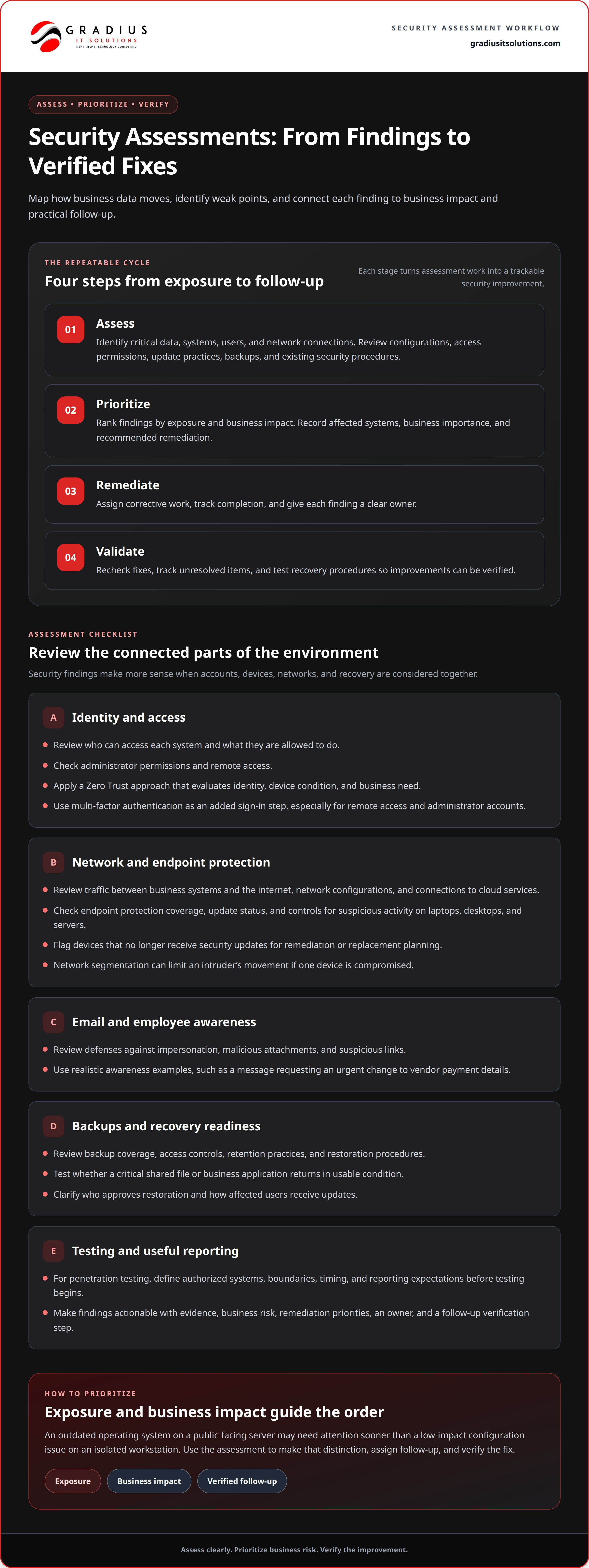
A security assessment maps how business data moves among users, devices, applications, and the network. The assessor reviews system configurations, access permissions, update practices, backups, and existing security procedures. For example, an Edison business might trace how an employee accesses a shared finance folder from a managed laptop. The review identifies weak points and connects each finding to business impact, such as unauthorized access or disrupted operations.
Vulnerability management turns findings into prioritized work. The assessor records affected systems, exposure, business importance, and recommended remediation. An outdated operating system on a public-facing server may need attention sooner than a low-impact configuration issue on an isolated workstation. After fixes, the team verifies changes and tracks unresolved items. This creates a repeatable cycle: assess, prioritize, remediate, and reassess. Clear records also help connect technical improvements with relevant compliance requirements.
Network security reviews examine how traffic moves between business systems and the internet. A segmented network can limit an intruder’s movement if one device is compromised. Assessment steps include reviewing remote access, administrator permissions, network configurations, and connections to cloud services. Endpoint security reviews check laptops, desktops, and servers for protection coverage, update status, and controls for suspicious activity. For example, a device that no longer receives security updates should be flagged for remediation or replacement planning.
Identity reviews focus on who can access each system and what they can do. A Zero Trust approach evaluates access based on identity, device condition, and business need, rather than assuming every connection is safe. Multi-factor authentication adds a verification step at sign-in, especially for remote access and administrator accounts. Email security reviews examine defenses against impersonation, malicious attachments, and suspicious links. Awareness exercises can use realistic examples, such as a message requesting an urgent change to vendor payment details.
Backups support recovery, but their existence alone doesn’t show whether business data can be restored. An assessment reviews backup coverage, access controls, retention practices, and restoration procedures. A recovery exercise can test whether a critical shared file or business application returns in usable condition. The review should also clarify who approves restoration and how affected users receive updates. These steps connect backup planning to business continuity instead of treating stored copies as a complete recovery plan.
Penetration testing provides a controlled examination of whether security weaknesses can be exploited. Before testing, professionals define authorized systems, boundaries, timing, and reporting expectations. Findings should identify evidence, business risk, and remediation priorities without disrupting normal operations. Assessment reports are more useful when each item has an owner and a follow-up verification step. Together, vulnerability reviews, penetration testing, and recovery checks give leaders a clearer view of exposure and next steps.
- Scope: Identify critical data, systems, users, and network connections.
- Prioritize: Rank findings by exposure and business impact.
- Remediate: Assign corrective work and track completion.
- Validate: Recheck fixes and test recovery procedures.
Managed IT and cybersecurity services in Edison
Managed support connects security controls with daily technology operations, from employee access to mobile devices. Organizations seeking robust protection should consider whether cybersecurity services fit their workflows and support staff without unnecessary disruption, whether they are based locally or operating nationally.
Managed Cybersecurity and Risk Reduction
Managed cybersecurity combines preventive controls, monitoring, and follow-up to reduce exposure to threats. For example, when a staff member loses a phone, a defined process can restrict its access to business accounts. Look for clear ownership of updates, user access, endpoint protection, backups, and incident escalation. These responsibilities should connect to continuity plans so ransomware or a compromised account doesn’t leave recovery decisions unclear.
Comparing Cybersecurity Providers
Compare providers by reviewing their scope, reporting, escalation process, and support for the systems your staff use. Ask for a sample description of findings and remediation priorities, not just a list of security features. A useful comparison explains who handles user issues, how mobile devices are managed, and how unresolved risks are tracked. Businesses coordinating these operational needs can explore managed IT services from Gradius IT Solutions.
Managed IT support also connects security work with routine service requests. If an employee can’t access a business application, support should distinguish a password issue from a suspicious sign-in or device problem. For mobile staff, mobile device management can apply access policies across company phones and approved personal devices used for work. A lost-device procedure should restrict business access while preserving necessary work information.
Flat-rate managed IT pricing is a service arrangement, not a security control. To compare a proposal, examine which systems, users, support tasks, monitoring, and response coordination it includes. Check how the agreement handles added devices, new locations, or work outside its defined scope. The key is to match service boundaries to the organization’s environment, rather than comparing a monthly figure alone.
Cybersecurity training can include workplace awareness sessions, formal coursework, or certification programs. Match instruction to roles: employees need guidance on suspicious messages, while technical staff may need deeper incident-handling skills. A practical exercise could walk staff through reporting a suspicious message and escalating it appropriately.
Common business risks include phishing, ransomware, account takeover, fraudulent payment requests, and lost devices. One realistic example is an urgent email requesting a vendor payment change. Verification procedures and employee awareness can interrupt an attack before credentials or funds are exposed. These risks matter to organizations evaluating comprehensive cyber defenses nationwide.
For suspected cybercrime, preserve relevant records and contact appropriate law enforcement or federal reporting channels. If an incident affects business systems, follow established isolation procedures and coordinate recovery with technical support. Clear incident records can help responders understand what happened and which accounts or systems may need attention.
Account, device, email, and website protection
Effective defense connects identity controls with the devices and services employees use. For a remote employee accessing payroll from a personal browser, protections should limit access to approved accounts and business data. Separating work and personal activity helps reduce accidental exposure. It also gives technical teams useful context when reviewing unusual sign-ins or investigating unauthorized access.
Account security also depends on limiting privileges. A staff member who only needs to view reports shouldn’t have administrator rights across business systems. Technical teams can assign access by job responsibility, separate administrative accounts from everyday accounts, and review permissions when roles change. For example, a temporary project account should lose access when the project ends. These measures limit the impact of a compromised login.
Device controls should address more than whether endpoint protection is active. Security teams can review local administrator access, encryption settings, and whether business data can be copied to unapproved storage. For example, restricting unapproved removable drives can reduce exposure when employees transfer files between computers. Clear device policies help staff understand what’s permitted and give support teams consistent standards to enforce.
Email defenses should address risks beyond suspicious attachments. An attacker who gains mailbox access may create a hidden forwarding rule that copies messages outside the organization. Reviewing mailbox rules and delegated access can help identify unexpected changes. Staff training can also explain how to report unusual calendar invitations or shared-document requests, rather than accepting every familiar-looking message.
Website protection requires attention to both the public-facing site and administrative access. A review can examine encrypted connections, software updates, and permissions for publishing or editing content. For example, a former marketing contractor shouldn’t retain publishing access after a project ends. Separating editorial accounts from administrative accounts can also limit the changes available to each user.
These safeguards work best as connected layers, not isolated settings. A report of an unexpected mailbox rule, for instance, can prompt a review of recent account activity and related messages. Security teams can document what changed, identify affected information, and remove unauthorized access. A defined process helps ensure the event is assessed across relevant accounts and systems.
Useful operating records include account approvals, administrator assignments, device ownership, website access, and security incidents. A review can identify permissions that no longer match an employee’s responsibilities or accounts left active after a project. Security teams can assign corrective work and record its completion. These records help leaders understand how access and protection controls support everyday operations.
Cybersecurity assessments and SOC/SIEM services
A cybersecurity assessment shows whether security operations can detect and respond to activity across business systems. It defines the review scope, identifies important data sources, and tests whether alerts reach the right people. For example, an assessment may trace a suspicious Microsoft 365 sign-in from its initial alert through investigation and escalation. That walkthrough exposes gaps between security settings and actual response procedures.
A Security Information and Event Management system, or SIEM, collects and correlates activity records from connected systems. These may include user sign-ins, endpoint alerts, network events, and application activity. Correlation can reveal patterns that separate alerts might obscure, such as repeated login failures followed by an unusual successful sign-in. The quality of this view depends on whether relevant systems send usable records.
A Security Operations Center, or SOC, reviews security alerts, investigates potential incidents, and coordinates response steps. Analysts need documented escalation paths, clear incident priorities, and context about normal business operations. If a finance account signs in from an unfamiliar location and then downloads sensitive files, responders can assess both events together. That context helps distinguish a likely threat from routine activity that needs clarification.
Assessment work should examine coverage before relying on dashboards. Professionals map critical accounts, devices, cloud services, and business applications, then identify missing or incomplete event records. A Microsoft 365 environment, for instance, may contain sign-in, email, and administrative events relevant to an investigation. The assessment also considers access permissions and retention needs, so investigators can review events when a business concern arises.
Frameworks can help organize assessment findings, but they don’t replace business context. A review maps existing controls to the organization’s selected framework and identifies evidence gaps. Findings should state the affected system, observed weakness, operational impact, and recommended action. For example, an alert with no assigned escalation owner is a process gap, even if the system records activity correctly.
Useful SOC/SIEM reporting turns technical signals into decisions. A concise report can group incidents by severity, describe investigation status, and identify recurring sources of alerts. Operations leaders can then see whether repeated account lockouts involve one application or several departments. Reports should distinguish confirmed incidents from events still under investigation and record who owns the next action.
Assessment follow-through closes the loop. Security engineers can validate that important data sources are connected, test how representative alerts move through escalation, and document unresolved limitations. After corrective work, a focused reassessment checks whether the original gap has changed. This cycle makes monitoring more useful: business leaders gain clearer visibility, and response teams work from documented processes rather than assumptions.
24/7 SOC monitoring and incident response
Security activity can happen while employees are away from their desks. Continuous SOC monitoring gives suspicious events a defined review path beyond normal office hours. For example, a sign-in attempt during scheduled system maintenance may need different attention than one from an unfamiliar device at an unusual time. Context helps analysts decide whether an alert deserves escalation.
Effective monitoring starts with clear alert priorities. A business can distinguish events needing immediate attention from lower-risk notifications suited to routine review. A privileged account accessing a new service, for instance, may warrant faster review than a blocked email attachment. Defined severity levels keep urgent signals visible without treating every system notification as a crisis.
Escalation rules should identify who receives each alert and how the SOC reaches them. A named primary contact and backup can prevent an urgent notification from sitting in an unattended inbox. Businesses should also clarify who can approve disruptive actions, such as temporarily restricting an account. That clarity reduces delays when operational and security concerns need to be balanced.
Monitoring quality depends on business context. The SOC needs to understand expected sign-in patterns, critical applications, and planned technology changes. If a company launches a new cloud application, normal access activity may change. Sharing that operational context helps analysts distinguish planned activity from events needing investigation, while keeping business teams informed about relevant alert patterns.
Alert communication should be concise and actionable. A useful notification identifies the affected account or system, explains why it was flagged, and states what decision or follow-up is needed. For example, an operations manager may need to confirm whether a late-night administrative change was authorized. Clear messages help the right people respond without interpreting raw technical records.
Monitoring reports can help leadership spot recurring patterns without duplicating technical event logs. A monthly review might show repeated alerts associated with one department, application, or type of user activity. That trend can guide policy updates or focused employee awareness. Reports are most useful when they separate meaningful security concerns from routine blocked activity and identify items requiring attention.
Organizations should periodically review monitoring contacts, alert priorities, and escalation routes as personnel and systems change. A departing employee who remains listed as an incident contact can cause confusion during a time-sensitive event. Keeping responsibilities current helps security teams reach people empowered to make decisions. It also gives business leaders a clearer view of how monitoring supports operational continuity.
Incident response planning should also set expectations for how quickly alerts move from review to action. The Edison IT provider advertises an average response time of <1hr, giving businesses a stated benchmark to consider when evaluating support.
Coverage matters when an incident begins outside a typical workday. The provider advertises SOC coverage in Edison 24/7/365, so organizations can compare that commitment with their escalation needs and confirm how urgent communications reach authorized decision-makers. Clear expectations about response and coverage help teams understand what assistance is available when monitoring identifies a concern.
Gradius IT Solutions: Cybersecurity & SOC
Gradius IT Solutions helps Edison businesses connect cybersecurity, monitoring, and incident response with their day-to-day technology. Its Cybersecurity & SOC offering supports continuous threat monitoring, while Managed IT Services can align security work with routine support and system operations. This joined-up approach is useful when alerts, access controls, and recovery plans need clear ownership.
For organizations using Microsoft 365 or cloud services, security measures should reflect how employees access business information. Gradius also runs a GRC platform that keeps technology aligned with the client’s framework and documentation audit-ready. Turn to the team when you need professional support to assess vulnerabilities, strengthen defenses, or clarify incident response responsibilities.
Make security a deliberate business decision
Security priorities should have clear ownership, a review schedule, and a connection to business goals. Use an upcoming planning meeting to identify which security decisions need executive approval and how teams will track follow-through. That creates a practical starting point as technology and responsibilities change.
A focused conversation can clarify your organization’s priorities, open questions, and next planning steps. Bring the operational concerns that matter most, such as protecting sensitive information or keeping essential work moving during a disruption.
Frequently Asked Questions
What cybersecurity companies and consultants serve Edison, NJ?
Businesses seeking cybersecurity services in Edison, NJ, can work with Gradius IT Solutions for cybersecurity and technology support. Its Cybersecurity & SOC offering addresses managed security operations, while IT Consulting & vCIO supports technology planning. The right scope depends on the organization’s systems, data, internal expertise, and operational priorities. For example, a business with limited internal IT capacity may need support coordinating security decisions with routine technology management.
What cybersecurity services are available for businesses in Edison, NJ?
Cybersecurity support can include security assessments, vulnerability management, account and device protection, email security, incident response, and continuous monitoring. The right combination depends on how employees work and which systems handle sensitive business information. A company using cloud applications across departments, for example, may need access policies and response procedures that account for remote sign-ins and shared business data.
Which cybersecurity firms in Edison, NJ specialize in managed security and monitoring?
Gradius IT Solutions offers Cybersecurity & SOC for businesses seeking managed security and monitoring support. Compare the service scope by examining how alert investigations, incident escalation, and follow-up connect to your organization’s operations. For example, a monitoring alert involving a finance application should have a defined route to the people responsible for reviewing access and business impact, rather than remaining an isolated technical notification.
How much do cybersecurity services cost for small businesses in Edison, NJ?
Gradius describes its pricing as a predictable flat monthly rate per user, with exact amounts not disclosed. The required scope can depend on employee accounts, devices, business applications, monitoring needs, and support requirements. A small office with cloud-based workflows may need something different from a company with multiple sites or specialized systems. Define the required coverage and responsibilities to understand what the service should include.

Article by
Robert Joyce
Robert Joyce is the Owner and Chief Technology Officer of Gradius IT Solutions, a security-first provider of managed IT, cybersecurity, cloud, compliance, and secure AI solutions. Headquartered in New Jersey with satellite offices in the Midwest and South Florida, Gradius serves businesses across the Tri-State Area, Midwest, South Florida, and nationwide.
Robert brings 30 years of IT experience, including 23 years in hedge funds, global banks, and wealth management firms where uptime, security, and continuity are non-negotiable. He began in trade floor support at Caxton, Shell Trading, and Knight, provided senior trade floor support at RBC and SAC Capital, served as VP of IT at EntrustPermal, and was CTO of Gerstein Fisher. After September 11, he helped rebuild critical technology infrastructure for Merrill Lynch.
His expertise spans Microsoft 365, cloud, cybersecurity, networking, infrastructure, disaster recovery, compliance, and strategic IT leadership.
Robert founded Gradius to bring enterprise-level technology and security to small and midsized businesses at a predictable monthly cost. Gradius delivers managed and co-managed IT, cybersecurity, Microsoft 365 and cloud, compliance programs supported by a GRC platform, secure AI consulting, and vCIO services, with a full help desk, 24/7 NOC and SOC monitoring, and U.S.-based onsite engineers and SOC.
Robert works directly with business owners and executives as their single accountable point of contact. His philosophy: one trusted partner, complete IT accountability.
Disclaimer
## Disclaimer
The information provided in this article is for general informational and educational purposes only and should not be considered professional IT, cybersecurity, legal, regulatory, or compliance advice. While Gradius IT Solutions strives to provide accurate and up to date information, technology, security threats, and regulatory requirements change frequently, and we cannot guarantee that all information will remain current or applicable to your specific situation.
Every organization has unique technology, security, compliance, and business requirements. Before implementing any recommendations discussed in this article, you should evaluate their suitability for your environment or consult with a qualified technology professional.
Gradius IT Solutions makes no warranties, express or implied, regarding the completeness, accuracy, reliability, or results obtained from the use of this information. Any actions you take based on this content are at your own risk. Gradius IT Solutions shall not be liable for any direct, indirect, incidental, or consequential damages arising from the use of, or reliance upon, the information contained in this article.
References to third party products, services, or vendors are provided for informational purposes only and do not constitute an endorsement unless explicitly stated.
If you would like guidance tailored to your organization, contact Gradius IT Solutions to schedule a consultation with one of our technology experts.